
MATCH
Overview
The MATCH statement allows you to specify a graph pattern to search for in the graph. It is the fundamental statement for retrieving data from the graph database and binding them to variables for use in subsequent parts of the query.
Syntax<match statement> ::=
  "MATCH" <graph pattern>
  [ "YIELD" <graph pattern yield item> [ { "," <graph pattern yield item> } ... ] ]

<graph pattern yield item> ::=
  <node variable reference> | <edge variable reference> | <path variable reference>
Example Graph
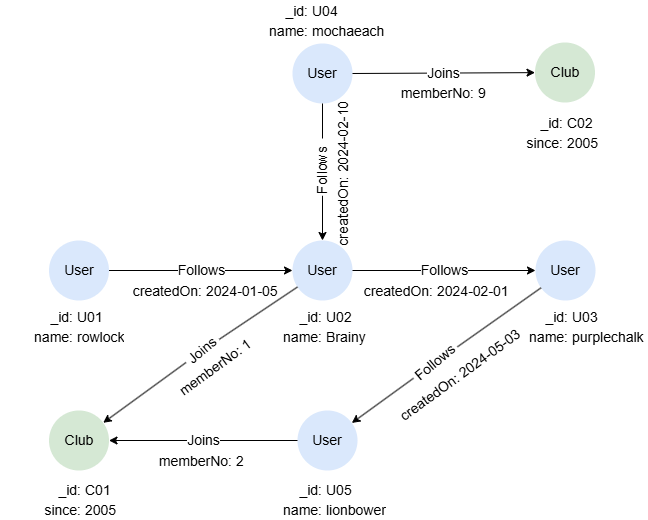
GQLINSERT (rowlock:User {_id: 'U01', name: 'rowlock'}),
       (brainy:User {_id: 'U02', name: 'Brainy'}),
       (purplechalk:User {_id: 'U03', name: 'purplechalk'}),
       (mochaeach:User {_id: 'U04', name: 'mochaeach'}),
       (lionbower:User {_id: 'U05', name: 'lionbower'}),
       (c01:Club {_id: 'C01', since: 2005}),
       (c02:Club {_id: 'C02', since: 2005}),
       (rowlock)-[:Follows {createdOn: '2024-01-05'}]->(brainy),
       (mochaeach)-[:Follows {createdOn: '2024-02-10'}]->(brainy),
       (brainy)-[:Follows {createdOn: '2024-02-01'}]->(purplechalk),
       (purplechalk)-[:Follows {createdOn: '2024-05-03'}]->(lionbower),
       (brainy)-[:Joins {memberNo: 1}]->(c01),
       (lionbower)-[:Joins {memberNo: 2}]->(c01),
       (mochaeach)-[:Joins {memberNo: 9}]->(c02)
Matching All Nodes
GQLMATCH (n)
RETURN n
Result:
JSON[
  {"id": "U05", "labels": ["User"], "properties": {"name": "lionbower"}},
  {"id": "U04", "labels": ["User"], "properties": {"name": "mochaeach"}},
  {"id": "U03", "labels": ["User"], "properties": {"name": "purplechalk"}},
  {"id": "U02", "labels": ["User"], "properties": {"name": "Brainy"}},
  {"id": "U01", "labels": ["User"], "properties": {"name": "rowlock"}},
  {"id": "C02", "labels": ["Club"], "properties": {"since": 2005}},
  {"id": "C01", "labels": ["Club"], "properties": {"since": 2005}}
]
Matching All Edges
GQLMATCH ()-[e]->()
RETURN e
Result:
JSON[
  {"id": "e:1", "label": "Follows", "fromNodeId": "U01", "toNodeId": "U02", "properties": {"createdOn": "2024-01-05"}},
  {"id": "e:2", "label": "Follows", "fromNodeId": "U02", "toNodeId": "U03", "properties": {"createdOn": "2024-02-01"}},
  {"id": "e:3", "label": "Follows", "fromNodeId": "U03", "toNodeId": "U05", "properties": {"createdOn": "2024-05-03"}},
  {"id": "e:4", "label": "Follows", "fromNodeId": "U04", "toNodeId": "U02", "properties": {"createdOn": "2024-02-10"}},
  {"id": "e:5", "label": "Joins", "fromNodeId": "U02", "toNodeId": "C01", "properties": {"memberNo": 1}},
  {"id": "e:6", "label": "Joins", "fromNodeId": "U05", "toNodeId": "C01", "properties": {"memberNo": 2}},
  {"id": "e:7", "label": "Joins", "fromNodeId": "U04", "toNodeId": "C02", "properties": {"memberNo": 9}}
]
Notice that if you don't specifiy the edge direction, either as outgoing or incoming, each edge in the graph will be returned twice, as two paths are considered distinct when their element sequences differ, i.e., (n1)-[e]->(n2) and (n2)<-[e]-(n1) are different paths.
GQL - Each edge will be returned twiceMATCH ()-[e]-()
RETURN e
Matching with Labels
Both node pattern and edge pattern support the label expression to specify labels.
Retrieve all Club nodes:
GQLMATCH (n:Club)
RETURN n
Result:
JSON[
  {"id": "C02", "labels": ["Club"], "properties": {"since": 2005}},
  {"id": "C01", "labels": ["Club"], "properties": {"since": 2005}}
]
Retrieve all outgoing nodes from Brainy with Follows or Joins edges:
GQLMATCH (:User {name: 'Brainy'})-[:Follows|Joins]->(n)
RETURN n
Result:
JSON[
  {"id": "U03", "labels": ["User"], "properties": {"name": "purplechalk"}},
  {"id": "C01", "labels": ["Club"], "properties": {"since": 2005}}
]
Matching with Property Specification
Property specification can be included in node and edge patterns to apply joint equalities to filter nodes and edges with key-value pairs.
Retrieve Club nodes whose _id and since have specific values:
GQLMATCH (n:Club {_id: 'C01', since: 2005})
RETURN n
Result:
JSON[
  {"id": "C01", "labels": ["Club"], "properties": {"since": 2005}}
]
Retrieve the name of the member of club C01 whose memberNo is 1:
GQLMATCH (:Club {_id: 'C01'})<-[:Joins {memberNo: 1}]-(n)
RETURN n.name
Result: n
| n.name |
|---|
| Brainy |
Matching with Abbreviated Edges
You can use abbreviated edge patterns when you do not need to filter edges or assign them to a variable. Even with the abbreviated form, you may still specify the direction of the edge when necessary.
Retrieve nodes connected with mochaeach with any outgoing edges:
GQLMATCH (:User {name: 'mochaeach'})->(n)
RETURN n
Result:
JSON[
  {"id": "U02", "labels": ["User"], "properties": {"name": "Brainy"}},
  {"id": "C02", "labels": ["Club"], "properties": {"since": 2005}}
]
Matching Paths
Retrieve users followed by mochaeach, and the clubs joined by those users:
GQLMATCH p = (:User {name: 'mochaeach'})-[:Follows]->(:User)-[:Joins]->(:Club)
RETURN p
Result: p

Matching with WHERE Clauses
The WHERE clause can be used within an element pattern (node or edge pattern), a parenthesized path pattern, or immediately after a graph pattern in the MATCH statement to specify various search conditions.
Element Pattern WHERE Clause
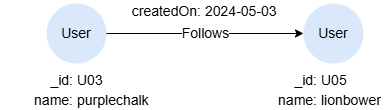
Retrieve 1-step paths with outgoing Follows edges, where their createdOn values are greater than a specified date:
GQLMATCH p = ()-[e:Follows WHERE e.createdOn > '2024-04-01']->()
RETURN p
Result: p
Parenthesized Path Pattern WHERE Clause
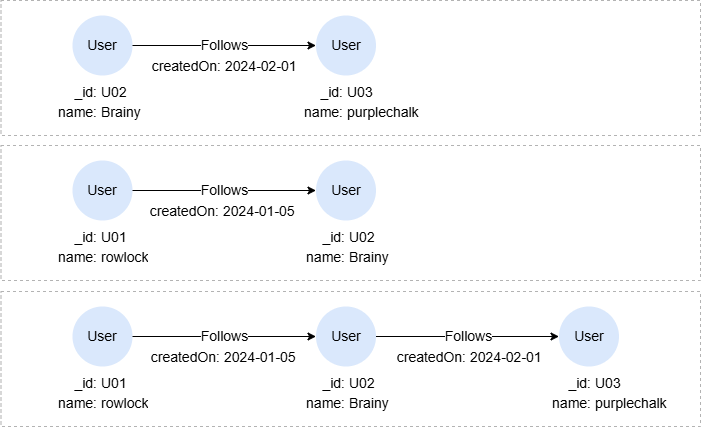
Retrieve one- or two-step paths containing outgoing Follows edges, where their createdOn values are smaller than a specified value:
GQLMATCH p = (()-[e:Follows]->() WHERE e.createdOn < "2024-02-05"){1,2}
RETURN p
Result: p
Graph Pattern WHERE Clause
Retrieve members of club C01 whose memberNo is greater than 1:
GQLMATCH (c:Club)<-[e:Joins]-(n)
WHERE c._id = 'C01' AND e.memberNo > 1
RETURN n
Result:
JSON[
  {"id": "U05", "labels": ["User"], "properties": {"name": "lionbower"}}
]
Matching Quantified Paths
A quantified path is a variable-length path where the complete path or a part of it is repeated a specified number of times.
Retrieve distinct nodes related to lionbower in 1 to 3 hops:
GQLMATCH (:User {name: 'lionbower'})-[]-{1,3}(n)
RETURN collect_list(DISTINCT n._id) AS IDs
Result:
| IDs |
|---|
| ["C01","U01","U02","U03","U04"] |
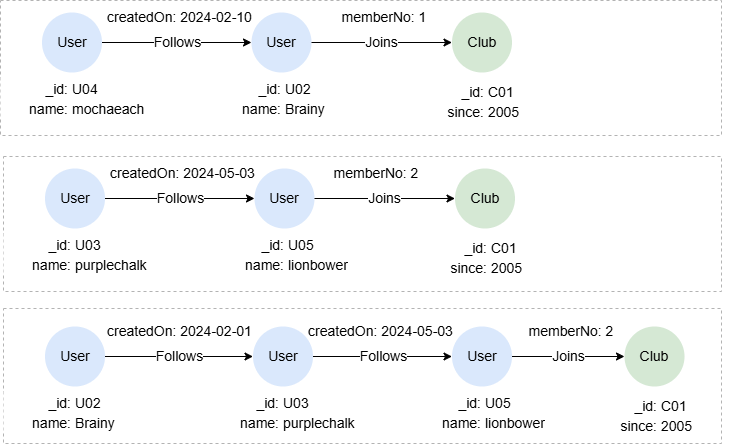
Retrieve paths that begin with one- or two-step subpaths containing Follows edges, where their createdOn values are greater than a specified value, and these subpaths must connect to node C01:
GQLMATCH p = (()-[e:Follows]->() WHERE e.createdOn > "2024-01-31"){1,2}()-({_id:"C01"})
RETURN p
Result: p
Matching Shortest Paths
A shortest paths between two nodes are the paths that has the fewest edges.
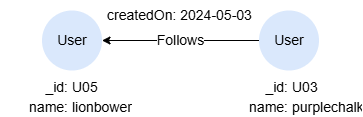
Retrieve all the shortest paths between lionbower and purplechalk within 5 hops:
GQLMATCH p = ALL SHORTEST (n1:User)-[]-{,5}(n2:User)
WHERE n1.name = 'lionbower' AND n2.name = 'purplechalk'
RETURN p
Result: p
Matching Multiple Paths
When a MATCH statement contains multiple path patterns, each pattern is matched independently against the graph to produce its own result set. These result sets are then combined by performing an equi-join on the shared node or edge variables.
Retrieve users who joined club C02 and also follow Brainy:
GQLMATCH (u)-[:Joins]->(:Club {_id: 'C02'}), (u)-[:Follows]->(:User {name: 'Brainy'})
RETURN u
Result:
JSON[
  {"id": "U04", "labels": ["User"], "properties": {"name": "mochaeach"}}
]
The above query is equivalent to the following using two MATCHs:
GQLMATCH (u)-[:Joins]->(:Club {_id: 'C02'})
MATCH (u)-[:Follows]->(:User {name: 'Brainy'})
RETURN u
If the path patterns share no common variables, the result sets are combined using a Cartesian product — a behavior that is usually undesired. For example,
GQLMATCH (c:Club), (u:User)-[f:Follows WHERE f.createdOn > '2024-02-01']->()
RETURN c._id, u.name
Result:
| c._id | u.name |
|---|---|
| C02 | mochaeach |
| C02 | purplechalk |
| C01 | mochaeach |
| C01 | purplechalk |
MATCH YIELD
The YIELD clause can be used to select specific node, edge, or path variables from the MATCH statement, making them accessible for reference in subsequent parts of the query. Variables not selected with YIELD will no longer be available. If the YIELD clause is omitted, all variables are passed through by default.
This query only returns c, as n is not involved in YIELD:
GQLMATCH (n:User)-[:Joins]->(c:Club)
YIELD c
RETURN *
Result:
JSON[
  {"c": {"id": "C01", "labels": ["Club"], "properties": {"since": 2005}}},
  {"c": {"id": "C02", "labels": ["Club"], "properties": {"since": 2005}}},
  {"c": {"id": "C01", "labels": ["Club"], "properties": {"since": 2005}}}
]
This query returns n1 and e, n2 is not included:
GQLMATCH (n1:Club)
MATCH (n2:Club)<-[e:Joins WHERE e.memberNo < 3]-() YIELD e
RETURN *
Result:
[ {"id": "C02", "labels": ["Club"], "properties": {"since": 2005}}, {"id": "C02", "labels": ["Club"], "properties": {"since": 2005}}, {"id": "C01", "labels": ["Club"], "properties": {"since": 2005}}, {"id": "C01", "labels": ["Club"], "properties": {"since": 2005}} ]
This query throws syntax error since n2 is not selected in the YIELD clause, thus it cannot be accessed by the RETURN statement:
GQL - Syntax ErrorMATCH (n1:User), (n2:Club)
YIELD n1
RETURN n1, n2