
FOR
Overview
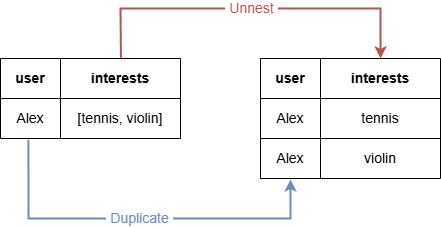
The FOR statement unnests a list into individual records and expands the intermediate result table accordingly.
Syntax<for statement> ::=
  "FOR" <binding variable> "IN" <list value expression> [ <ordinality or offset> ]

<ordinality or offset> ::=
  "WITH" { "ORDINALITY" | "OFFSET" } <binding variable>
Details
- The
<ordinality or offset>defines a variable to track the position of elements in the list:ORDINALITYprovides the ordinal position of each element, i.e., 1, 2, 3,....OFFSETprovides the zero-based position of each element, i.e., 0, 1, 2, ...
- The name of the
<binding variable>in<ordinality or offset>must differ from the<binding variable>placed right afterFOR.
NOTEThe
UNWIND <list> AS <variable>syntax is accepted as a synonym forFOR <variable> IN <list>and behaves identically. However,UNWINDis not part of the GQL standard (ISO/IEC 39075): queries using it run normally but return an advisory warning recommending the standardFOR ... INform.
Unnesting a Simple List
GQLFOR item IN [1,1,2,3,null]
RETURN item
Result:
| item |
|---|
| 1 |
| 1 |
| 2 |
| 3 |
null |
GQLFOR item IN [[1,2], [2,3,5]]
RETURN item
Result:
| item |
|---|
| [1,2] |
| [2,3,5] |
Unnesting a Variable
GQLLET user = "Alex"
LET interests = ["tennis", "violin"]
FOR interest IN interests
RETURN user, interest
Result:
| user | interest |
|---|---|
| Alex | tennis |
| Alex | violin |
In this query, the FOR statement unnests the list contained in the interests column of the working table into two records. Consequently, the corresponding record in the user column is duplicated to two records as well.
Unnesting a Group Variable
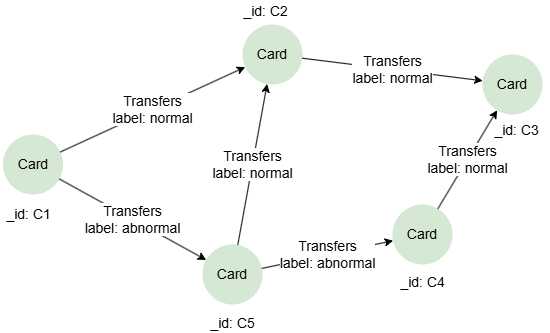
GQLINSERT (c1:Card {_id: 'C1'}),
  	   (c2:Card {_id: 'C2'}),
  	   (c3:Card {_id: 'C3'}),
  	   (c4:Card {_id: 'C4'}),
  	   (c5:Card {_id: 'C5'}),
       (c1)-[:Transfers {label: 'normal'}]->(c2),
       (c1)-[:Transfers {label: 'abnormal'}]->(c5),
       (c5)-[:Transfers {label: 'normal'}]->(c2),
       (c5)-[:Transfers {label: 'abnormal'}]->(c4),
       (c2)-[:Transfers {label: 'normal'}]->(c3),
       (c4)-[:Transfers {label: 'normal'}]->(c3)
Retrieve one shortest path between C1 and C3, and return the label values on edges in the path:
GQLMATCH SHORTEST 1 ({_id: "C1"})-[trans:Transfers]-{1,6}({_id: "C3"})
FOR tran IN trans
RETURN tran.label
Result:
| tran.label |
|---|
| normal |
| normal |
In this query, the trans declared in a quantified path is a group variable. To convert it to a singleton degree of reference, you can use FOR to unnest it.
WITH ORDINALITY
To collect elements in even positions from a list to a new list:
GQLFOR item in ["a", "b", "c", "d"] WITH ORDINALITY index // index starts from 1
FILTER index %2 = 0
RETURN collect_list(item)
Result:
| collect_list(item) |
|---|
| ["b","d"] |
WITH OFFSET
Return the second element in a list:
GQLFOR item in ["a", "b", "c", "d"] WITH OFFSET index // index starts from 0
FILTER index = 1
RETURN item
Result:
| item |
|---|
| b |