
DELETE
Overview
The DELETE statement allows you to delete nodes and edges from a graph. These nodes or edges must first be retrieved using the MATCH statement.
An edge cannot exist when any of its endpoints is removed from the graph. Therefore, by default GQL does not allow to delete a node while it still has edges connected to it. You can bypass this restriction by explicitly using the keyword DETACH to enable the deletion of nodes along with their connected edges. For example, when node B is deleted by DETACH DELETE, edges 1, 2 and 4 will also be deleted.
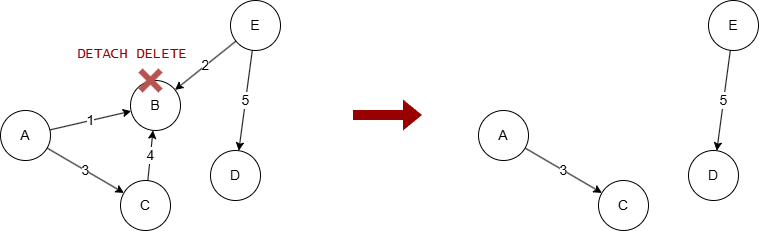
Without DETACH, the deletion of node B will fail, which can be useful as a security measure to prevent unintended deletions.
The keyword NODETACH makes the non-cascading behavior explicit: NODETACH DELETE is equivalent to plain DELETE.
Example Graph
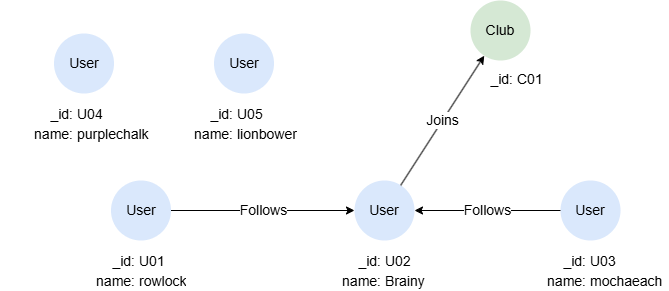
GQLINSERT (rowlock:User {_id: "U01", name: "rowlock"}),
       (brainy:User {_id: "U02", name: "Brainy"}),
       (mochaeach:User {_id: "U03", name: "mochaeach"}),
       (purplechalk:User {_id: "U04", name: "purplechalk"}),
       (lionbower:User {_id: "U05", name: "lionbower"}),
       (c:Club {_id: "C01"}),
       (rowlock)-[:Follows]->(brainy),
       (mochaeach)-[:Follows]->(brainy),
       (brainy)-[:Joins]->(c)
Deleting Isolated Nodes
Delete the isolated nodes purplechalk and lionbower:
GQLMATCH (n:User) WHERE n.name IN ["purplechalk", "lionbower"]
DELETE n
The DELETE statement (without DETACH) can only delete isolated nodes. If any node specified has connected edges, an error will be thrown.
Deleting Any Nodes
Delete the node rowlock along with its connected edges:
GQLMATCH (n:User {name: 'rowlock'})
DETACH DELETE n
Deleting All Nodes and Edges
Delete all nodes along with all edges:
GQLMATCH (n)
DETACH DELETE n
Deleting Edges
Delete all Follows edges:
GQLMATCH ()-[e:Follows]->()
DELETE e
Limiting the Amount to Delete
To limit the number of nodes or edges to delete, apply the LIMIT statement after MATCH to keep only the first N records before passing the variable to the DELETE statement.
Delete any two edges:
GQLMATCH ()-[e]->() LIMIT 2
DELETE e