
CALL
Overview
The CALL statement is used to invoke an inline procedure or a named procedure.
Syntax<call statement> ::= <call inline procedure> | <call named procedure>
Calling Inline Procedures
An inline procedure is a user-defined procedure embedded within a query, commonly used to execute subqueries or perform data modifications. It enables complex logic such as looping and enhances efficiency by managing resources more effectively, especially when working with large graphs, thereby reducing memory overhead.
Syntax<call inline procedure> ::=
  [ "OPTIONAL" ] "CALL" [ <variable reference list> ] <procedure specification>

<variable reference list> ::=
  "(" <variable reference> [ { "," <variable reference> }... ] ")"

<procedure specification> ::=
  "{" <statement block> "}"
Details
- You can import variables from earlier parts of the query into
CALL. If omitted, all current variables are implicitly imported. - The imported variables are processed row by row independently inside
CALL. - When used for subqueries, the
<statement block>must end with aRETURNstatement to output variables to the outer query:- Each returned variable becomes a new column in the intermediate result table.
- If a subquery yields no records, the associated imported record is discarded. The
OPTIONALkeyword can be used to handle this case - producing anullvalue instead of discarding the record. - If multiple records are returned, the imported row is duplicated accordingly.
- For data modification procedures, a
RETURNstatement is not required. In such cases, the number of records in the intermediate result table remains the same afterCALL.
Example Graph
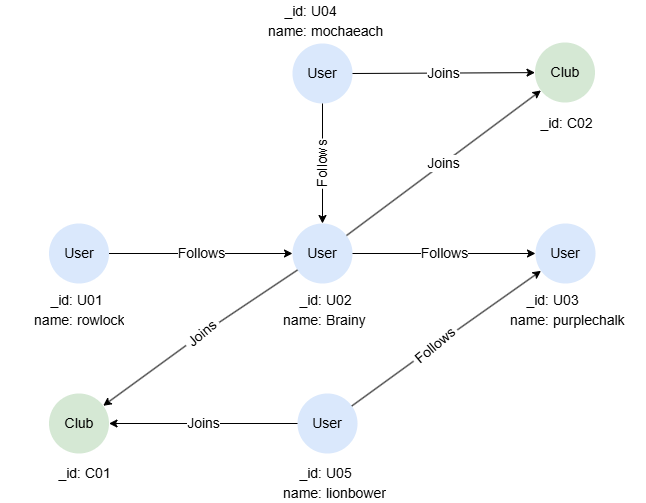
GQLINSERT (rowlock:User {_id:'U01', name:'rowlock'}),
       (brainy:User {_id:'U02', name:'Brainy'}),
       (purplechalk:User {_id:'U03', name:'purplechalk'}),
       (mochaeach:User {_id:'U04', name:'mochaeach'}),
       (lionbower:User {_id:'U05', name:'lionbower'}),
       (c01:Club {_id:'C01'}),
       (c02:Club {_id:'C02'}),
       (rowlock)-[:Follows]->(brainy),
       (mochaeach)-[:Follows]->(brainy),
       (brainy)-[:Follows]->(purplechalk),
       (lionbower)-[:Follows]->(purplechalk),
       (brainy)-[:Joins]->(c01),
       (lionbower)-[:Joins]->(c01),
       (brainy)-[:Joins]->(c02),
       (mochaeach)-[:Joins]->(c02)
Subqueries
Find members of each club:
GQLMATCH (c:Club)
CALL {
    MATCH (c)<-[:Joins]-(u:User)
    RETURN collect_list(u.name) AS members
}
RETURN c._id, members
Result:
| c._id | members |
|---|---|
| C01 | ["Brainy","lionbower"] |
| C02 | ["Brainy","mochaeach"] |
OPTIONAL CALL
Retrieve the followers of each member in club C01, ensure that members with no followers are still included in the results:
GQLMATCH (c)<-[:Joins]-(u:User) WHERE c._id = "C01"
OPTIONAL CALL (u) {
  MATCH (u)<-(follower:User)
  RETURN collect_list(follower.name) AS followers
}
RETURN u.name, followers
Result:
| u.name | followers |
|---|---|
| Brainy | ["rowlock","mochaeach"] |
| lionbower | [] |
Execution Order of Subqueries
The order in which the subquery executed is not determined. If a specific execution order is desired, ORDER BY should be used to sort the records before CALL to enforce that sequence.
This query counts the number of followers for each user. The execution order of the subqueries is determined by the ascending order of the users' name:
GQLMATCH (u:User)
ORDER BY u.name
CALL {
  MATCH (u)<-[:Follows]-(follower)
  RETURN count(follower) AS followersNo
}
RETURN u.name, followersNo
Result:
| u.name | followersNo |
|---|---|
| Brainy | 2 |
| lionbower | 0 |
| mochaeach | 0 |
| purplechalk | 2 |
| rowlock | 0 |
Data Modifications
Set values for the property rates of Joins edges:
GQLFOR score IN [1,2,3,4]
CALL {
    MATCH ()-[e:Joins WHERE e.rates IS NULL]-() LIMIT 1
    SET e.rates = score
    RETURN e
}
RETURN e
Result:
JSON[
  {"id": "e:7", "label": "Joins", "fromNodeId": "U02", "toNodeId": "C02", "properties": {"rates": 1}},
  {"id": "e:8", "label": "Joins", "fromNodeId": "U04", "toNodeId": "C02", "properties": {"rates": 2}},
  {"id": "e:5", "label": "Joins", "fromNodeId": "U02", "toNodeId": "C01", "properties": {"rates": 3}},
  {"id": "e:6", "label": "Joins", "fromNodeId": "U05", "toNodeId": "C01", "properties": {"rates": 4}}
]
Calling Named Procedures
A named procedure refers to a predefined procedure that is registered in the system and can be invoked by its name using the CALL statement. The following kinds of named procedures are supported:
- Built-in graph algorithms such as
algo.degree,algo.pagerank. See Graph Algorithms. - Built-in full-text procedures
ft.searchandft.analyze. See Full-text Index → Procedures. - User-defined stored procedures created with
CREATE PROCEDURE. See Stored Procedures.
Syntax<call named procedure> ::= [ "OPTIONAL" ] "CALL" <procedure reference> [ <yield clause> ]

<yield clause> ::= "YIELD" <yield item> [ { "," <yield item> }... ]

<yield item> ::= <column name> [ "AS" <binding variable> ]
Details
- The
YIELDclause outputs the procedure's columns to the outer query. - The yielded columns are added to each incoming row, so variables from earlier clauses (e.g.,
nfrom a precedingMATCH (n)) remain visible after a namedCALL ... YIELD. Avoid yielding a column whose name is already bound: the collision is not reported, and the procedure's column silently overwrites the existing variable. - A user-defined stored procedure executes once for each row of the incoming binding table, and that row's variables are visible inside the call, so arguments can reference them (e.g.,
CALL score_node(n._id)). Each incoming row is combined with the rows the procedure yields for it. See Per-Row Execution. - A built-in algorithm (
algo.*) executes once per query, not once per row, since running a graph-wide algorithm per matched node would be prohibitive. Its rows are combined with the incoming rows, so variables from earlier clauses remain visible.
Running Algorithms
Execute the Degree Centrality algorithm:
GQLCALL algo.degree({
  order: "desc"
}) YIELD nodeId, degree
To learn more about available algorithms, see Graph Algorithms.
Running Full-text Procedures
ft.search runs a BM25-ranked search over a named full-text index:
GQLCALL ft.search('prodDesc', 'graph database', {limit: 10}) YIELD node, score
RETURN node, score ORDER BY score DESC
To learn more about full-text procedures, see Full-text Index → Procedures.
Running Stored Procedures
Given a stored procedure greet created with CREATE PROCEDURE, invoke it the same way:
GQLCALL greet('World') YIELD greeting
For details on defining, listing, and managing user-defined procedures, refer to Stored Procedures.
OPTIONAL CALL
For named procedures, OPTIONAL CALL does two things. It suppresses the "procedure not found" error when the procedure does not exist, and it keeps an incoming row, with NULLs in the yielded columns, when a resolved procedure yields no rows for that row. Without OPTIONAL, such a row is dropped by the join.
GQL-- Errors if 'maybe_proc' is not defined
CALL maybe_proc() YIELD result

-- No error; returns an empty result with column 'result'
OPTIONAL CALL maybe_proc() YIELD result
Running on a Projection
Append ON <projection> to scope any CALL to a projection's materialized subset. See Projections.