
Triangle Counting
✓ File Writeback ✕ Property Writeback ✓ Direct Return ✓ Stream Return ✓ Stats
Overview
The Triangle Counting algorithm identifies triangles in a graph, where a triangle represents a set of three nodes that are connected to each other. Triangles are important in graph analysis as they reflect the presence of loops or strong connectivity patterns within the graph.
Triangles in social networks indicate the presence of cohesive communities. Identifying triangles helps in understanding the clustering and interconnectedness of individuals or groups within the network. In financial networks or transaction networks, the presence of triangles can be indicative of suspicious or fraudulent activities. Triangle counting can help identify patterns of collusion or interconnected transactions that might require further investigation.
Concepts
Triangle
In a complex graph, it is possible for multiple edges to exist between two nodes. This can lead to the formation of more than one triangle involving three nodes. Take the graph below as an example:
- Counting triangles assembled by edges, there are 4 different triangles.
- Counting triangles assembled by nodes, there are 2 different triangles.
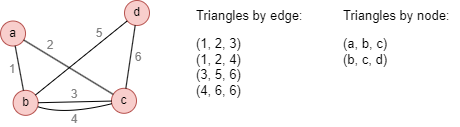
The number of triangles assembled by edges tends to be greater than those assembled by nodes in complex graph. The choice of assembly principle should align with the objectives of the analysis and the insights sought from the graph data. In social network analysis, where the focus is often on understanding connectivity patterns among individuals, the assembling by node principle is commonly adopted. In financial network analysis or other similar domains, the assembling by edge principle is often preferred. Here, the emphasis is on the relationships between nodes, such as financial transactions or interactions. Assembling triangles based on edges allows for the examination of how tightly nodes are connected and how funds or information flow through the network.
Considerations
- The Triangle Counting algorithm ignores the direction of edges but calculates them as undirected edges.
Syntax
- Command:
algo(triangle_counting) - Parameters:
Name | Type | Spec | Default | Optional | Description |
|---|---|---|---|---|---|
| type | int | 1, 2 | 1 | Yes | 1 to assemble triangles by edges, 2 to assemble triangles by nodes |
| result_type | int | 1, 2 | 1 | Yes | 1 to return the number of triangles, 2 to return triangles in the form of nodes or edges |
| limit | int | ≥-1 | -1 | Yes | Number of results to return, -1 to return all results |
Examples
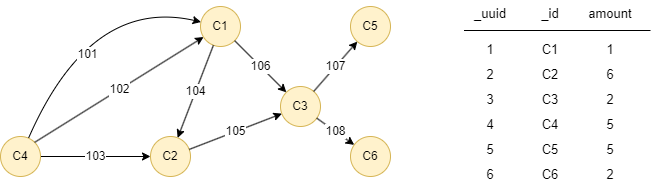
The example graph is as follows:
File Writeback
Spec | Content |
|---|---|
| filename | edge1,edge2,edge3 or node1,node2,node3 |
UQLalgo(triangle_counting).params({
  type: 1,
  result_type: 2
}).write({
  file:{
    filename: "te"
}})
Statistics: triangle_count = 3
Results: File te
File103,104,101
103,104,102
105,104,106
UQLalgo(triangle_counting).params({
  type: 2,
  result_type: 2
}).write({
  file:{
    filename: "tn"
}})
Statistics: triangle_count = 2
Results: Files tn
FileC4,C2,C1
C3,C2,C1
Direct Return
Alias Ordinal | Type | Description | Columns |
|---|---|---|---|
| 0 | KV or []perTriangle | Number of triangles or triangles | triangle_count or edge1, edge2, edge3 or node1, node2, node3 |
UQLalgo(triangle_counting).params({
  result_type: 1
}) as count
return count
Results: count
| triangle_count |
|---|
| 3 |
UQLalgo(triangle_counting).params({
  result_type: 2
}) as triangles
return triangles
Results: triangles
| edge1 | edge2 | edge3 |
|---|---|---|
| 103 | 104 | 101 |
| 103 | 104 | 102 |
| 105 | 104 | 106 |
Stream Return
Alias Ordinal | Type | Description | Columns |
|---|---|---|---|
| 0 | KV or []perTriangle | Number of triangles or triangles | triangle_count or edge1, edge2, edge3 or node1, node2, node3 |
UQLalgo(triangle_counting).params({
  type: 2,
  result_type:2
}).stream() as t
call {
  with t
  find().nodes({_uuid in [t.node1, t.node2, t.node3]}) as nodes
  return sum(nodes.amount) as sumAmount
}
return table(t.node1, t.node2, t.node3, sumAmount)
Results: table(t.node1, t.node2, t.node3, sumAmount)
| t.node1 | t.node2 | t.node3 | sumAmount |
|---|---|---|---|
| 4 | 2 | 1 | 12 |
| 3 | 2 | 1 | 9 |
UQLalgo(triangle_counting).params({
  type: 2,
  result_type:1
}).stream() as tNodes
algo(triangle_counting).params({
  type: 1,
  result_type:1
}).stream() as tEdges
return table(tNodes.triangle_count, tEdges.triangle_count)
Results: table(tNodes.triangle_count, tEdges.triangle_count)
| tNodes.triangle_count | tEdges.triangle_count |
|---|---|
| 2 | 3 |
Stats Return
| Alias Ordinal | Type | Description | Columns |
|---|---|---|---|
| 0 | KV | Number of triangles | triangle_count |
UQLalgo(triangle_counting).params({
  result_type: 1
}).stats() as sta
return sta
Results: sta
| triangle_count |
|---|
| 3 |