
WITH
Overview
The WITH statement can be used to manipulate the data generated earlier in the query before passing it to subsequent parts. Note that the WITH statement affects the scope of aliases. Any aliases not included in the WITH statement will not be available in the remainder of the query.
Example Graph
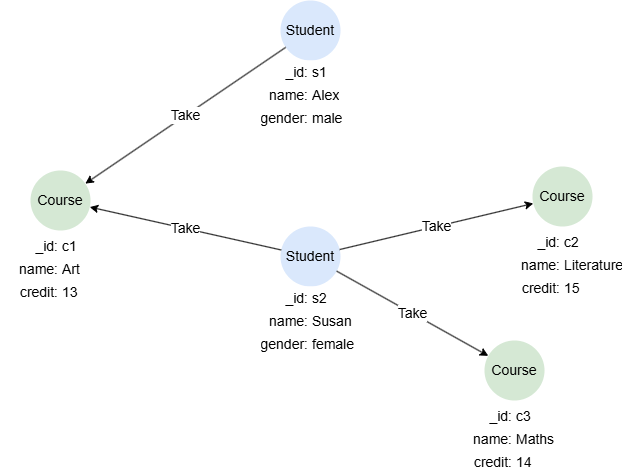
To create the graph, execute each of the following UQL queries sequentially in an empty graphset:
UQLcreate().node_schema("Student").node_schema("Course").edge_schema("Take")
create().node_property(@Student,"name").node_property(@Student,"gender").node_property(@Course,"name").node_property(@Course,"credit",int32)
insert().into(@Student).nodes([{_id:"s1", name:"Alex", gender:"male"}, {_id:"s2", name:"Susan", gender:"female"}])
insert().into(@Course).nodes([{_id:"c1", name:"Art", credit:13}, {_id:"c2", name:"Literature", credit:15}, {_id:"c3", name:"Maths", credit:14}])
insert().into(@Take).edges([{_from:"s1", _to:"c1"}, {_from:"s2", _to:"c1"}, {_from:"s2", _to:"c2"}, {_from:"s2", _to:"c3"}])
Performing Functions
To find the courses with the highest credit taken by Susan:
UQLn({@Student.name == "Susan"} as s).re().n({@Course} as c1)
with max(c1.credit) as maxCredit
find().nodes({@Course.credit == maxCredit}) as c2
return c2.name
Result:
| c2.name |
|---|
| Literature |
Joining Heterologous Data
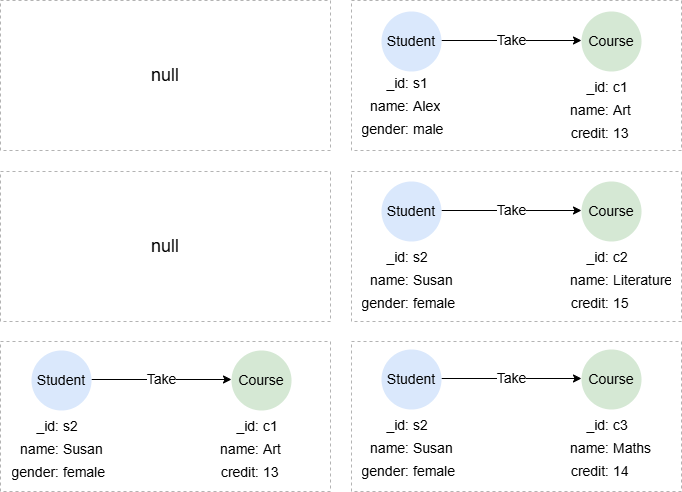
This query checks whether paths exist between each pairing of students and courses in the graph. Note that a Cartesian product is performed between s and c in the WITH statement, resulting in a total of 6 records. The n().e().n() statement then executes six times, processing each record individually. See Heterologous Data for details.
UQLfind().nodes({@Student}) as s
find().nodes({@Course}) as c
with s, c
optional n(s).e().n({_id == c._id}) as p
return p{*}
Result: p
Constructing Data
To find the courses with a credit greater than the target:
UQLwith 13 as target
find().nodes({@Course.credit > target}) as c
return c.name
Result:
| c.name |
|---|
| Literature |
| Maths |