
CALL
Overview
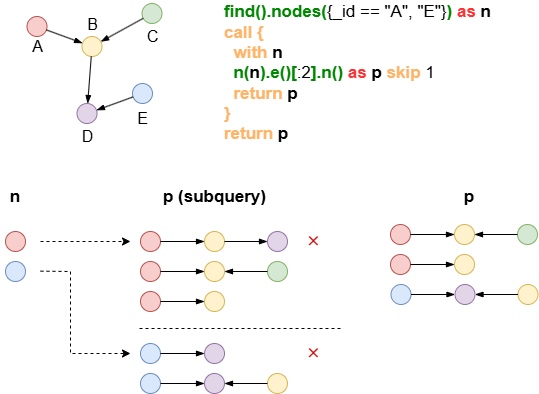
The CALL statement invokes subqueries, each executed with one record from the imported aliases as input. These subqueries enhance efficiency by managing resources more effectively, particularly when working with large datasets, thereby reducing memory overhead.
Syntax
Syntaxcall {
  with <alias_in_1>, <alias_in_2?>, ...
  ...
  return <item1> as <alias_out_1?>, <item2?> as <alias_out_2?>, ...
}
Details
- The subquery in
CALLbegins with aWITHto import aliases and concludes with aRETURNto deliver results which are available in the subsequent parts of the query. - When the initial
WITHstatement is omitted, all available aliases from the previous parts of the query are implicitly imported, and any heterologous aliases are combined using a Cartesian product.
Example Graph
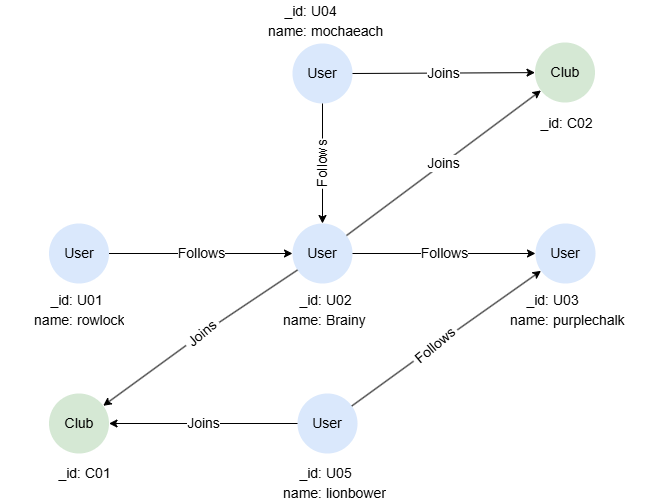
To create the graph, execute each of the following UQL queries sequentially in an empty graphset:
UQLcreate().node_schema("User").node_schema("Club").edge_schema("Follows").edge_schema("Joins")
create().node_property(@User, "name").edge_property(@Joins, "rates", float)
insert().into(@User).nodes([{_id:"U01", name:"rowlock"},{_id:"U02", name:"Brainy"},{_id:"U03", name:"purplechalk"},{_id:"U04", name:"mochaeach"},{_id:"U05", name:"lionbower"}])
insert().into(@Club).nodes([{_id:"C01"},{_id:"C02"}])
insert().into(@Follows).edges([{_from:"U01", _to:"U02"},{_from:"U02", _to:"U03"},{_from:"U04", _to:"U02"},{_from:"U05", _to:"U03"}])
insert().into(@Joins).edges([{_from:"U02", _to:"C01"},{_from:"U05", _to:"C01"},{_from:"U02", _to:"C02"},{_from:"U04", _to:"C02"}])
Queries
To find the clubs joined by each user:
UQLfind().nodes({@User}) as u
call {
  with u
  n(u).e({@Joins}).n({@Club} as c)
  return c{*}
}
return u.name, c._id
Result:
| u.name | c._id |
|---|---|
| mochaeach | C02 |
| Brainy | C01 |
| Brainy | C02 |
| lionbower | C01 |
Aggregations
To count the number of followers for each user who joins a club:
UQLn({@User} as u).e({@Joins}).n({@Club} as c)
call {
  with u
  n(u).le({@Follows}).n(as follower)
  return count(follower) as followersNo
}
return u.name, c._id, followersNo
Result:
| u.name | c._id | followersNo |
|---|---|---|
| mochaeach | C02 | 0 |
| Brainy | C01 | 2 |
| Brainy | C02 | 2 |
| lionbower | C01 | 0 |
Data Modifications
To set values for the property rates of @Joins edges:
UQLuncollect [1,2,3,4] as score
call {
  with score
  find().edges({@Joins.rates is null}) as e1 limit 1
  update().edges(e1).set({rates: score}) as e2
  return e2{*}
}
return e2{*}
Result: e2
_uuid | _from | _to | _from_uuid | _to_uuid | schema | values |
|---|---|---|---|---|---|---|
| Sys-gen | U04 | C02 | UUID of U04 | UUID of C02 | Joins | {rates: 1} |
| Sys-gen | U02 | C01 | UUID of U02 | UUID of C01 | Joins | {rates: 2} |
| Sys-gen | U02 | C02 | UUID of U02 | UUID of C02 | Joins | {rates: 3} |
| Sys-gen | U05 | C01 | UUID of U05 | UUID of C01 | Joins | {rates: 4} |
Importing Multiple Aliases
To check if any two users connected by a @Follows edge have joined the same club:
UQLn({@User} as u1).le({@Follows}).n({@User} as u2)
call {
  with u1, u2
  optional n(u1).e().n({@Club}).e().n({_id == u2._id}) as p
  return p
}
return u1.name, u2.name,
       case when p is not null then "Y"
       else "N" end as sameClub
Result:
| u1.name | u2.name | sameClub |
|---|---|---|
| Brainy | rowlock | N |
| Brainy | mochaeach | Y |
| purplechalk | Brainy | N |
| purplechalk | lionbower | N |
Execution Order of Subqueries
The execution order of a subquery is not fixed. If a specific execution order is desired, the ORDER BY statement should be used before CALL to enforce that sequence.
This query counts the number of followers for each user. The execution order of the subqueries is determined by the ascending order of the users' names:
UQLfind().nodes({@User}) as u
order by u.name
call {
  with u
  n(u).le({@Follows}).n(as follower)
  return count(follower) as followersNo
}
return u.name, followersNo
Result:
| u.name | followersNo |
|---|---|
| Brainy | 2 |
| lionbower | 0 |
| mochaeach | 0 |
| purplechalk | 2 |
| rowlock | 0 |