
Expressions
CASE
The CASE expression evaluates one or more conditions and returns different results depending on which condition is met.
UQL supports two forms of the CASE expression:
Example Graph
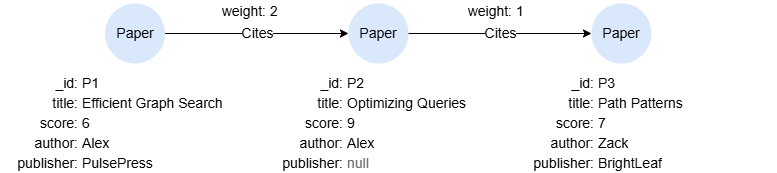
UQLcreate().node_schema("Paper").edge_schema("Cites")
create().node_property(@Paper, "title").node_property(@Paper, "score", int32).node_property(@Paper, "author").node_property(@Paper, "publisher").edge_property(@Cites, "weight", int32)
insert().into(@Paper).nodes([{_id:'P1', title:'Efficient Graph Search', score:6, author:'Alex', publisher: "PulsePress"}, {_id:'P2', title:'Optimizing Queries', score:9, author:'Alex'}, {_id:'P3', title:'Path Patterns', score:7, author:'Zack', publisher: "BrightLeaf"}])
insert().into(@Cites).edges([{_from:"P1", _to: "P2", weight: 2}, {_from:"P2", _to: "P3", weight: 1}])
Simple CASE
The simple CASE expression evaluates a single value against multiple possible values, returning the result associated with the first matching value.
Syntaxcase <expr>
  when <value_1> then <result_1>
  when <value_2> then <result_2>
  ...
  else <result_default>
end
Details
<expr>is an expression such as an alias reference, an aggregate function, etc.- Execution Flow:
- The
<expr>is compared sequentially against each<value_N>specified by thewhenclause. - If
<value_N>matches<expr>, the corresponding<result_N>is returned. - If no matches are found, the
<result_default>specified by theelseclause is returned. Ifelseis omitted,nullis returned by default.
- The
UQLfind().nodes({@Paper.score > 6}) as n
return case count(n) when 3 then "Y" else "N" end AS result
Result:
| result |
|---|
| N |
Searched CASE
The searched CASE expression evaluates multiple conditions, returning the result associated with the first condition that evaluates to true.
Syntaxcase
  when <condition_1> then <result_1>
  when <condition_2> then <result_2>
  ...
  else <result_default>
end
Details
- Each
<condition_N>is a boolean value expression that evaluates to true or false. - Execution Flow:
- The
<condition_N>s are evaluated sequentially. - When a
<condition_N>evaluates to true,<result_N>is returned immediately. - If no
<condition_N>s are true, the<result_default>specified by theelseclause is returned. Ifelseis omitted,nullis returned by default.
- The
UQLfind().nodes({@Paper}) as n
return n.title,
case
  when n.publisher is null then "Publisher N/A"
  when n.score < 7 then -1
  else n.author
end as note
Result:
| n.title | note |
|---|---|
| Optimizing Queries | Publisher N/A |
| Efficient Graph Search | -1 |
| Path Patterns | Zack |