
Delete
Overview
The delete() statement removes nodes or edges that meet specified conditions.
Syntax// Deletes isolated nodes
delete().nodes(<filter?>).nodetach()

// Deletes nodes along with any edges connected to them
delete().nodes(<filter?>).detach()

// Deletes edges
delete().edges(<filter?>)
Method | Param | Description | Optional |
|---|---|---|---|
nodes() or edges() | <filter?> | The filtering condition enclosed in {}, or an alias to specify the nodes or edges to delete. If left blank, all nodes or edges are targeted. | No |
nodetach() | / | Prevents the deletion of nodes that still have edges connected to them; it is implicitly applied. | Yes |
detach() | / | Enforces the deletion of nodes along with edges connected to them. | Yes |
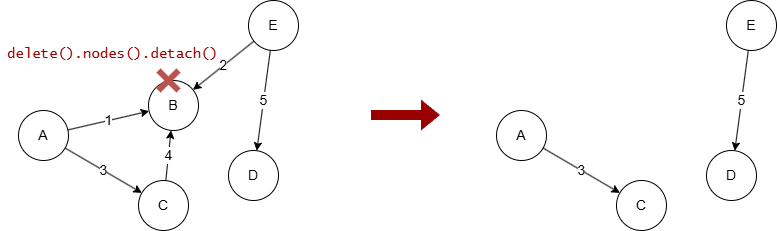
An edge cannot exist if any of its endpoints is removed from the graph. By default, UQL does not allow to delete a node while it still has edges connected to it.
However, you can use the method detach() or nodetach().force() to enable the deletion of nodes along with their connected edges. For example, when node B is deleted, edges 1, 2 and 4 will also be deleted.
Example Graph
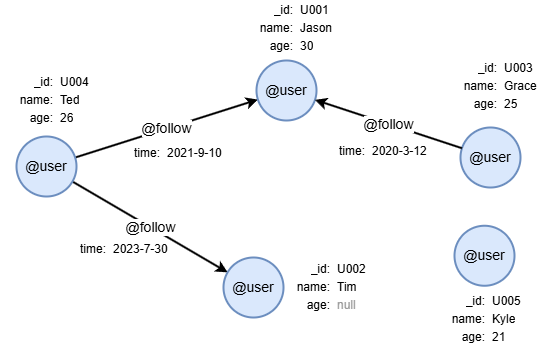
To create the graph, execute the following UQL queries sequentially in an empty graphset:
UQLcreate().node_schema("user").edge_schema("follow")
create().node_property(@user, "name").node_property(@user, "age", int32).edge_property(@follow, "time", datetime)
insert().into(@user).nodes([{_id:"U001", name:"Jason", age:30}, {_id:"U002", name:"Tim"}, {_id:"U003", name:"Grace", age:25}, {_id:"U004", name:"Ted", age:26}, {_id:"U005", name:"Kyle", age:21}])
insert().into(@follow).edges([{_from:"U004", _to:"U001", time:"2021-9-10"}, {_from:"U003", _to:"U001", time:"2020-3-12"}, {_from:"U004", _to:"U002", time:"2023-7-30"}])
Deleting Isolated Nodes
To delete the isolated node whose name is Kyle:
UQLdelete().nodes({name == "Kyle"})
The delete().nodes() query can only delete isolated nodes, if any node specified has connected edges, an error will be thrown, and no nodes will be deleted.
Deleting Any Nodes
To delete the node whose name is Grace along with its connected edges:
UQLdelete().nodes({name == "Grace"}).detach()
To delete all nodes along with all edges:
UQLdelete().nodes().detach()
Deleting Edges
To delete @follow edges:
UQLdelete().edges({@follow})
Limiting the Amount to Delete
To limit the number of nodes or edges to delete, first retrieve the data from the database using statements like find(), then apply the LIMIT statement to keep only the first N records before passing the alias to the delete() statement.
To delete any two edges:
UQLfind().edges() as e limit 2
delete().edges(e)
return e{*}
Result: e
_uuid | _from | _to | _from_uuid | _to_uuid | schema | values |
|---|---|---|---|---|---|---|
| Sys-gen | U004 | U001 | UUID of U004 | UUID of U001 | follow | {time: "2021-09-11 00:00:00"} |
| Sys-gen | U004 | U002 | UUID of U004 | UUID of U002 | follow | {time: "2023-07-31 00:00:00"} |