
Find Edges
Overview
The find().edges() statement retrieves edges from the current graphset that meet the given conditions.
Syntax
Syntaxfind().edges(<filter?>)
- Statement alias: Type
EDGE; default isedges - Methods:
Method | Param | Description | Optional | Alias Type |
|---|---|---|---|---|
edges() | <filter?> | The filtering condition enclosed in {}, or an alias to specify the edges to retrieve. If left blank, all edges are targeted. | No | N/A |
limit() | <N> | Limits the number of edges (N≥-1) returned each time the statement executes; -1 includes all edges. | Yes | N/A |
Example Graph
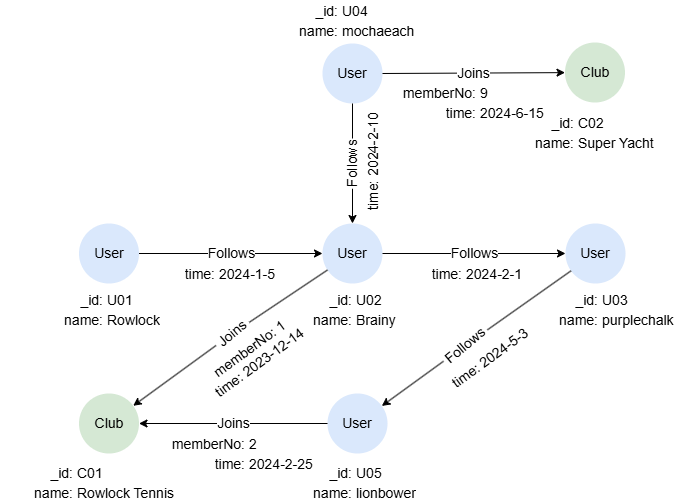
To create the graph, execute each of the following UQL queries sequentially in an empty graphset:
UQLcreate().node_schema("User").node_schema("Club").edge_schema("Follows").edge_schema("Joins")
create().node_property(@User, "name").node_property(@Club, "name").edge_property(@Follows, "time", datetime).edge_property(@Joins, "memberNo", uint32).edge_property(@Joins, "time", datetime)
insert().into(@User).nodes([{_id:"U01", name:"Rowlock"},{_id:"U02", name:"Brainy"},{_id:"U03", name:"purplechalk"},{_id:"U04", name:"mochaeach"},{_id:"U05", name:"lionbower"}])
insert().into(@Club).nodes([{_id:"C01", name:"Rowlock Tennis"},{_id:"C02", name:"Super Yacht"}])
insert().into(@Follows).edges([{_from:"U01", _to:"U02", time:"2024-1-5"},{_from:"U02", _to:"U03", time:"2024-2-1"},{_from:"U04", _to:"U02", time:"2024-2-10"},{_from:"U03", _to:"U05", time:"2024-5-3"}])
insert().into(@Joins).edges([{_from:"U02", _to:"C01", memberNo:1, time:"2023-12-14"},{_from:"U05", _to:"C01", memberNo:2, time:"2024-2-25"},{_from:"U04", _to:"C02", memberNo:9, time:"2024-6-15"}])
Finding All Edges
To retrieve all edges:
UQLfind().edges() as e
return e{*}
Result: e
_uuid | _from | _to | _from_uuid | _to_uuid | schema | values |
|---|---|---|---|---|---|---|
| Sys-gen | U01 | U02 | UUID of U01 | UUID of U02 | Follows | {time: "2024-01-05 00:00:00" } |
| Sys-gen | U02 | U03 | UUID of U02 | UUID of U03 | Follows | {time: "2024-02-01 00:00:00"} |
| Sys-gen | U03 | U05 | UUID of U03 | UUID of U05 | Follows | {time: "2024-05-03 00:00:00"} |
| Sys-gen | U04 | U02 | UUID of U04 | UUID of U02 | Follows | {time: "2024-02-10 00:00:00"} |
| Sys-gen | U02 | C01 | UUID of U02 | UUID of C01 | Joins | {memberNo: 1, time: "2023-12-14 00:00:00"} |
| Sys-gen | U05 | C01 | UUID of U05 | UUID of C01 | Joins | {memberNo: 2, time: "2024-02-25 00:00:00"} |
| Sys-gen | U04 | C02 | UUID of U04 | UUID of C02 | Joins | {memberNo: 9, time: "2024-06-15 00:00:00"} |
Finding Edges with Schemas
To retrieve edges belonging to the schema Joins:
UQLfind().edges({@Joins}) as e
return e{*}
Result: e
_uuid | _from | _to | _from_uuid | _to_uuid | schema | values |
|---|---|---|---|---|---|---|
| Sys-gen | U02 | C01 | UUID of U02 | UUID of C01 | Joins | {memberNo: 1, time: "2023-12-14 00:00:00"} |
| Sys-gen | U05 | C01 | UUID of U05 | UUID of C01 | Joins | {memberNo: 2, time: "2024-02-25 00:00:00"} |
| Sys-gen | U04 | C02 | UUID of U04 | UUID of C02 | Joins | {memberNo: 9, time: "2024-06-15 00:00:00"} |
To retrieve edges belonging to the schema Joins or Follows:
UQLfind().edges({@Joins || @Follows}) as e
return e{*}
Result: e
_uuid | _from | _to | _from_uuid | _to_uuid | schema | values |
|---|---|---|---|---|---|---|
| Sys-gen | U01 | U02 | UUID of U01 | UUID of U02 | Follows | {time: "2024-01-05 00:00:00" } |
| Sys-gen | U02 | U03 | UUID of U02 | UUID of U03 | Follows | {time: "2024-02-01 00:00:00"} |
| Sys-gen | U03 | U05 | UUID of U03 | UUID of U05 | Follows | {time: "2024-05-03 00:00:00"} |
| Sys-gen | U04 | U02 | UUID of U04 | UUID of U02 | Follows | {time: "2024-02-10 00:00:00"} |
| Sys-gen | U02 | C01 | UUID of U02 | UUID of C01 | Joins | {memberNo: 1, time: "2023-12-14 00:00:00"} |
| Sys-gen | U05 | C01 | UUID of U05 | UUID of C01 | Joins | {memberNo: 2, time: "2024-02-25 00:00:00"} |
| Sys-gen | U04 | C02 | UUID of U04 | UUID of C02 | Joins | {memberNo: 9, time: "2024-06-15 00:00:00"} |
Finding Edges with Properties
In filters, properties can either be associated with a schema or used independently. When used independently, these properties apply to all edges that contain them, regardless of schema. Specifically, system properties _uuid, _from, _to, _from_uuid, and _to_uuid cannot be used with a schema (e.g., @Joins._uuid).
To retrieve @Joins edges where memberNo is 2:
UQLfind().edges({@Joins.memberNo == 2}) as e
return e.time
Result:
| e.time |
|---|
| 2024-02-25 00:00:00 |
To retrieve edges where time is greater than 2024-5-1:
UQLfind().edges({time > "2024-5-1"}) as e
return e{*}
Result: e
_uuid | _from | _to | _from_uuid | _to_uuid | schema | values |
|---|---|---|---|---|---|---|
| Sys-gen | U03 | U05 | UUID of U03 | UUID of U05 | Follows | {time: "2024-05-03 00:00:00"} |
| Sys-gen | U04 | C02 | UUID of U04 | UUID of C02 | Joins | {memberNo: 9, time: "2024-06-15 00:00:00"} |
To retrieve edges where _from is "U01" or "U04":
UQLfind().edges({_from in ["U01", "U04"]}) as e
return e{*}
Result: e
_uuid | _from | _to | _from_uuid | _to_uuid | schema | values |
|---|---|---|---|---|---|---|
| Sys-gen | U01 | U02 | UUID of U01 | UUID of U02 | Follows | {createdOn: "2024-01-05 00:00:00" } |
| Sys-gen | U04 | U02 | UUID of U04 | UUID of U02 | Follows | {createdOn: "2024-02-10 00:00:00"} |
| Sys-gen | U04 | C02 | UUID of U04 | UUID of C02 | Joins | {memberNo: 9} |
Using Default Alias
You can use the default alias edges for the find().edges() statement without explicitly declaring it.
To retrieve all edges and return their time (with schema and system properties returned by default):
UQLfind().edges()
return edges{time}
Result: edges
_uuid | _from | _to | _from_uuid | _to_uuid | schema | time |
|---|---|---|---|---|---|---|
| Sys-gen | U01 | U02 | UUID of U01 | UUID of U02 | Follows | 2024-01-05 00:00:00 |
| Sys-gen | U02 | U03 | UUID of U02 | UUID of U03 | Follows | 2024-02-01 00:00:00 |
| Sys-gen | U03 | U05 | UUID of U03 | UUID of U05 | Follows | 2024-05-03 00:00:00 |
| Sys-gen | U04 | U02 | UUID of U04 | UUID of U02 | Follows | 2024-02-10 00:00:00 |
| Sys-gen | U02 | C01 | UUID of U02 | UUID of C01 | Joins | 2023-12-14 00:00:00 |
| Sys-gen | U05 | C01 | UUID of U05 | UUID of C01 | Joins | 2024-02-25 00:00:00 |
| Sys-gen | U04 | C02 | UUID of U04 | UUID of C02 | Joins | 2024-06-15 00:00:00 |
Limiting the Number of Edges
You can use the LIMIT statement immediately after the find().edges() statement to restrict the number of edges passed to subsequent statements.
To retrieve any 3 @Follows edges:
UQLfind().edges({@Follows}) as e limit 3
return e.time
Result:
| e.time |
|---|
| 2024-02-10 00:00:00 |
| 2024-02-01 00:00:00 |
| 2024-01-05 00:00:00 |
Using limit()
In this query, the find().edges() statement executes two times, each time using one record from t. With the limit() method, only one edge is retrieved each time:
UQLuncollect ["2024-1-1", "20224-5-1"] as t
call {
    with t
    find().edges({@Follows.time > t}).limit(1) as e
    return e
}
return e{*}
Result: e
_uuid | _from | _to | _from_uuid | _to_uuid | schema | values |
|---|---|---|---|---|---|---|
| Sys-gen | U04 | U02 | UUID of U04 | UUID of U02 | Follows | {time: "2024-02-10 00:00:00"} |
| Sys-gen | U04 | U02 | UUID of U04 | UUID of U02 | Follows | {time: "2024-02-10 00:00:00"} |
Using OPTIONAL
In this query, the find().edges() statement executes three times, each time using one record from num. With the OPTIONAL prefix, the query returns null if no result is found during execution:
UQLuncollect [1,2,3] as num
optional find().edges({memberNo == num}) as e
return e.time
Result:
| e.time |
|---|
| 2023-12-14 00:00:00 |
| 2024-02-25 00:00:00 |
null |
Without the prefix OPTIONAL, only two records are returned:
UQLuncollect [1,2,3] as num
find().edges({memberNo == num}) as e
return e.time
Result:
| e.time |
|---|
| 2023-12-14 00:00:00 |
| 2024-02-25 00:00:00 |