
Update
Overview
The update() statement updates custom property values of nodes and edges that meet the given conditions.
System properties of nodes and edges (_id, _uuid) are immutable. Similarly, the source and destination nodes of an edge cannot be reassigned once the edge is created.
Syntax// Updates nodes
update().nodes(<filter?>)
  .set({<property1>: <value1>, <property2?>: <value2?> ...})

// Updates edges
update().edges(<filter?>)
  .set({<property1>: <value1>, <property2?>: <value2?> ...})
Method | Param | Description |
|---|---|---|
nodes() or edges() | <filter?> | The filtering condition enclosed in {}, or an alias to specify the nodes or edges to update. Leaving it blank will target all nodes or edges. |
set() | Property specification | Assigns the updates with a property specification wrapped in {}. |
Example Graph
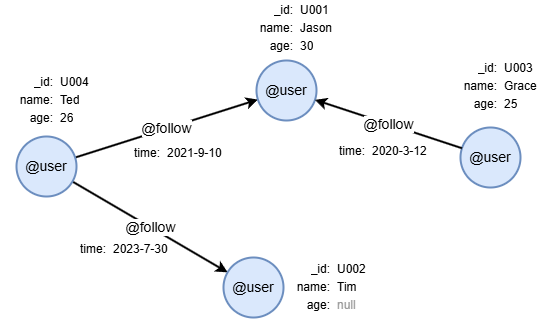
To create the graph, execute each of the following UQL queries sequentially in an empty graphset:
UQLcreate().node_schema("user").edge_schema("follow")
create().node_property(@user, "name").node_property(@user, "age", int32).edge_property(@follow, "time", datetime)
insert().into(@user).nodes([{_id:"U001", name:"Jason", age:30}, {_id:"U002", name:"Tim"}, {_id:"U003", name:"Grace", age:25}, {_id:"U004", name:"Ted", age:26}])
insert().into(@follow).edges([{_from:"U004", _to:"U001", time:"2021-9-10"}, {_from:"U003", _to:"U001", time:"2020-3-12"}, {_from:"U004", _to:"U002", time:"2023-7-30"}])
Updating Nodes
To update the name property of nodes whose name is currently Tim:
UQLupdate().nodes({name == "Tim"}).set({name: "Tom"})
Updating Edges
To update the time property of edges whose current time is later than 2021-5-21, setting it to one day later, and to return the updated edges:
UQLupdate().edges({time > "2021-5-1"}).set({time: dateAdd(time, 1, "day")}) as edges
return edges{*}
Result: edges
_uuid | _from | _to | _from_uuid | _to_uuid | schema | values |
|---|---|---|---|---|---|---|
| Sys-gen | U004 | U001 | UUID of U004 | UUID of U001 | follow | {time: "2021-09-11 00:00:00"} |
| Sys-gen | U004 | U002 | UUID of U004 | UUID of U002 | follow | {time: "2023-07-31 00:00:00"} |
Updating All
To update the age property of all nodes by incrementing it to the next integer value:
UQLupdate().nodes().set({age: age + 1}) as n
return table(n.name, n.age)
Result:
| name | age |
|---|---|
| Jason | 31 |
| Tim | null |
| Grace | 26 |
| Ted | 27 |
Limiting the Amount to Update
To limit the number of nodes or edges to update, first retrieve the data from the database using a clause like find(), then apply the LIMIT N clause to keep only the first N rows before passing the alias to the update() clause.
To update the name property of only two @user nodes, setting it to lowercase:
UQLfind().nodes({@user}) as n1 limit 2
update().nodes(n1).set({name: lower(name)}) as n2
return n2{*}
Result: n2
_id | _uuid | schema | values |
|---|---|---|---|
| U004 | Sys-gen | user | {name: "ted", age: 26} |
| U002 | Sys-gen | user | {name: "tim", age: null} |
Removing Property Values
To remove the name and age property values of the node with _id U001:
UQLupdate().nodes({_id == "U001"}).set({name: null, age: null})