
LIMIT
Overview
The LIMIT statement retains a specified number of records from the start of the data and discards the remaining ones.
Syntax
SyntaxLIMIT <N>
Details
<N>is a non-negative integer or-1. A value of-1retains all records.
LIMIT and limit()
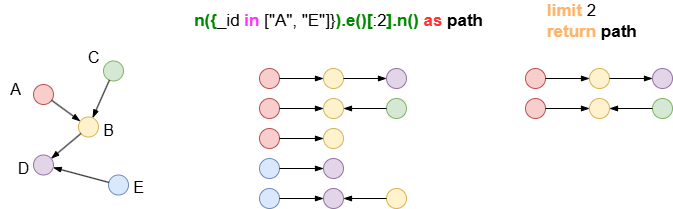
The limit() method can be chained to pathfinding and K-Hop queries (ab(), autonet(), spread(), khop(), path templates, and K-Hop templates) to restrict the number of paths or K-hop neighbors returned for each start node or node pair.
On the other hand, the LIMIT statement is used independently to limit the maximum number of records retained in the resulting data.
Example Graph
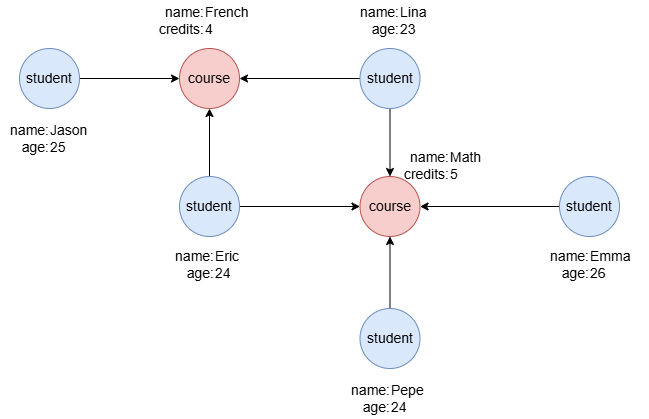
To create the graph, execute each of the following UQL queries sequentially in an empty graphset:
UQLcreate().node_schema("student").node_schema("course").edge_schema("takes")
create().node_property(@*, "name").node_property(@student, "age", int32).node_property(@course, "credits", int32)
insert().into(@student).nodes([{_id:"S1", name:"Jason", age:25}, {_id:"S2", name:"Lina", age:23}, {_id:"S3", name:"Eric", age:24}, {_id:"S4", name:"Emma", age:26}, {_id:"S5", name:"Pepe", age:24}])
insert().into(@course).nodes([{_id:"C1", name:"French", credits:4}, {_id:"C2", name:"Math", credits:5}])
insert().into(@takes).edges([{_from:"S1", _to:"C1"}, {_from:"S2", _to:"C1"}, {_from:"S3", _to:"C1"}, {_from:"S2", _to:"C2"}, {_from:"S3", _to:"C2"}, {_from:"S4", _to:"C2"}, {_from:"S5", _to:"C2"}])
Limiting Records Returned
UQLfind().nodes({@student}) as n
limit 3
return n.name
Result:
| n.name |
|---|
| Pepe |
| Jason |
| Eric |
LIMIT can also be placed after RETURN. The following query produces the same result as the one above:
UQLfind().nodes({@student}) as n
return n.name
limit 3
Limiting Records Passed Forward
UQLfind().nodes({@student}) as n limit 1
n(n).e().n({@course}) as p
return p{*}
Result: p
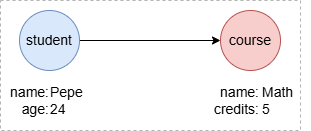
UQLPepe -> Math
Limiting Ordered Records
UQLfind().nodes({@student}) as n
order by n.age desc
limit 3
return n.name
Result:
| n.name |
|---|
| Emma |
| Jason |
| Pepe |