
Alias
An alias is a unique name (identifier) assigned to represent a collection of data of a specific type. Aliases allow users to reference this data throughout the query, enabling data retrieval, manipulation, and further operations.
Declaration and Reference
An alias can be declared using the keyword as immediately after some statements (referred to as a statement alias) or within a statement method (referred to as a method alias). The alias represents the data retrieved or generated by the statement.
You can reference an alias later in the query to further utilize the data or return it to the client.
Examples
NOTERefer to the syntax of each statement to determine whether the statement alias and method aliases are supported.
To declare alias e for the find().edges() statement and reference it in the RETURN statement:
UQLfind().edges({@direct}) as e
return e.time
The following query results in a syntax error because declaring an alias for the method edges() is not allowed:
UQL - Syntax Errorfind().edges({@direct} as e)
return e
To declare alias paths for the autonet() statement and alias start for its method src(), then reference them in the RETURN statement:
UQLautonet().src({age < 60} as start).dest({@event}).depth(3) as paths
return start, paths
To declare alias a for the find().nodes() statement, reference it in the WITH statement to compute the minimum age as minAge, reference minAge in another find().nodes() statement to retrieve accounts with that age as alias b, and finally reference b in the RETURN statement to output their names:
UQLfind().nodes({@account}) as a
with min(a.age) as minAge
find().nodes({@account.age == minAge}) as b
return b.name
In a path template statement, declare alias start in the first n() and reference it in the last n() to form a simple cycle:
UQLn(as start).e()[3].n({_id == start._id}) as p
return p limit 1
Naming Conventions
Naming conventions for aliases are:
- 1 to 64 characters.
- Cannot start with a tilde (
~). - Cannot contain backticks (
`) or any reserved keywords.
NOTEIt is recommended to avoid using a property name for an alias. If necessary, use the system alias this to disambiguate when required.
Alias Type
The alias type matches the data it represents.
In this query, the alias users represents nodes and is of the type NODE, while the alias ages represents the values of the property age, sharing the same type as age:
UQLfind().nodes({@user}) as users
return users.age as ages
Referencing an Alias
Depending on the alias type, you can either reference the alias directly in certain statements or extract specific data from the alias for use.
The table below shows examples of alias referencing with different alias types:
| Alias (Alias Type) | Alias Reference | Data Represented | Data Type |
|---|---|---|---|
n( NODE) | n | Nodes | NODE |
n.name | Values of the property name | Same with name | |
n.@ | Schemas of nodes | string | |
e( EDGE) | e | Edges | EDGE |
e.time | Values of the property time | Same with time | |
e.@ | Schemas of edges | string | |
p( PATH) | p | Paths | PATH |
lists( list) | lists | Lists | list |
lists[2] | The 3rd elements | Same with the element | |
lists[0:3] | Lists formed by the 1st to 4th elements | list | |
lists[:5] | Lists formed by the 1st to 6th elements | list | |
lists[2:] | Lists formed by the 3rd elements to the end | list | |
points( point) | points | Points, each with two coordinates | point |
points.x | Values of the x coordinates | double | |
points.y | Values of the y coordinates | double |
NOTEMore alias referencing formats are supported in the
RETURNstatement.
System Alias
A system alias is designed for special purposes and can be used without declaration. UQL provides three system aliases: prev_n and prev_e for inter-step filtering in path templates, and this to distinguish a property that shares the same name as an alias when referenced in a filter.
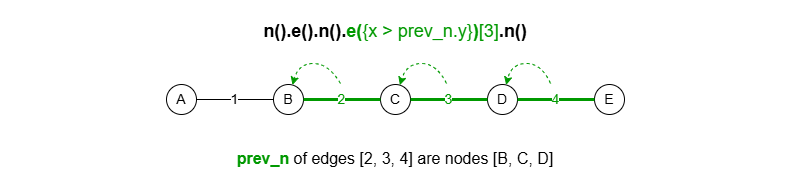
prev_n
The alias prev_n applies exclusively within a node or edge template, referring to the previous node of the current node or edge in a path.
(1) Using prev_n in the multi-edge template e()[]:
(2) Using prev_n in the multi-edge with intermediates template e().nf()[]:
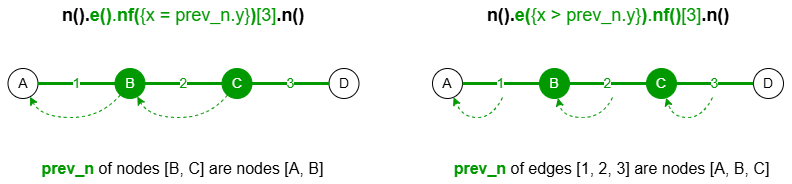
Note that all nodes referenced by prev_n must have the property y.
This example searches for 5-step outgoing paths starting from a card node, ensuring that each step moves through a card node where the level increases, and finally reaching an account node:

UQLn({@card}).re().nf({@card.level > prev_n.level})[5].n({@account}) as p
return p{*}
prev_e
The alias prev_e applies exclusively within a node or edge template, referring to the previous edge of the current node or edge in a path.
(1) Using prev_e in the multi-edge template e()[]:

(2) Using prev_e in the multi-edge with intermediates template e().nf()[]:
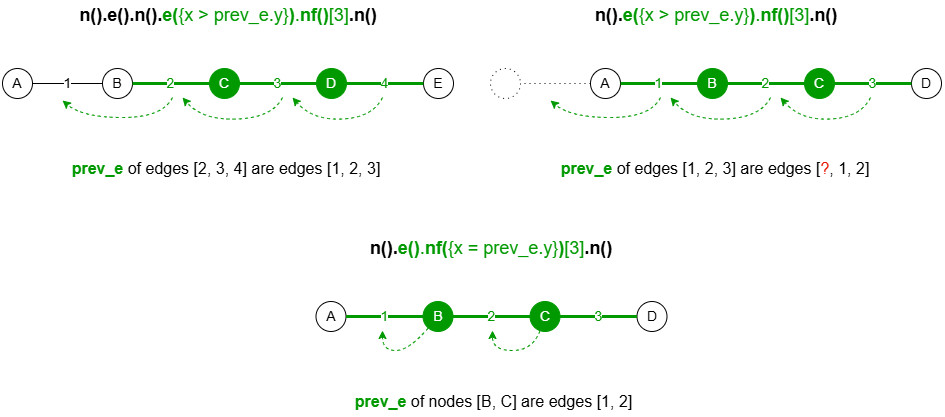
Note that all edges referenced by prev_e must have the y property it calls.
This example searches for 4-step outgoing transaction paths between card nodes, ensuring ascending transaction times:

UQLn({@card}).re({@transfers.time > prev_e.time})[4].n({@card}) as p
return p{*}
this
The alias this can be used for disambiguation when an alias referenced in a node or edge filter shares the same name as a node or edge property.
In the following example, the alias balance is declared and balance is also a node property. Using this.balance in the filter specifies that the balance refers to the node property.
UQL... as balance
find().nodes({this.balance > 5000})
...
If {balance > 5000} is used in this case, it refers to the alias balance.
Default Alias
The find().nodes() statement provides a default alias, nodes, to represent the retrieved nodes. Similarly, the find().edges() statement provides a default alias, edges, for the retrieved edges.
You can reference the default alias directly without declaring it.
UQLfind().nodes({@account})
return nodes{*}
However, the default alias becomes invalid if a custom alias is declared instead.