
Data Flow in Queries
Data and Query Execution
A UQL query often involves multiple statements, through which data retrieved from the database or constructed is sequentially passed, processed and finally returned to the client. Meanwhile, aliases can be declared to represent specific data, allowing subsequent statements to reference in order to further process the data.
Records and Their Columns
The data flowing between statements may consist of multiple records (rows), with each record containing one or multiple columns.
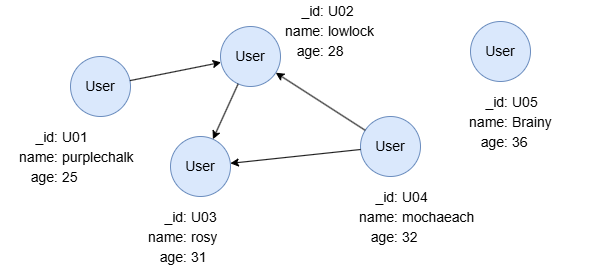
UQLfind().nodes({@user}) as n
return n.name as Name
In this query, n represents nodes retrieved from the graph, containing 5 records. Each record consists of columns schema, _id, _uuid, name and age, which store the schema and properties of the nodes. The RETURN statement references n and extracts the name values of the nodes, outputting them as Name. Name also contains 5 records, with each record having only one column.
Referencing External Alias
An alias referenced in a statement is considered an external alias if it was declared in a previous statement.
How Does External Alias Influence Statement Execution Time?
When a statement references an external alias, it typically executes as many times as the number of records in that alias, processing each record individually, with system optimizations applied based on the specific context and scenario.
UQLfind().nodes({age > 30}) as users
n(users).e().n() as paths
return paths{*}
UQLn({age > 30}).e().n() as paths
return paths{*}
The above two queries yield the same output. In the first query, the path template n().e().n() references an external alias users, which contains 3 records, so the query executes three times, once for each record in users. In contrast, n().e().n() in the second query executes only once, as it doesn't rely on an external alias.
Why Reference an External Alias?
In this example, using find().nodes() to retrieve the start nodes for the n().e().n() path template improves query efficiency. Because find().nodes() is specialized and optimized for node filtering; and by referencing an external alias, the path template can execute without extra computational overhead. The efficiency gain becomes more significant as the graph size increases and as the depth of the path query grows.
Sometimes, it's necessary to check whether each record yields results. In such cases, the OPTIONAL prefix can be used in conjunction with external alias referencing.
UQLfind().nodes({age > 30}) as users
optional n(users).e().n() as paths
return paths{*}
In this query with OPTIONAL prefixed for n().e().n(), if any record in users has no return during its execution (e.g., the record of node U05), the path template will return null for that record instead.
Homologous Data
Data that enters and flows out from the same statement is considered homologous. Typically, homologous data has the same number of records, and the columns within the same row are correlated.
Example: tail and path are homologous as they both derive from the path template; length also becomes homologous, as it originates from path.

UQLn().e()[:2].n(as tail) as path limit 5
with length(path) as length
return path, tail, length
Example: n, n.s1, n.s2 and mean are homologous.

UQLfind().nodes() as n
return (n.s1 + n.s2) / 2 as mean
How Does Aggregation Affect Homologous Data?
Applying aggregation to data condenses multiple records into a single record, discarding the others. The homologous data of the aggregated data will also be affected, leaving only one record. The remaining single records in all homologous data are usually uncorrelated.
Example: n and n.s1 are homologous, originally containing 4 records. When n.s1 is aggregated in RETURN, n is also left with only one record.

UQLfind().nodes() as n
return n, min(n.score1)
Heterologous Data
Statements can be related to each other through common aliases. Data derived from unrelated statements is considered heterologous. Heterologous data may have differing record counts.
When a statement references multiple heterologous external aliases, a Cartesian product is performed on all heterologous data before they are processed by that statement row by row.
Example: n1 and n2 are heterologous. A Cartesian product is created between their records when they are passed into the path template statement. Pathfinding is then performed for each pair of records.
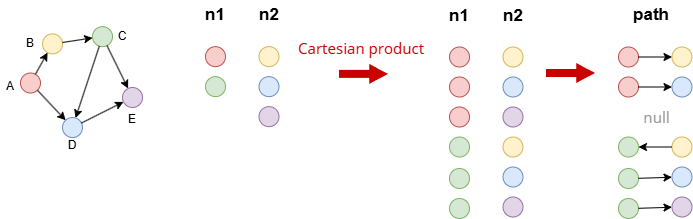
UQLfind().nodes({_id in ["A", "C"]}) as n1
find().nodes({_id in ["B", "D", "E"]}) as n2
optional n(n1).e().n({_id == n2._id}) as path
return path