
Insert
Overview
The insert() statement inserts new nodes and edges into a single schema in a graphset.
Syntax// Inserts nodes
insert().into(<schema>).nodes([
  {<property1?>: <value1?>, <property2?>: <value2?>, ...},
  {<property1?>: <value1?>, <property2?>: <value2?>, ...},
  ...
])

// Inserts edges
insert().into(<schema>).edges([
  {_from: <fromValue>, _to: <toValue>, <property1?>: <value1?>, <property2?>: <value2?>, ...},
  {_from: <fromValue>, _to: <toValue>, <property1?>: <value1?>, <property2?>: <value2?>, ...},
  ...
])
Method | Param | Description |
|---|---|---|
into() | <schema> | Specifies the node or edge schema (e.g., @user). |
nodes() or edges() | List of property specifications | Defines the node(s) or edge(s) to be inserted into the specified schema, with each property specification wrapped in {}. |
In the property specifications, each provided property will be assigned its given value, while any missing custom properties will default to null.
Please note:
- Node
_idvalues will be generated by the system if not provided, though custom unique values can be assigned if desired. - Node and edge
_uuidvalues are always generated by the system and cannot be manually assigned. - Edge properties
_fromand_tomust be provided to specify the source and destination nodes of the edge.
Properties in Schema-Free Graphs
In a schema-free graph, you can directly insert nodes and edges, and the corresponding schemas and properties will be automatically created on the fly. When a property is created, its value type is inferred from the first value provided. See the examples below:
| Value Example | Description | Inferred Property Value Type |
|---|---|---|
-20, 1315 | Any integer from -9,223,372,036,854,775,808 to 9,223,372,036,854,775,806 | INT64 |
100000000000000001 | Any integer from 9,223,372,036,854,775,807 to 18,446,744,073,709,551,614 | UINT64 |
18.25 | Any decimal with up to 15 significant digits | DOUBLE |
"graph database" | Any string with a length up to 60,000 bytes | STRING |
"graph database is ..." | Any string exceeding 60,000 bytes in length | TEXT |
date("1993-05-09") | Values returned by the date() function | DATE |
local_datetime("1993-05-09 03:02:11") | Values returned by the local_datetime() function | LOCAL DATETIME |
local_time("03:02:11") | Values returned by the local_time() function | LOCAL TIME |
zoned_datetime("1993-05-09T03:02:11-0600") | Values returned by the zaoned_datetime() function | ZONED DATETIME |
zoned_time("03:02:11-06:00") | Values returned by the zoned_time() function | ZONED TIME |
TRUE, FALSE | Boolean values | BOOL |
point({latitude:39.9, longitude:116.3}) | Values returned by the point() function | POINT |
point3d({x:10, y:3.2, z:5}) | Values returned by the point3d() function | POINT3D |
["tennis", "football", "swimming"] | Constructed lists | LIST |
Example Graph
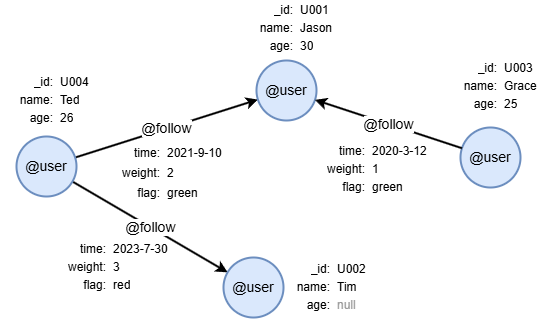
To create the graph, execute each of the following UQL queries sequentially in an empty graphset:
UQLcreate().node_schema("user").edge_schema("follow")
create().node_property(@user, "name").node_property(@user, "age", int32).node_property(@user, "location", point).node_property(@user, "isBlocked", bool).node_property(@user, "permissionCodes", "set(uint32)").edge_property(@follow, "time", datetime)
insert().into(@user).nodes([{_id:"U001", name:"Jason", age:30}, {_id:"U002", name:"Tim"}, {_id:"U003", name:"Grace", age:25}, {_id:"U004", name:"Ted", age:26}])
insert().into(@follow).edges([{_from:"U004", _to:"U001", time:"2021-9-10"}, {_from:"U003", _to:"U001", time:"2020-3-12"}, {_from:"U004", _to:"U002", time:"2023-7-30"}])
Inserting a Single Node/Edge
To insert a @user node:
UQLinsert().into(@user).nodes({_id: "U005", name: "Alice"})
To insert a @follow edge:
UQLinsert().into(@follow).edges({_from: "U002", _to: "U001", time: "2023-8-9"})
NOTEWhen inserting a single node or edge, the outer brackets
[]innodes()oredges()can be omitted.
Inserting Multiple Nodes/Edges
To insert three @user nodes:
UQLinsert().into(@user).nodes([
  {_id: "U006", name: "Lee", age: 12},
  {name: "Alex"},
  {}
])
To insert two @follow edges:
UQLinsert().into(@follow).edges([
  {_from: "U001", _to: "U002"},
  {_from: "U004", _to: "U003", time: "2023-9-10"}
])
Returning Inserted Data
To insert two @follow edges and return all the information of the inserted edges:
UQLinsert().into(@follow).edges([
  {_from: "U001", _to: "U004"},
  {_from: "U001", _to: "U003", time: "2022-2-7"}
]) as e
return e{*}
Result: e
_uuid | _from | _to | _from_uuid | _to_uuid | schema | values |
|---|---|---|---|---|---|---|
| Sys-gen | U001 | U004 | UUID of U001 | UUID of U004 | follow | {time: null} |
| Sys-gen | U001 | U003 | UUID of U001 | UUID of U003 | follow | {time: "2022-02-07 00:00:00"} |
Inserting Boolean Values
A property of the bool type accepts only 1 (or true) or 0 (or false).
NOTEAny positive integer other than
0will be automatically converted to1. Assigning other values may result in unpredictable behavior.
To insert a @user node with a value for the property isBlocked of type bool:
UQLinsert().into(@user).nodes({isBlocked: 0})
Inserting Point Values
Use the point() function to assign a value to a property of type point. For example, to insert a @user node with a value for the property location of type point:
UQLinsert().into(@user).nodes([
  {location: point({latitude: 132.1, longitude: -1.5})}
]) as n
return n.location
Result:
| n.location |
|---|
| POINT(132.1 -1.5) |
Use the point3d() function to assign a value to a property of type point3d. For example, to insert a @city node with a value for the property landmark of type point3d:
UQLinsert().into(@city).nodes([
  {landmark: point3d({x: 10, y: 3.2, z: 5})}
]) as n
return n.landmark
Result:
| n.landmark |
|---|
| POINT3D(10 3.2 5) |
Inserting Record Values
To insert a @product node with a value for the property specs of type record:
UQLinsert().into(@product).nodes([
  {specs: {weight: "2kg", color: "red", warranty: "1y"}}
])
Inserting Blob Values
To insert a @user node with a value for the property avatar of type blob:
UQLwith "data:image/png;base64,iVBORw0KGgoAAAANSUhEUgAAAEAAAABACAYAAACqaXHeAAAABHNCSVQICAgIfAhkiAAAAAlwSFlzAAAB2AAAAdgB+lymcgAAABl0RVh0U29mdHdhcmUAd3d3Lmlua3NjYXBlLm9yZ5vuPBoAAA5rSURBVHicvZtpcFzVlcd/973Xi1pq7ZJXiBfwIoPDsBljMJJNDbZJgBDJxjjJEHaYgplKKhNmUpmBSiUzVYQMkEBgCmJCAsGInYBDANk1kNixYxuwMQiMsWUbWbIsa7Fa3f2WMx9aS0tqSb0o8//U/e5955577r1nu+cJ/89YtOjGhfn5eUtU3UtA5gGn9jWpKo0islWEN8vKWv5YX1/v/q35kVwJLF58Q+mWLY+3j9XnnHNuDvn97k88T9cFAv4y0zTTGfcwcG95ecUj9fV3x3PlczTkJIAlS67/z3jcucs0rfVbt/7q+uHtS5feON+2edB17RpVzLy8PEzTzHSYv6rq2s2bH96XC6+jIScBXHDBt1td160AME3zGMiThmG+r+rNV/Wu9Tz3S6qJvj6fn0AgkO1QXSK6sqHh4T/nwm8qZC2ARYvuKPS8zs50+4dC+RiGke1wBNDuBYZ7wX1vP7o3ayIpkDVHlhVZndFARm7qJoaEw577vtbUPqDVV0/PiVgSshaA6+q8zPp72Q41gP8lYG0ncCdifqY1qx/R6rXludLMWgCmGBWZ9HddO9uhBqDADyhiPQX+KNyCOJ9odd0/aV1dxpq1H1kJQC+uq6g27ZpM3rHtiTHpDsJvCHEbJRzHKEG4n2O8qRdfPSUbehkLQJevrsHig8WGc0pG76mH9puECcBBLH5MYeKPUINl7tBlq5dmSicjAeiyuq/h6esvuP7JGxwr07FIbOKJw3v4+Qhf/98pqL6p1bXXZEIjbQFoTe3tKM8BwbMNh0Yn88mIZG4JysIWf7+wkOL81Md8F/7kv35EntJldbelSz+tZdTq1d8A/QV9fsMM8ZhsGjQ7qTW73zKID2uzLB+ZuB2nlPmovaCE5WcUYhlwpN3mjvWHiMSH0m0buYYGykO6rDYqDc+tH2+ccTnS6tqvIPIiw4T1guvnv3pHrsoPryxlVZXHF90+Xnovxgvbu+mJaVqOUHHIZPGcfJbMKeCc2aERzG18r5MHNh4b8uxyonyXrlTkbESvlIbnNo415pgC0Oq60xB2QL+2GYproiH2DzsKT99awcziwdhFEY70hHj3QIAj7XE6e12itocg5AcMysImMyoCzKoMcNpkP8YYx8R2ldqffU4saXeNIQCAbuA82VTfOFqHUY+ArlwZIMoGRpk8wIOBKFe4Qbwk7V6WP1QggjK1xKJucvFoZNKGzxRmVPhobI4NPAszpnkNA89q9XWLZPMT0VQdRt+TsfCPgbPHol4pHqcMi2xTB7o5R90DCPiGslw2vmVZiETuGa0xpQC0es0ZqN6ZDkPzzaFKyUvJz8SZP9sdSmsOThpv6Xd0+dcXpmoZIQAFQbxfwqCBHQsXmUMZ8KeyVpJ9FDgcwaQdYKHMIS0X28IzHkjVMJKzZbUrgIvSZWiZYQ8orrlT/ATMFCtiZp0HGIHzZocGfi/AIZD+7qrW6tWXDn84Ugmq/FsmDFlAmSkcc5S7VhWCDq7IS+85vH/Ewx9sZ+kCjxkVASYXj72x4o6y93CESBxO9LiYBlRNC3JqecLhWXlWIRu2nKAz4nIWGWbKRH8AvDWc/wPostoL0fRXvx+TDaXLJ8ytGFz9m38bZffhGD7LwDBsGj5KKOF8gMHZM0P861WThpi8/S0x/vGxTznZa2OaPoLBIGXhBHudEZfvXzGJi+cVkOc3WDq/gFd3dHLq2BYgFaq1es0FsnnD1pQCAOPbGSksAW9ZEfdNDXCwy0JIKMQvOhVQXry9kMrKStQXpqvXZd/RGLubouxuinDwmM3MykE39pW/tuO3DBbPLeGi+YUsP7OI/EBCobR02vx+ZycXzysA4IrT/aw9DUqkAN3kIS0Z7ATR64ABAQwsgVZfF0R6moG0DbbODuKt7Ose80NgJCNeaDLddpBIzKOyKL0AyvXgWJdNSb5FwDfShEp7D4avJfH7qI3x3PF0WQboJMoU2VLfC8lKUE5eRgaTByCYxJykiAuCYZzTLmXdzw9wzf2fcP2jTVA+c3R6YnBEprHm/v2se3Af33umBXPW+TAikzy4SzWYsY9RRJ4MKMMkK2Asz5QSzUkmKMXiSuU8rIJSAn6DhIE18M+5GHPWopGdTR9W1XLCp59Db9wFlIKQDyO/HCM8aSjdpPSaHM0i06TeQDJn8AjU1O0BFmRKy1tTglYEwHVTrBRooIQ2p5ijJ6JMKi+mLOSCO4bzYgU5dDxGJBJlenmA/BRGw2htQ4KdoIqxsQP5PON7k/dlU/1Z0CcAXbmukGi8gyx8Vu+SIExVUEXLyxiuRNVXiBfMOXc5BEbbYYzuFhDB+F1KF388KEqhbK4/mTgCcWcuWTrsxj4H+oKhho9TmCVv4q/39rdGAYXerGMMwTDmQL8OcHVu1tw0OyAGvbbwu+2xEc2iuWeDk9F+0mH7oT6azbnEGIk59ylB/VLWdDxgr8fhk8LHR22GJ4lUR+4A8RwMuwvcvu3rxTHinYg3vrA27+ygs8cD28TYntX272PMmwH9utvQMJp9yGq8H6f1Ax+OK6zf4nDTkkGTIKkEEGtDnAgmglpBxOnb0nY3XmjaqLlDT5U3dnYyL6YYjb1Z89vHdRj6BaBGONeQ9ZiTYPrprVH+YVE+fitpEurxizdaeX1HG6YVwGcZTC0W1p1nMrcyTtMJkyf/4nKoPUrU2c+sSj+XnVXEii+Hh7jLb2/v4GCvMm1C8gteIQxYb52wcC1qu/zzs3EevjZBsieurPtpIy0dUUQgFApie8q+VuWe11KZL6WxOUZjcysNu7v4j7ophIMmrR02j25qY+KSKxKEQR2Qw2FKINkD2NUU5V9eiON5cMOTvbR0DJLPJDO+53CUe19t5Yv2ON9//CAnvcTLE5Nd0B7o3wHCyVyTNsNdoHc+6WX5f8eIJSVNVcG2bXy+tHItiAhNzb3c8j9N2En8ZX0ROBQnYUAHSEbRRCr4U0gwaidMgmUaOK6HiBC0XBZMNZhVGeDMKXDGFI/P2oRdh6G506Pb9rG/1SVgKid6XI72jNwy5oSk2BJz7tMBsj9XJXiKMfr1t+N6BC2TX90xl1PL/YjTg9gnQUzUDHJuUYxzZ9qoLx+1wmzd0809v29FRznvxRMiAP0MBgWwL1cBnC4uCQWVmk7Ucdn1aTenlpejVgFqFQyy4gsP6Vu/uXVMbiozT4SMhCv7oV+flHsfATkZVovRUuKDeOytZjxvcKcYsQ7M7v0Y0cHbnh0fdfPhybHpVJBzsUUvk2iEPgFIfX0c2JEr1YJxymBORB2u+sletu3rBkhs+UApnq+QqK289ufj/Ojlo+OOMy2tVPiY+EvfnJOjeHkHNON8YDJmmcqucXZne6/Nd9bvw2cIeT6TOaV5OJ7QFFHiCuPZ+QDKrFwFoPJu/88kk+q+nBtVOM9Mf2vanhJV4eNu2NfTP/nxMR87vSvtsSD6Uv/PQQFsen4b0JQL3cvNWNqOjojg82XugH45vYuQsXCQTfU7+/8MCEASOauncqE8BaXCTM9PMwwjq4KJ5eTotAq/lSRTNZRb0YcgNxGvsNIzUdnUC1VhMz03E+jguY8kPxgiAGmoPwLyEjngFiuKP42KUM/zhpjEdFBHJFu2+qD1svmFw8lPUnCqP4Ts1azPgCvTrCCMxWKkuxFmWS5LfTkVjbu45o+GP0x5CLWm9nGQEdXfo0EXL0SvWIpOr0DiPbgND7Hq19AZHX+FA4HguMGRifKzK4UFVbMxZq6E5mOwaRts3QXRNIUi8pg0PHvTiMcpJ1S9thxx9gKjr6VhoNeuQpefjQ67E5f2w+x9+Tfc+LKMUi+QzJcQChWMaT2+VaV8c0Uh5vm3QUGS23wyAn94B155G9rHrNs+js+pkj++2Dq8IWVkec+BPZG7Zy04CnwtVbtevQy961vonGmQSuvnFVHptFAh7bzbNL6mtyxr1AKqS6d73LbSwpx9FTJpWG2m3wdVp8FXa6C8FBoPQGxkYha4Sd5+fmuqhrGLpGpqN4AMVIXrZReiay5FA+NH5KIKf/gpz3/ocd+7DKkjGo5gMA/LGunerJrhcecqC6vyTIxza8cdk0gvPP8mvPIW9PYJQuQZaXh27ah8jkVPq+sK8Jtb9ZJzFmjtcjQcHJ+JZOKRLnj75+xuNfjemyYdval1Ql5eaMiXJGFTuXmJsGKhgRRMwjjvBsjkY4v2TnjmNdi87VM891zZ+NSoZWTj1wlu2/JV95TSl1A3q0yUdBxR3nlCAB7Z6ePZPbiRuDcwWxEhPz8RGvtNoiuriH7jfKO4OA/IK8JcfHsn/mBRxgN7XisfNF4mS5a8NyZ/6dByWvfX4cQ2kGXu3Og44uk7TxgYghYXs/2QsvFD29lzxLEL86zY4tl+PWs6JQunCr5+0eQVY154azu+vNIshmxHqZaC0t3jdUx7Qs6JA9cT7X0MzVII0c647nzan87bUj47bvzd2jimr2D83iPQhniXS6h8WzqdM5qMHj+0wrV7XsXz0grIxPQh/iBiBcEwwY60eXteKdCWj4MpM0eBAoyqrzTLpPmTyCb5q/oplrVKgkVpf2GW8Wpq24H5nmf/SR27JDVFQXwhjEAeGKPIye49rs174trVXITTG5D8sk4q5kWkePpk0izgHjmuNuD41khhYVtGr2Uzlqqa2vbZ854dv3IIMX8eRjA8oXWBaSCKcjf5JfeKpCpTGRs5XbM4J5quknj0CfXcIiNYhPgzM5M5Q9iMyx0SLt2TPYkcoapCx5Fv4g99F0hZjjrhED4G/XcJldXnTmqCoKomkY7LQW8FLmOibrAG4QFvAL8kVPK6iExI5cXElXEnQaMds3C8WmAVwhKyVWxgI/wJj42YRr3kFX8+gWwCfyMBJEPb24sIcCHKmYhWgcwlEWUWMvAtgnaCdAHHQBtR2Qu6m7hskdLStD/PzQb/BzXqR+4x42zOAAAAAElFTkSuQmCC" as base64_string
insert().into(@user).nodes([
  {avatar: base64_string}
])
Inserting List Values
To insert a @user node with a value for the property interests of type string[]:
UQLinsert().into(@user).nodes([
  {interests: ["violin", "tennis", "movie"]}
])
Inserting Set Values
To insert a @user node with a value for the property permissionCodes of type set(uint32):
UQLinsert().into(@user).nodes([
  {permissionCodes: [1002, 1002, 1003, 1004]}
]) as n
return n.permissionCodes
Result:
| n.permissionCodes |
|---|
| [1003,1004,1002] |
Element values within a set are automatically deduplicated.