
UltipaDocs
Products
Solutions
Resources
Company
Start Free Trial
UltipaDocs
Start Free Trial
  • Introduction
    • Overview
    • Node and Edge Patterns
    • Path Patterns
    • Quantified Paths
    • Shortest Paths
    • Graph Patterns
    • Overview
    • Typed Graph
    • Open Graph
    • Graph Sharding and Storage
    • Constraints
    • Unique Identifiers
    • INSERT
    • INSERT OVERWRITE
    • UPSERT
    • SET
    • REMOVE
    • DELETE
    • Query Composition
    • Result Table and Visualization
    • MATCH
    • OPTIONAL MATCH
    • FILTER
    • LET
    • FOR
    • ORDER BY
    • LIMIT
    • SKIP
    • CALL
    • RETURN
    • Composite Query
    • NEXT
    • All Functions
    • Scalar Functions
    • Path Functions
    • Aggregate Functions
    • Mathematical Functions
    • Trigonometric Functions
    • String Functions
    • List Functions
    • Datetime Functions
    • Spatial Functions
    • Label Functions
    • Record Functions
    • Table Functions
  • Operators
  • Predicates
    • CASE
    • NULLIF
    • COALESCE
    • LET Value Expression
    • Value Query Expression
    • Index
    • Full-text Index
    • Vector Index
    • Spatial Index
    • Overview
    • Managing HDC Graphs
    • HDC Graph Queries
  • Transaction
  • Trigger
  • Stored Procedure
    • Process
    • Session
    • Job
    • Execution Plan
    • Variables
    • Values and Types
    • Comments
    • Reserved Words
    • Syntactic Notation
  • Access Control
  • GQL Conformance
  1. Docs
  2. /
  3. ISO GQL
  4. /
  5. Expressions

NULLIF

The NULLIF expression is a conditional expression that compares two values and returns null if they are equal; otherwise, it returns the first value. It is often used to handle cases where specific values should be treated as null, which can be helpful for conditional data cleansing or handling default values.

Syntax
<nullif expression> ::=
  "NULLIF" "(" <value expression> "," <value expression> ")"

The NULLIF(V1, V2) expression is equivalent to the following CASE expression:

CASE Expression
CASE
  WHEN V1 = V2 THEN NULL
  ELSE V1
END

Example Graph

The following examples run against this graph:
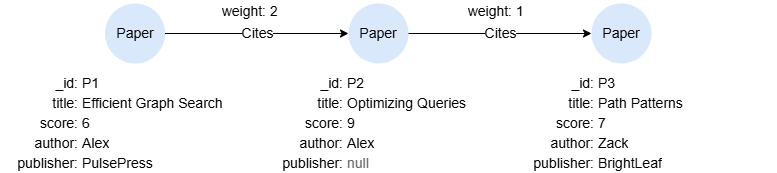
To create this graph, run the following query against an empty graph:

GQL
ALTER GRAPH CURRENT_GRAPH ADD NODE {
    Paper ({title string, score int32, author string, publisher string})
};
ALTER GRAPH CURRENT_GRAPH ADD EDGE {
    Cites ()-[{weight int32}]->()
};
INSERT (p1:Paper {_id:'P1', title:'Efficient Graph Search', score:6, author:'Alex', publisher:'PulsePress'}),
       (p2:Paper {_id:'P2', title:'Optimizing Queries', score:9, author:'Alex'}),
       (p3:Paper {_id:'P3', title:'Path Patterns', score:7, author:'Zack', publisher:'BrightLeaf'}),
       (p1)-[:Cites {weight:2}]->(p2),
       (p2)-[:Cites {weight:1}]->(p3)

Example

GQL
MATCH (n:Paper)
RETURN n.title, NULLIF(n.author, "Alex")

Result:

n.titleNULLIF(n.author, "Alex")
Efficient Graph Searchnull
Optimizing Queriesnull
Path PatternsZack