
CASE
The CASE expression is a conditional expression that allows you to evaluate one or more conditions and return different results based on those conditions.
GQL supports two forms of the CASE expression:
Example Graph
The following examples run against this graph:
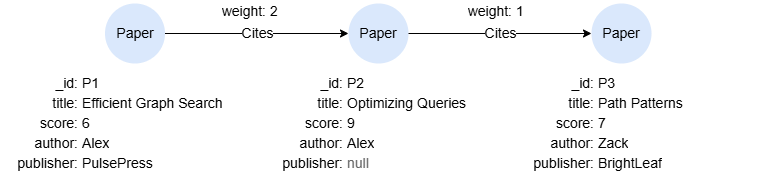
To create this graph, run the following query against an empty graph:
GQLINSERT (p1:Paper {_id:'P1', title:'Efficient Graph Search', score:6, author:'Alex', publisher:'PulsePress'}),
       (p2:Paper {_id:'P2', title:'Optimizing Queries', score:9, author:'Alex'}),
       (p3:Paper {_id:'P3', title:'Path Patterns', score:7, author:'Zack', publisher:'BrightLeaf'}),
       (p1)-[:Cites {weight:2}]->(p2),
       (p2)-[:Cites {weight:1}]->(p3)
Simple CASE
The simple CASE expression evaluates a single value against multiple possible values, returning the result associated with the first matching value.
Syntax<simple case> ::=
  "CASE" <case operand>
    "WHEN" <when operand list> "THEN" <result>
    [ { "WHEN" <when operand list> "THEN" <result> }... ]
    [ "ELSE" <result> ]
  "END"

<when operand list> ::= <when operand> [ { "," <when operand> }... ]
Details
<case operand>is an expression such as a variable reference, an aggregate function, etc.- Execution Flow:
- The
<case operand>is compared sequentially against each<when operand list>. - If a
<when operand list>matches<case operand>, the corresponding<result>is returned. - If no matches are found, returns the
<result>specified by theELSEclause. IfELSEis omitted,nullis returned by default.
- The
- When the
<when operand list>contains multiple<when operand>s, if any<when operand>evaluates to true, the<when operand list>is considered true. - The
<when operand>can explicitly include operators such as=,<>,>,<,>=,<=,IS NULL,IS NOT NULL, etc. The=is implicitly used when no operator but only a constant is specified.
GQLMATCH (n:Paper WHERE n.score > 6)
RETURN CASE count(n) WHEN 3 THEN "Y" ELSE "N" END AS result
Result:
| result |
|---|
| N |
GQLMATCH (n:Paper)
RETURN n.title, n.score,
CASE n.score
  WHEN <7 THEN "Low"
  WHEN 7,8 THEN "Medium"
ELSE "High" END AS scoreLevel
Result:
| n.title | n.score | scoreLevel |
|---|---|---|
| Efficient Graph Search | 6 | Low |
| Optimizing Queries | 9 | High |
| Path Patterns | 7 | Medium |
GQLMATCH (n:Paper)
RETURN n.title,
CASE n.publisher
  WHEN IS NULL THEN "Unknown"
ELSE n.publisher END AS Publisher
Result:
| n.title | Publisher |
|---|---|
| Efficient Graph Search | PulsePress |
| Optimizing Queries | Unknown |
| Path Patterns | BrightLeaf |
General CASE
The general CASE expression evaluates multiple conditions, returning the result associated with the first condition that evaluates to true.
Syntax<general case> ::=
  "CASE"
    "WHEN" <condition> "THEN" <result>
    [ { "WHEN" <condition> "THEN" <result> }... ]
    [ "ELSE" <result> ]
  "END"
Details
- The
<condition>is a boolean value expression that evaluates to true or false. - Execution Flow:
- The
<condition>s are evaluated sequentially. - When a
<condition>evaluates to true, the corresponding<result>is returned immediately. - If no
<condition>s are true, returns the<result>specified by theELSEclause. IfELSEis omitted,nullis returned by default.
- The
GQLMATCH (n:Paper)
RETURN n.title,
CASE
  WHEN n.publisher IS NULL THEN "Publisher N/A"
  WHEN n.score < 7 THEN -1
  ELSE n.author
END AS note
Result:
| n.title | note |
|---|---|
| Optimizing Queries | Publisher N/A |
| Efficient Graph Search | -1 |
| Path Patterns | Zack |