Import from Relational Databases
This page demonstrates the process of importing data from a relational database into a graph in Ultipa, including MySQL, PostgreSQL, SQL Server, Oracle, and Snowflake.
NOTEThe following steps are demonstrated using MySQL and PowerShell on windows.
Generate the Configuration File
Open the terminal program and navigate to the folder containing ultipa-importer. Then, run the following command and select sql to generate a sample configuration file for a relational database:
Bash./ultipa-importer --sample

A file named import.sample.sql.yml will be generated in the same directory as ultipa-importer. If the file already exists, it will be overwritten.
Modify the Configuration File
Customize the import.sample.sql.yml configuration file based on your specific requirements. It includes the following sections:
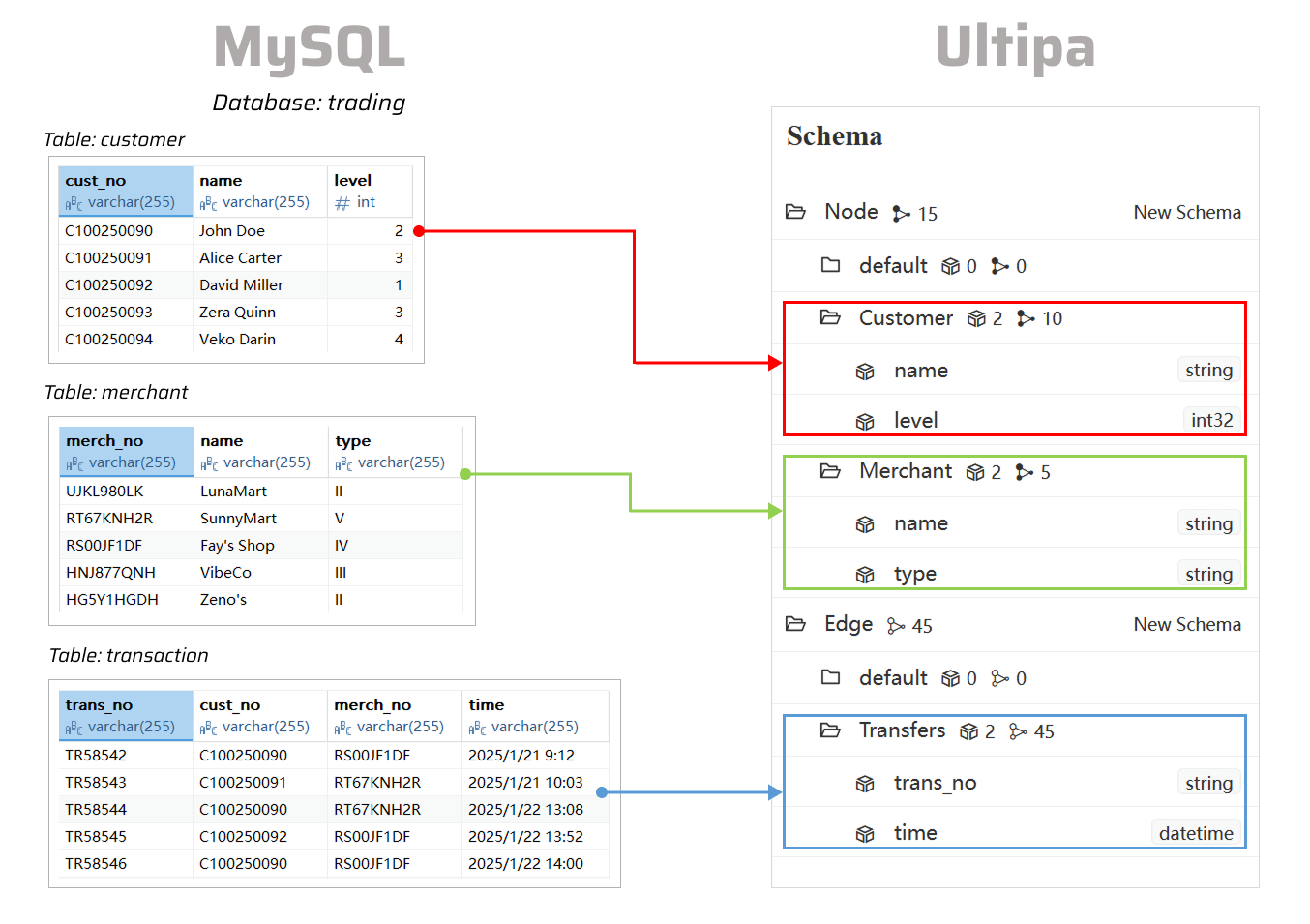
mode: Set tosql.sqlDatabase: Configure the SQL database connection, including the driver, data source name (DSN), and server details.server: Provide your Ultipa server details and specify the target graph (new or existing) for data import.nodeConfig: Define node schemas, where each schema corresponds to a query result. Columns in the query results are mapped to node properties.edgeConfig: Define edge schemas, where each schema corresponds to a query result. Columns in the query results are mapped to edge properties.settings: Set global import preferences and parameters.
import.sample.sql.yml# Mode options: csv/json/jsonl/rdf/graphml/bigQuery/sql/kafka/neo4j/salesforce
mode: sql

# SQL server configurations
sqlDatabase:
  # Driver: choose from mysql/postgreSQL/sqlserver/snowflake/odbc/oracle
  driver: "mysql"
  # dsn: If a DSN (Data Source Name) is provided, the other settings (host/port/dbname/username/password) will be ignored
  ## mysql dsn: "<username>:<password>@tcp(<host>:<port>)/<dbname>?net_write_timeout=6000"
  ## postgreSQL dsn: "user=<username> dbname=<dbname> password=<password> host=<host> port=<port> sslmode=disable"
  ## sqlserver dsn: "server=<host>,<port>;user id=<username>;password=<password>;database=<dbname>"
  # snowflake dsn: "<username>:<password>@<orgname>-<account_name>/<db_name>/<schema_name>?warehouse=<warehouse_name>"
  ## odbc dsn: "DSN=<dsn>;UID=<username>;PWD=<password>"
  ## oracle dsn: "oracle://<username>:<password>@<host>:<port>/<dbname>"
  dsn: ""
  # Host IP/URI
  host: "192.168.1.88"
  port: "3306"
  dbname: "trading"
  username: "root"
  password: "root"

# Ultipa server configurations
server:
  # Host IP/URI and port; if it's a cluster, separate multiple hosts with commas
  host: "10.11.22.33:1234"
  username: "admin"
  password: "admin12345"
  # The new or existing graph for data import
  graphset: "myGraph"
  # If the above graph is new, specify the shards where the graph will be stored
  shards: "1,2,3"
  # If the above graph is new, specify the partition function (Crc32/Crc64WE/Crc64XZ/CityHash64) used for sharding
  partitionBy: "Crc32"
  # Path of the certificate file for TLS encryption
  crt: ""

# Node configurations
nodeConfig:
    # Specify the schema
  - schema: "Customer"
    # The SQL query to retrieve data from the SQL database
    sql: "SELECT * FROM Customer"
    # properties: Map SQL query results to properties; if unset, all columns will be automatically mapped
    ## name: A column name in the SQL query results
    ## new_name: The property name; it defaults to the name above; if the type is _id/_from/_to, the property name is automatically set to _id/_from/_to
    ## type: The property value type; set to _id, _from, _to, or other supported value types like int64, float, string, etc; set to _ignore to skip importing the column
    ## prefix: Add a prefix to the values of a property; only apply to _id, _from, and _to; if a prefix is added to an _id, the same prefix must be applied to the corresponding _from and _to
    properties:
      - name: cust_no
        type: _id
        prefix:
      - name: name
        new_name:
        type: string
      - name: level
        new_name:
        type: int32
  - schema: "Merchant"
    sql: "SELECT * FROM Merchant"
    properties:
      - name: merch_no
        type: _id
        prefix:
      - name: name
        new_name:
        type: string
      - name: type
        new_name:
        type: string

# Edge configurations
edgeConfig:
  - schema: "Transfers"
    sql: "SELECT * FROM Transaction"
    # _from and _to types are necessary for edges
    properties:
      - name: trans_no
        new_name:
        type: string
      - name: cust_no
        type: _from
        prefix:
      - name: merch_no
        type: _to
        prefix:
      - name: time
        new_name:
        type: datetime

# Global settings
settings:
  # Path of the log file
  logPath: "./logs"
  # Number of rows included in each insertion batch
  batchSize: 10000
  # Import mode: insert/overwrite/upsert
  importMode: insert
  # Stops the importing process when error occurs
  stopWhenError: false
  # Set to true to automatically create new graph, schemas and properties
  yes: true
  # The maximum threads
  threads: 32
  # The maximum size (in MB) of each packet
  maxPacketSize: 40
  # Timezone for the timestamp values
  # timeZone: "+0200"
  # Timestamp value unit, support ms/s
  timestampUnit: s
Execute Import
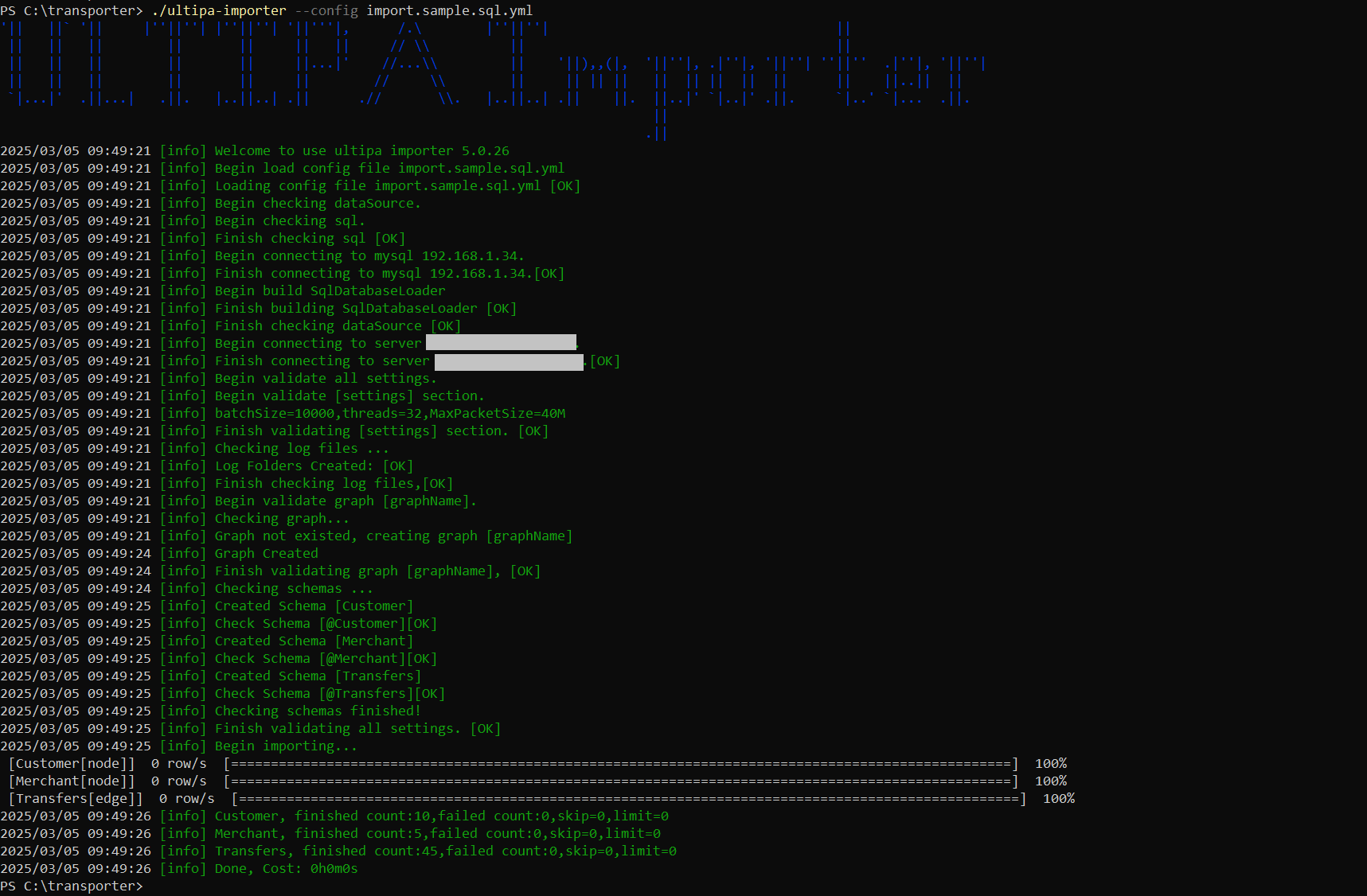
Execute the import by specifying the configuration file using the --config flag:
Bash./ultipa-importer --config import.sample.sql.yml