
UltipaDocs
Try Playground
  • Introduction
  • Terminologies
    • Reserved Words
    • Data Types
    • Alias
    • Operators
    • Expression
    • Filter
    • Prefix
    • Node and Edge Templates
    • Homologous and Heterologous Data
    • Clause Execution Times
    • Graphset
    • Schema
    • Property
    • Insert
    • Overwrite
    • Upsert
    • Update
    • Delete
    • Find Nodes
    • Find Edges
      • AB
      • Autonet
      • Spread
      • Path Template
      • K-Hop
      • K-Hop Template
    • Find Subgraphs
    • GROUP BY
    • ORDER BY
    • SKIP
    • LIMIT
    • WHERE
    • RETURN
    • WITH
    • UNCOLLECT
    • UNION
    • UNION ALL
    • CALL
    • BATCH
      • Schema Checker
      • Equal
      • Not Equal
      • Less Than
      • Greater Than
      • Less Than or Equal
      • Greater Than or Equal
      • Between
      • Between or Equal
      • Beong to
      • Not Belong To
      • CONTAINS | String
      • CONTAINS | Full-Text
      • Regular Match
      • IS NULL
      • IS NOT NULL
      • And
      • Or
      • Not
      • Exclusive OR
      • DISTINCT
      • toString()
      • toInteger()
      • toFloat()
      • toDouble()
      • toDecimal()
      • toSet()
      • castToRaw()
      • now()
      • dateAdd()
      • dateDiff()
      • year()
      • month()
      • day()
      • dayOfWeek()
      • dateFormat()
      • point()
      • distance()
      • pointInPolygon()
      • lower()
      • upper()
      • reverse()
      • startsWith()
      • endsWith()
      • JSON_decode()
      • JSON_merge()
      • trim()
      • ltrim()
      • rtrim()
      • left()
      • right()
      • substring()
      • replace()
      • split()
      • intersection()
      • difference()
      • listUnion()
      • size()
      • head()
      • reduce()
      • listContains()
      • append()
      • pi()
      • pow()
      • sqrt()
      • abs()
      • floor()
      • ceil()
      • round()
      • sin()
      • cos()
      • tan()
      • cot()
      • asin()
      • acos()
      • atan()
      • length()
      • pnodes()
      • pedges()
      • count()
      • sum()
      • max()
      • min()
      • avg()
      • stddev()
      • collect()
      • dedup()
      • CASE
      • table()
      • coalesce()
      • ifnull()
    • Acceleration
    • Index
    • Full-text
    • LTE
    • Real-time Process
    • Backend Task
    • Analytics Node
    • Server Statistics
    • Server Backup
    • Privilege
    • Policy
    • User
  • Trigger
  1. Docs
  2. /
  3. UQL
  4. /
  5. Queries

WHERE

WHERE keeps the rows in the data stream that meet the conditions, and discards those that do not meet the conditions.

Syntax 1: WHERE <condition>
Syntax 2: WHERE <query> (Under development)
Input

  • <condition>: Judgement condition, rows that are judged as TRUE will be kept
  • <query>: Query statement, rows that have return will be kept
NOTE

The statement right following WHERE clause should call the alias (or its homologous alias) that enters WHERE clause, otherwise this statement will not be valid.

For instance, compare n1 and n2 that are heterologous, return them if they have the same color:
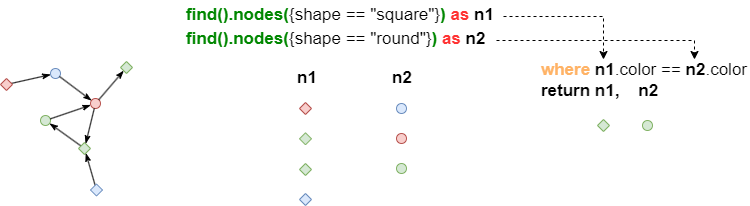
UQL
find().nodes({shape == "square"}) as n1
find().nodes({shape == "round"}) as n2
where n1.color == n2.color
return n1, n2

WHERE <condition>

Sample graph: (to be used for the following examples)
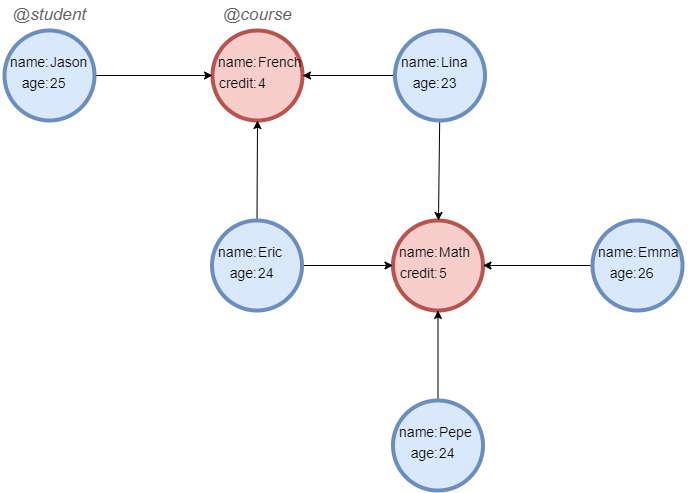
Run below UQLs one by one in an empty graphset to create graph data: ```customlang___fold__lang_uql create().node_schema("student").node_schema("course") create().node_property(@*, "name").node_property(@student, "age", int32).node_property(@course, "credit", int32) insert().into(@student).nodes([{_id:"S001", _uuid:1, name:"Jason", age:25}, {_id:"S002", _uuid:2, name:"Lina", age:23}, {_id:"S003", _uuid:3, name:"Eric", age:24}, {_id:"S004", _uuid:4, name:"Emma", age:26}, {_id:"S005", _uuid:5, name:"Pepe", age:24}]) insert().into(@course).nodes([{_id:"C001", _uuid:6, name:"French", credit:4}, {_id:"C002", _uuid:7, name:"Math", credit:5}]) insert().into(@default).edges([{_uuid:1, _from_uuid:1, _to_uuid:6}, {_uuid:2, _from_uuid:2, _to_uuid:6}, {_uuid:3, _from_uuid:3, _to_uuid:6}, {_uuid:4, _from_uuid:2, _to_uuid:7}, {_uuid:5, _from_uuid:3, _to_uuid:7}, {_uuid:6, _from_uuid:4, _to_uuid:7}, {_uuid:7, _from_uuid:5, _to_uuid:7}]) ```

Example: Find 1-step paths @course-@student, if the credit of course is 4, or the age of student is 24, then return the path

UQL
n({@course} as a).e().n({@student} as b) as p
where a.credit == 4 || b.age == 24
return p{*}
Result
French <---- Jason
French <---- Lina
French <---- Eric
Math <---- Pepe
Math <---- Eric

WHERE <query> (Under Development)

Example: find an intermediate card with alias 'agent' that satisfies conditions as shown in the image below: Card CA002 transfers money to Card CA001 via agent; agent is a neighbor to Card CA003 within 2 hops
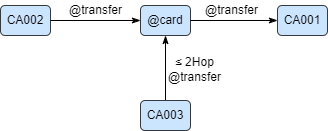
UQL
n({_id == "CA002"}).re().n({@card} as agent).re().n({_id == "CA001"})
where n(agent).e()[*:2].n({_id == "CA003"})
return agent{*}

Analysis: WHERE further filters data columns "agent": it judges if the shortest paths from "agent" to Card CA003 exist, if true, then it passes "agent" to later "return"

The example above can be put in a subgraph template as shown below:

UQL
subgraph([
  n({_id == "CA002"}).re().n({@card} as agent).re().n({_id == "CA001"}),
  n(agent).e()[*:2].n({_id == "CA003"})
])
return agent{*}