
Node and Edge Templates
Overview
Node and edge templates serve as buliding blocks for constructing paths and subgraphs. By incorporating filters that define the nodes and edges involved, these templates can accurately match patterns across various scenarios.
Templates
There are four basic node and edge templates:
Template | Name | Description | Custom Alias |
|---|---|---|---|
n() | Single node |  | Supported, type: NODE |
e(),le(),re() | Single edge (Direction: ignored, left, right) | 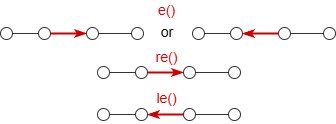 | Supported, type: EDGE |
e()[<steps>],le()[<steps>],re()[<steps>] | Multi-edge (Direction: ignored, left, right) | 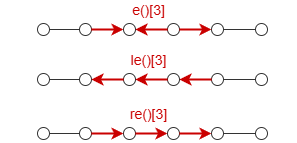 Formats of [<steps>]: (N≥1)[N]: N edges[:N]: 1~N edges[M:N]: M~N edges[1] (M≥0)[*:N]: the shortest paths within N edges | Not supported |
e().nf()[<steps>],le().nf()[<steps>],re().nf()[<steps>] | Multi-edge with intermediate nodes (Direction: ignored, left, right) | 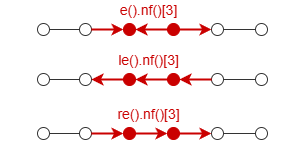 Formats of [<steps>] is same as above | Not supported |
[1] When setting [0:N] for a multi-edge template, the step 0 is valid only when the n() before the multi-edge template meets the filtering condition of the n() after the multi-edge template. In this case, this multi-edge template along with the right side n() are considered dismissed.
Path Composition Rules
Rule 1: A path starts and ends with a node, and consists of alternating nodes and edges in between.
Example: The paths below with a length of 3 can be expressed as n().e().n().e().n().e().n(), each individual node and edge template in the path can have its own filter and alias.
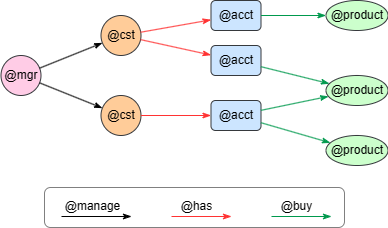
UQLn({@mgr}).re({@manage}).n({@cst} as n1)
  .re({@has}).n({@acct} as n2)
  .re({@buy} as e1).n({@product}) as p
return n1, n2, e1, p
Particularly, it's supported to use n() independently.
Example: Find all @account nodes.
UQLn({@account} as acc)
return acc
Rule 2: Consecutive edges and nodes with same filtering condition can be merged into a multi-edge template.
Example: The paths below have the same types of edges and nodes from step 2 to step 4. You can use the multi-edge template e().nf()[3] to represent those edges and intermediate nodes. However, custom alias is not applicable in multi-edge template.
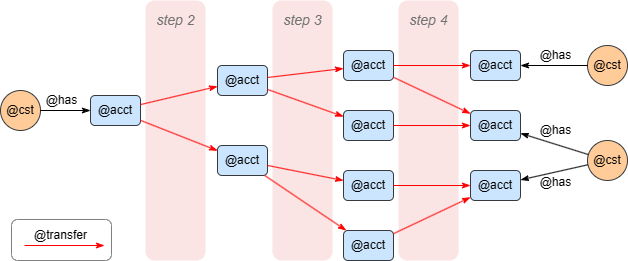
UQLn({@cst}).re({@has}).n({@acct} as n1)
  .re({@transfer}).nf({@acct})[3].n({@acct} as n2)
  .le({@has}).n({@cst}) as p
return n1, n2, p
Rule 3: Set the steps as a range instead of a fixed number when applicable to expand the query scope.
Example: You can use the multi-edge template e().nf()[:3] to limit the number of transactions in paths within 3, as shown below.
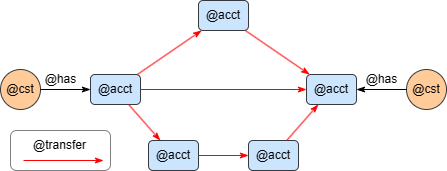
UQLn({@cst} as n1).re({@has}).n({@acct} as c1)
  .re({@transfer})[:3].n({@acct} c1)
  .le({@has}).n({@cst}) as p
return c1, c2, p