
RETURN
RETURN performs functional operations on the alias, and assembles multiple return values to send back to client end. Return values that are heterologous will NOT be trimmed.
Syntax: RETURN <expression> as <alias>, <expression> as <alias>, ...
Input:
- <expression>: Return value
- <alias>: Alias of return value, optional
RETURN clause is usually the last statement of a UQL, but can also be followed by ORDER BY, LIMIT or SKIP. Deduplicating an alias in RETURN clause will not affect its homologous aliases.
For instance, assemble 3 return values, of which n1 is heterologous with the other two; the deduplication against n2.color does NOT affect pnodes(path), which is homologous with n2.color:
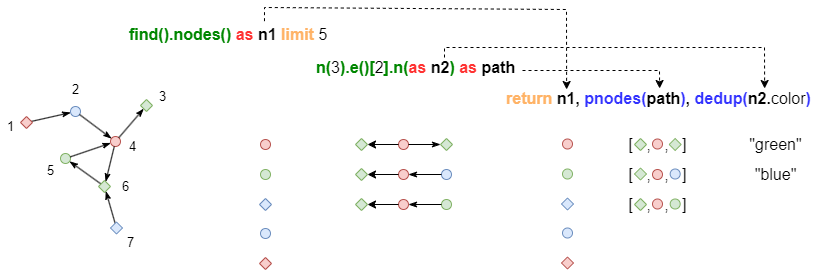
UQLfind().nodes() as n1 limit 5
n(3).e()[2].n(as n2) as path
return n1, pnodes(path), dedup(n2.color)
NOTEFor information on how to designate properties to be carried by NODE, EDGE, or PATH in RETURN clause, please refer to Chapter Query - Alias System.
Sample graph: (to be used for the following examples)
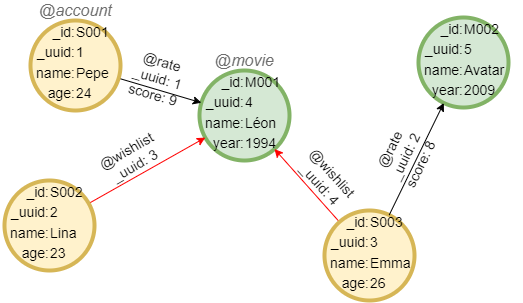
Return NODE
Example: Carry all properties
UQLfind().nodes({@account}) as n
return n{*}
Result|-------- @account ---------|
| _id  | _uuid | name | age |
|------|-------|------|-----|
| S001 | 1     | Pepe | 24  |
| S002 | 2     | Lina | 23  |
| S003 | 3     | Emma | 26  |
Example: Carry some custom properties
UQLfind().nodes() as n
return n{name, year}
Result|------ @account -----|
| _id  | _uuid | name |
|------|-------|------|
| S001 | 1     | Pepe |
| S002 | 2     | Lina |
| S003 | 3     | Emma |

|----------- @movie -----------|
| _id  | _uuid |  name  | year |
|------|-------|--------|------|
| M001 | 4     | Léon   | 1994 |
| M002 | 5     | Avatar | 2009 |
Analysis: NODE only carries the properties that it has.
Example: Carry only system properties
UQLfind().nodes({@movie}) as n
return n
Result|--- @movie ---|
| _id  | _uuid |
|------|-------|
| M001 | 4     |
| M002 | 5     |
Return EDGE
Example: Carry all properties
UQLfind().edges({@rate}) as e
return e{*}
Result|------------------------ @rate -----------------------|
| _uuid | _from | _to  | _from_uuid | _to_uuid | score |
|-------|-------|------|------------|----------|-------|
|   1   | S001  | M001 | 1          | 4        | 9     |
|   2   | S003  | M002 | 3          | 5        | 8     |
Example: Carry only system properties
UQLfind().edges() as e
return e
Result|-------------------- @rate -------------------|
| _uuid | _from | _to  | _from_uuid | _to_uuid |
|-------|-------|------|------------|----------|
|   1   | S001  | M001 | 1          | 4        |
|   2   | S003  | M002 | 3          | 5        |

|------------------ @wishlist -----------------|
| _uuid | _from | _to  | _from_uuid | _to_uuid |
|-------|-------|------|------------|----------|
|   3   | S002  | M001 | 2          | 4        |
|   4   | S003  | M001 | 3          | 4        |
Return PATH
Example: Carry some custom properties
UQLn({@account}).e({@rate}).n({@movie}) as p
return p{name}{*}
Result[
  {
    "nodes":[
      {"id":"S001","uuid":"1","schema":"account","values":{"name":"Pepe"}},
      {"id":"M001","uuid":"4","schema":"movie","values":{"name":"Léon"}}
    ],
    "edges":[
      {"uuid":"1","from":"S001","to":"M001","from_uuid":"1","to_uuid":"4","schema":"rate","values":{"score":"9"}}
    ],
    "length":1
  },
  {
    "nodes":[
      {"id":"S003","uuid":"3","schema":"account","values":{"name":"Emma"}},
      {"id":"M002","uuid":"5","schema":"movie","values":{"name":"Avatar"}}
    ],
    "edges":[
      {"uuid":"2","from":"S003","to":"M002","from_uuid":"3","to_uuid":"5","schema":"rate","values":{"score":"8"}}
    ],
    "length":1
  }
]
Example: Carry only system properties
UQLn({@movie}).e({@rate}).n({@account}).e({@wishlist}).n({@movie}) as p
return p
Result[
  {
    "nodes":[
      {"id":"M002","uuid":"5","schema":"movie","values":{}},
      {"id":"S003","uuid":"3","schema":"account","values":{}},
      {"id":"M001","uuid":"4","schema":"movie","values":{}}
    ],
    "edges":[
      {"uuid":"2","from":"S003","to":"M002","from_uuid":"3","to_uuid":"5","schema":"rate","values":{}},
      {"uuid":"4","from":"S003","to":"M001","from_uuid":"3","to_uuid":"4","schema":"wishlist","values":{}}
    ],
    "length":2
  }
]
Return TABLE
Example: Find 1-step path @account-@movie, assemble the name of accounts and movies into a table
UQLn({@account} as a).e({@wishlist}).n({@movie} as b)
return table(a.name, b.name)
Result| a.name | b.name |
|--------|--------|
| Lina   | Léon   |
| Emma   | Léon   |
Return ATTR - Atomic
Example: Return custom properties of nodes independently
UQLfind().nodes() as n
return n.name, n.age, n.year
Result - n.namePepe
Lina
Emma
Léon
Avatar
Result - n.age24
23
26
null
null
Result - n.yearnull
null
null
1994
2009
Analysis: A null will be returned when calling a property that is not existent.
Return ATTR - List
Example: Assemble the name of 1-Hop neighbors of each movie into a list
UQLkhop().n({@movie} as a).e().n() as b
group by a
return a.name, collect(b.name)
Result - a.nameLéon
Avatar
Result - collect(b.name)["Pepe","Lina","Emma"]
["Emma"]
Valid Return Format
Suppose that nodes, edges, paths, mytable, mylist, mypoint and myitem are aliases of type NODE, EDGE, PATH, TABLE, list, point and others, below return formats are supported:
| Return Format | Return Content | Return Type |
|---|---|---|
nodes | Node (carrying schema and system properties) | NODE |
nodes.<property> | Node property | ATTR (return null if property does not exist) |
nodes.@ | Node schema | ATTR |
nodes{<property>, ...} | Node (carrying schema, system properties and listed custom properties) | NODE |
nodes{*} | Node (carrying schema, system properties and all custom properties) | NODE |
edges | Edge (carrying schema and system properties) | EDGE |
edges.<property> | Edge property | ATTR (return null if property does not exist) |
edges.@ | Edge schema | ATTR |
edges{<property>, ...} | Edge (carrying schema, system properties and listed custom properties) | EDGE |
edges{*} | Edge (carrying schema, system properties and all custom properties) | EDGE |
paths | Path (carrying schema and system properties of metadata) | PATH |
paths{<property>, ...}{<property>, ...} | Path (carrying schema and system properties of metadata, carrying separately listed custom properties of nodes and edges) | PATH |
paths{*}{<property>, ...} | Path (carrying schema and system properties of metadata, carrying all custom properties of nodes and listed custom properties of edges) | PATH |
paths{<property>, ...}{*} | Path (carrying schema and system properties of metadata, carrying listed custom properties of nodes and all custom properties of edges) | PATH |
paths{<property>} | Path (carrying schema, system properties and listed custom properties of metadata) | PATH |
paths{*} | Path (carrying schema, system properties and all custom properties of metadata) | PATH |
mytable | The whole table | TABLE |
mylist | The whole list | ATTR |
mylist[n] | The element with index n | ATTR |
mylist[n1:n2] | A sub-list formed by element with index n1~n2 | ATTR |
mylist[:n] | A sub-list formed by element with index 0~n | ATTR |
mylist[n:] | A sub-list formed by element with index n~<length-1> | ATTR |
mypoint | The whole coordinates | ATTR |
mypoint.x | The coordinate x | ATTR |
mypoint.y | The coordinate y | ATTR |
myitem | The value | ATTR |