
Data Types
All Data Types
Category | Supported Types | Supported by Property |
|---|---|---|
| Numerical | int32, int64, uint32, uint64, float, double, decimal | Yes |
| Textual | string, text | Yes |
| Temporal | datetime, timestamp | Yes |
| Spatial | point | Yes |
| Binary | blob | Yes |
| Boolean | bool | No |
| Null | null | No |
| Graph Data | NODE, EDGE, PATH, GRAPH | No |
| List | list (containing elements of the types above) | Yes, but restricted to numerical, textual, or temporal elements excluding decimal |
| Set | set (containing elements of the types above except list) | Yes, but restricted to numerical, textual, or temporal elements excluding decimal |
| Object | object | No |
| Tabular | TABLE | No |
Property
Every created node or edge property has a data type. All the supported property data types are:
| Type | Description |
|---|---|
| int32 | Signed 32-bit integer (-2,147,483,648 to 2,147,483,647) |
| uint32 | Unsigned 32-bit integer (0 to 4,294,967,295) |
| int64 | Signed 64-bit integer (-9,223,372,036,854,775,808 to 9,223,372,036,854,775,807) |
| uint64 | Unsigned 64-bit integer (0 to 18,446,744,073,709,551,615) |
| float | 32-bit single-precision floating-point number with 6 to 7 significant digits (integer and fractional parts, excl. the decimal point) |
| double | 64-bit double-precision floating-point number with 15 to 16 significant digits (integer and fractional parts, excl. the decimal point) |
| decimal | Number with specified precision (1~65) and scale (0~30)[1], e.g., 'decimal(10,4)' represents a decimal number with a total of 10 digits, of which 4 are after the decimal point, and the remaining 6 are before the decimal pointNote: It must be wrapped in quotation marks when setting |
| string | Characters with a length of up to 60,000 bytes Note: This is the default type when creating a property |
| text | Characters with no limit on the length |
| datetime | Date and time value with a range from 1000-01-01 00:00:00.000000 to 9999-12-31 23:59:59.499999, stored as uint64 Valid input formats include yyyy-mm-dd hh:mm:ss and yyyy-mm-dd hh:mm:ss.ssssss |
| timestamp | A specific point in time relative (in seconds) to 1970-01-01 00:00:00 UTC onwards; the time zone can be set via RequestConfig of the desired SDK; stored as uint32Valid input formats include yyyy-mm-dd hh:mm:ss, yyyy-mm-dd, yyyymmddhhmmss and yyyymmdd |
| point | Two-dimensional geographical coordinates representing a location or position; the two values are stored as double |
| blob | Used to store binary large object such as file, image, audio or video; the length is subject to the max_rpc_msgsize (defaults to 4M) setting of the server |
| list | Supports int32[], int64[], uint32[], uint64[], float[], double[], string[], text[], datetime[] and timestamp[] Note: It must be wrapped in quotation marks when setting |
| set | Supports set(int32), set(int64), set(uint32), set(uint64), set(float), set(double), set(string), set(text), set(datetime) and set(timestamp) Note: It must be wrapped in quotation marks when setting |
[1] The precision is the total number of digits in the number, including both the integer and fractional parts (excl. the decimal point). The scale is the number of digits to the right of the decimal point.
Returned Data
After the data is retrieved from the database and processed, it can be returned with the following types:
Type | Data Structure (JSON) |
|---|---|
| NODE | {id: , uuid: , schema: , values: {...}} |
| EDGE | {uuid: , schema: , from: , from_uuid: , to: , to_uuid: , values: {...}} |
| PATH | {length: , nodes: [...], edges: [...]} |
| GRAPH | {nodes: [...], edges: [...]} |
| TABLE | {name: , headers: [...], rows: [...]} |
| ATTR | Other types other than the above types |
Example graph:
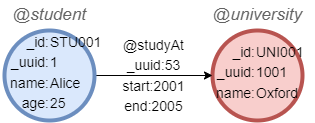
NODE
Return the node whose name is Alice:
UQLfind().nodes({name == 'Alice'}) as n
return n{*}
Data structure of the node:
n{
	"id": "STU001",
	"uuid": 1,
	"schema": "student",
	"values": {
		"name": "Alice",
		"age": 25
	}
}
EDGE
Return the edge whose UUID is 53:
UQLfind().edges({_uuid == 53}) as e
return e{*}
Data structure of the edge:
e{
	"uuid": 53,
	"schema": "studyAt",
	"from": "STU001",
	"to": "UNI001",
	"from_uuid": 1,
	"to_uuid": 1001,
	"values": {
		"start": 2001,
		"end": 2005
	}
}
PATH
Return the path from Alice to Oxford:
UQLn({name == 'Alice'}).e().n({name == 'Oxford'}) as p
return p{*}
Date structure of the path:
p{
	"length": 1,
	"nodes": [{
		"id": "STU001",
		"uuid": 1,
		"schema": "student",
		"values": {
			"name": "Alice",
			"age": 25
		}
	}, {
		"id": "UNI001",
		"uuid": 1001,
		"schema": "university",
		"values": {
			"name": "Oxford"
		}
	}],
	"edges": [{
		"uuid": 53,
		"schema": "studyAt",
		"from": "STU001",
		"to": "UNV001",
		"from_uuid": 1,
		"to_uuid": 1001,
		"values": {
			"start": 2001,
			"end": 2005
		}
	}]
}
GRAPH
Return the graph formed by the path from Alice to Oxford:
UQLn({name == 'Alice'}).e().n({name == 'Oxford'}) as p
return toGraph(collect(p))
Data structure of the graph:
toGraph(collect(p)){
	"nodes": [{
		"id": "STU001",
		"uuid": 1,
		"schema": "student",
		"values": {
			"name": "Alice",
			"age": 25
		}
	}, {
		"id": "UNI001",
		"uuid": 1001,
		"schema": "university",
		"values": {
			"name": "Oxford"
		}
	}],
	"edges": [{
		"uuid": 53,
		"schema": "studyAt",
		"from": "STU001",
		"to": "UNI001",
		"from_uuid": 1,
		"to_uuid": 1001,
		"values": {
			"start": 2001,
			"end": 2005
		}
	}]
}
TABLE
Return the table of all nodes' ID and name properties:
UQLfind().nodes() as n
return table(n._id, n.name)
Result:
| n._id | n.name |
|---|---|
| STU001 | Alice |
| UNI001 | Oxford |
Data structure of the table:
table(n._id, n.name){
  "name": "table(n._id, n.name)",
  "alias": "table(n._id, n.name)",
  "headers": [
    "n._id",
    "n.name"
  ],
  "rows": [
    [
      "STU001",
      "Alice"
    ],
    [
      "UNI001",
      "Oxford"
    ]
  ]
}
ATTR
Return how many years Alice studied in Oxford:
UQLfind().edges({_uuid == 53}) as e
return e.end - e.start
Data structure of the value:
e.end - e.start{
  "values": [
    4
  ]
}
NOTETo specify a valid return format in the RETURN clause, please refer to the table provided here.
Null
In Ultipa Graph, null signifies the absence of a value for a property or a query result. It differs from 0 or an empty string. Null values are encountered in the following scenarios:
- During the insertion of new nodes or edges (
insert(),insert().overwrite()), properties that are not specified are assigned null values. - Upon creating a new property, existing nodes or edges of the corresponding schema are assigned null values for the newly created property.
- When a requested property does not exist, null values are returned instead.
- When using the OPTIONAL prefix for a query (
find(),khop(),n().e().n(), etc.), if the query fails to yield results, null values are returned instead of nothing.
When null is involved in a conditional operation expression:
- If the judgement is definite, return true or false;
- otherwise, it returns null.
| Expression | Result | Note |
|---|---|---|
| null == 3 | null | Null represents an unknown or missing value, so its comparison to another value cannot definitively yield a result. The same applies to operators !=, <, >, >= and <=. |
| null == null | null | The same applies to operators !=, <, >, >= and <=. |
| [1, null, 2] == [1, 3, 2] | null | The same applies to the operator !=. |
| [1, null, 2] == [1, null, 2] | null | The same applies to the operator !=. |
| [1, null, 2] == [1, null, 3] | false | The judgement is sure since the third elements are different. The result is true for the operator !=. |
| [1, null, 2] == [1, null, 2, 3] | false | The judgement is sure since the lengths of the two lists are different. The result is true for the operator !=. |
| null <> [1, 3] | null | The same applies to the operator <=>. |
| 1 IN [1, null, 2] | true | The result is false for the operator NOT IN. |
| 3 IN [1, null, 2] | null | The same applies to the operator NOT IN. |
| null IN [ ] | false | The judgement is sure since the given list is empty. The result is true for the operator NOT IN. |
Any numerical computation (+, -, *, /, %) involving null will result in null.
Any aggregation operation (count(), sum(), max(), min(), avg(), stddev(), collect()) involving null will disregard rows with null values.
Functions and operators related to null: