Clause Execution Times
Overview
When a chained clause calls an alias or multiple homologous aliases, the number of times that clause executes equals the number of entries contained in the data represented by the alias. Each execution processes one data entry, while system optimizations may apply based on the actual situation. For the query clauses, each execution of the query is also referred to as a subquery.
However, when a chained clause calls heterologous aliases, the number of times that clause executes depends on the alias with the fewest data entries.
General
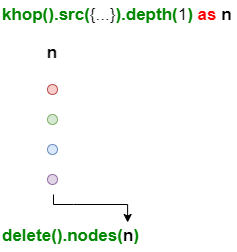
Example: n has 4 rows, the deletion clause is executed 4 times, each time deleting 1 node.
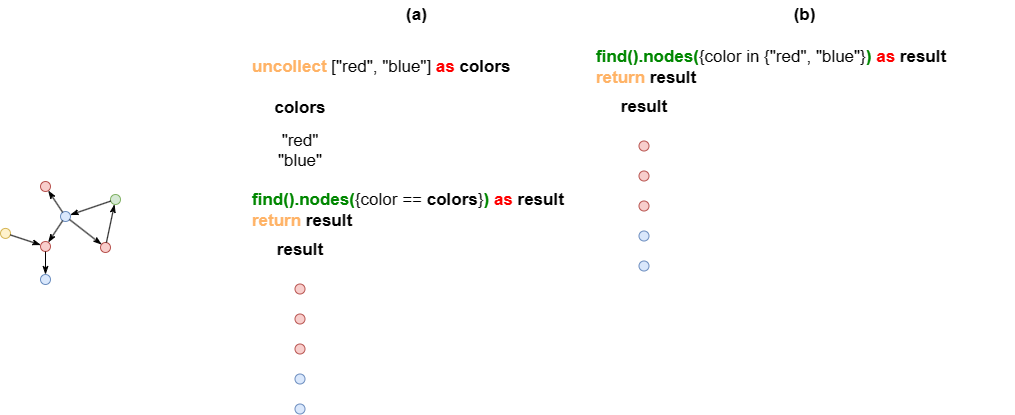
Example: These two UQLs yield the same results but differ in their executions:
- In part (a) where the
find().nodes()clause takescolorsin its filter, which contains two data entries, the clause executes 2 times. - In part (b) where the
find().nodes()takes no alias in its filter, it executes only once.
CALL Clause
The CALL clause can be used to perform processing for each row of the data independently.
Example: Each data entry of users is processed individually by the CALL clause. If users has N entries, the CALL clause will execute N times; within each execution of the CALL clause, the path query clause and the SKIP clause execute once each.
UQLfind().nodes({@user}) as users
call {
  with users
  n(users).e()[:2].n() as paths
  skip 2
  return paths
}
return paths
BATCH Clause
The BATCH clause partitions data into smaller batches for sequential processing by the subsequent clause, thereby reducing memory usage.
Example: The (maximum) 5000 nodes in users are put into 50 batches, each containing 100 nodes. Nodes in each batch are automatically collected into an array and passed into the path template query, which is thus executed for 50 times.
UQLfind().nodes({@user.age_level == 4}) limit 5000 as users
BATCH 100
n(users).e().n({@ad} as ads)
GROUP BY ads.cate
RETURN table(ads.cate, count(ads.cate))
LIMIT and limit()
The LIMIT clause restricts the number of data entries contained in an alias. In chained clauses, the limit() method is employed to confine the number of data entries returned in each clause execution.
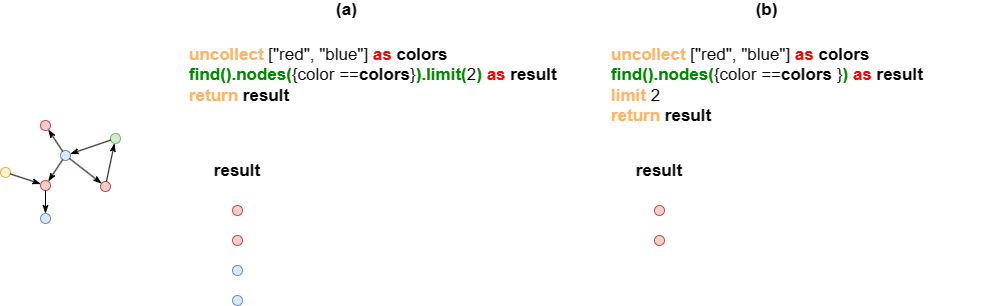
Example: In both statements, the find().nodes() clause executes twice, but the outcomes vary.
- In part (a), the
limit(2)method ensures that each query execution returns a maximum of two nodes. - In part (b), the
LIMITclause restricts the total number of nodes inresultto a maximum of two.
OPTIONAL Prefix
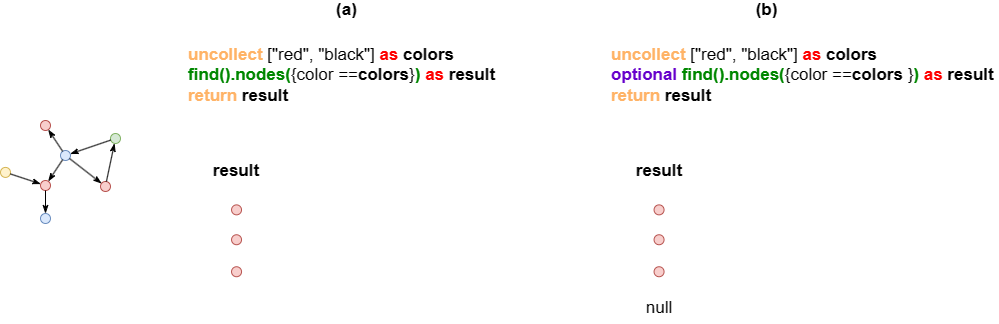
The OPTIONAL prefix guarantees that each clause execution yields some result. If the query finds nothing, it returns null.
Example: Both statements involve two executions of the find().nodes() clause, with differing outcomes.
- In part (a), the second query execution for the color black yields no return.
- In part (b), the second query execution for color black returns null.