
Alias
Overview
Alias is used to name the data generated during the execution of UQL, allowing it to be used or returned later on.
Alias
Custom Alias
Defining Custom Alias
A custom alias is defined using the keyword as. Note the following:
- Alias should be defined in the clause where the data is generated.
- An alias can be renamed, but only the last defined one is valid.
- An alias name can only be used once in a UQL statement, even if it's obsolete due to alias renaming.
NOTEIn UQL, if a retrieved data is never used by defining an alias, or if an alias is defined but never used or returned, both cases could have a negative effect on the validity of UQL.
Naming Conventions
The name for a custom alias should:
- contain 1~64 characters;
- not start with the tilde (~) symbol;
- not contain any backquotes (`);
- not use any system reserved words.
When an alias contains any characters other than letters, numbers and underscores, it must be wrapped with a pair of backquote (`) when used in UQL. Here is an example:
UQLfind().nodes() as `my-Nodes`
return `my-Nodes`
NOTEIt's suggested not to use the name of a property for an alias. If necessary, use the system alias this to disambiguate when required.
System Alias
There are three system aliases in UQL:
System Alias | Where Used | Data Represented |
|---|---|---|
this | Any node or edge filter | Current node or edge |
prev_n | Filter in node or edge template | Previous node of the current node or edge |
prev_e | Filter in node or edge template | Previous edge of the current node or edge |
this
In the node or edge filter, you can generally omit the use of this, which represents the current node or edge. For example, the node filter {balance > 5000} in the following UQL is actually equivalent to {this.balance > 5000}.
UQLfind().nodes({balance > 5000}) as n
return n
However, this cannot be omitted when there is any ambiguity. This occurs when a custom alias and a property share the same name. In the example below, balance is the name for both the alias and a node property. Using this in the filter clearly indicates that balance refers to the node property. If {balance > 5000} is written in this case, the alias balance is used instead.
UQL... as balance
find().nodes({this.balance > 5000})
...
prev_n
prev_n is exclusively applicable within a node or edge template, referring to the nearest node to the left of the current node or edge in the path.
- Using it in the single node or edge template:

NOTEWhen using
prev_nwithin the firstn()in the path templat, the referenced node byprev_ndoesn't physically exist. Consequently, any comparison involvingprev_nwith operators==,!=,>,>=,<and<=returns TRUE. The outcome of other operators is unpredictable.
- Using it in the multi-edge template:

It's important to highlight that all the nodes referenced by prev_n must possess the property called upon by prev_n. Consider the example below which searches for the "@actor - [@actsIn] - @movie" paths and matches that the rating of the @movie node must be exceed that of @actor node. If @actor lacks the rating property, the query will not yield any results.
UQLn({@actor}).e({@actsIn}).n({@movie.rating > prev_n.rating})
return p{*}
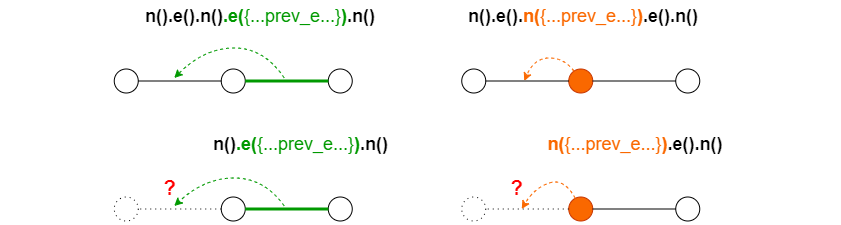
prev_e
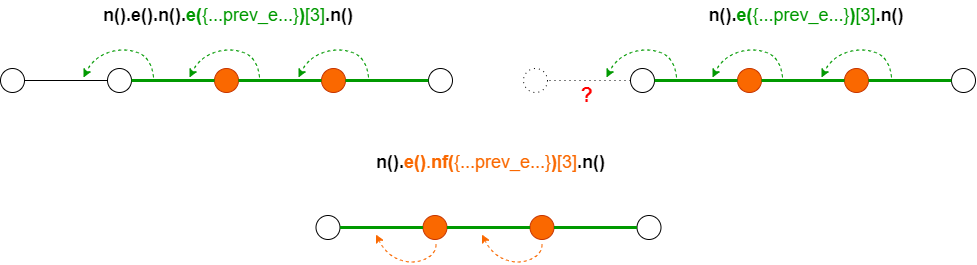
prev_e is exclusively applicable within a node or edge template, referring to the nearest edge to the left of the current node or edge in the path.
- Using it in the single node or edge template:
- Using it in the multi-edge template:
NOTEWhen using
prev_ewithin the firstn(),e()ore()[<>]in the path template, the (first) referenced edge byprev_edoesn't physically exist. Consequently, any comparison involvingprev_ewith operators==,!=,>,>=,<and<=returns true. The outcome of other operators is unpredictable.
It's important to highlight that all the edges referenced by prev_e must possess the property called upon by prev_e. Consider the example below which searches for the "holder - [@holds] - @card - [@transfersTo] - @card - [@transfersTo] - @card - [@holds] - holder" paths and ensures that the transaction time ascends. However, the prev_e also involves the first @holds edge, if @holds lacks the time property, the query will not yield any results.
UQLn({@user} as holder)
  .e({@holds}).n({@card})
  .e({@transfersTo.time > prev_e.time})[:2]
  .n({@card}).e({@holds})
  .n(holder) as p
return p{*}
Default Alias
In UQL, two default aliases are predefined:
Default Alias | Where Applied | Data Represented |
|---|---|---|
nodes | find().nodes() clause | Retrieved nodes |
edges | find().edges() clause | Retrieved edges |
You can employ these default aliases directly without defining them:
UQLfind().nodes({@account})
return nodes{*}
However, the default alias becomes invalid when a custom alias is defined instead.
Clause Alias and Method Alias
In some UQL clauses, you can define alias for the entire clause (known as clause alias), and for specific methods (known as method alias). Please refer to the syntax of each clause for more details.
Example: Define alias for the find().edges() clause
UQLfind().edges({@direct}) as e
return e
It's not allowed to define alias for the methods find() or edges() separately.
Example: Define aliases for the autonet().src().dest().depth() clause and one of its methods src()
UQLautonet().src({age < 60} as startNodes).dest({@event}).depth(:3) as paths
return startNodes, paths
Example: Define aliases for the find().nodes() clause and the WITH clause:
UQLfind().nodes({@account}) as a
with min(a.age) as minAge
find().nodes({@account.age == minAge}) as b
return b.name
Alias Type
The type of an alias is determined by the data it represents. Below is an example defining and calling several alias:
- The alias users represents nodes and is of the type NODE.
- The alias maxAge represents the maximum value of the property age, which can be of various numeric types such as int32 or int64.
- The alias signups represents edges and is of the type EDGE.
- The alias p represents paths and is of the type PATH.
UQLfind().nodes({@user}) as users
with max(users.age) as maxAge
n({@user.age == maxAge}).e({@signsUp} as signups).n({@course}) as p
return signups, p
Alias Call
Depending on the type of alias, you can either call the alias directly in certain clauses or extract specific data from the alias for use.
The table below shows the example calls of aliases of different types:
Note: nodes, edges, paths, myLists, myPoints, myObjects and myItems are aliases of type NODE, EDGE, PATH, list, point, object and others respectively.
Call Format | Data Represented | Data Type |
|---|---|---|
nodes | Nodes | NODE |
nodes.name | Values of the property name | Same with the property |
nodes.@ | Schemas of the nodes | string |
edges | Edges | EDGE |
edges.time | Values of the edge property time | Same with the property |
edges.@ | Schemas of the edges | string |
paths | Paths | PATH |
myLists | Lists | list |
myLists[2] | The 3rd elements in the lists | Same with the element |
myLists[0:3] | Sub-lists formed by the 1st to 4th elements in the lists | list |
myLists[:5] | Sub-lists formed by the 1st to 6th elements in the lists | list |
myLists[2:] | Sub-lists formed by the elements from index 2 to the end in the lists | list |
myPoints | Points, each with two coordinates | point |
myPoints.x | Values of the x coordinates | double |
myPoints.y | Values of the y coordinates | double |
myObjects.age | Values of the key age | Same with the key |
myItems | Values | Same with the value |
NOTEAlias with the type of TABLE cannot be called in UQL.
More call formats are supported in the RETURN clause. Please click here for more information.