
Data Insertion
Example Graph
The examples in this section demonstrate the node and edge insertion into a graph with the following schema and property definitions:
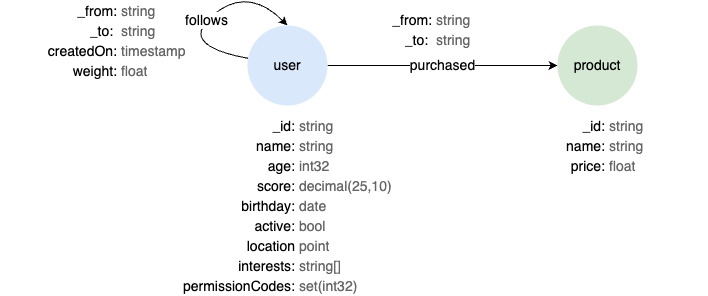
To create this graph, see the example provided here.
Insertion Request Configuration
All insertion methods accept an optional InsertRequestConfig object instead of the standard RequestConfig.
The InsertRequestConfig extends all fields found in RequestConfig, along with the following:
Field | Type | Default | Description |
|---|---|---|---|
insertType | InsertType | NORMAL | The insertion mode. Supports NORMAL, UPSERT, and OVERWRITE. |
silent | boolean | true | Whether to return the _id or _uuid of the inserted nodes or edges. By default, no values are returned; set to false to return them. |
Simple Insertion
The methods insertNodes() and insertEdges() are best for inserting a small number of nodes or edges. These methods convert the user request into a UQL statement and send it to the database. They are easy to use, but due to the overhead of query processing, they are less efficient for large-volume data insertion.
insertNodes()
Inserts nodes to a schema in the graph.
Parameters
schemaName: string: Schema name.nodes: Node[]: The list of nodes to be inserted.config?: InsertRequestConfig: Request configuration.
Returns
Response: Response of the request.
TypeScript// Inserts two 'user' nodes into the graph 'social'

const insertRequestConfig: InsertRequestConfig = {
  graph: "social",
  insertType: InsertType.NORMAL,
  silent: true
};

const node1: Node = {
  id: "U1",
  values: {
    name: "Alice",
    age: 18,
    score: 65.32,
    birthday: "1993-05-04",
    active: 0,
    location: "POINT(132.1 -1.5)",
    interests: ["tennis", "violin"],
    permissionCodes: [2004, 3025, 1025]
  },
};
const node2 = {
  id: "U2",
  values: { name: "Bob" }
};
const nodeList = [node1,node2]

const response = await driver.insertNodes("user", nodeList, insertRequestConfig);
console.log(response.status?.message);
OutputSUCCESS
insertEdges()
Inserts edges to a schema in the graph.
Parameters
schemaName: string: Schema name.edges: Edge[]: The list of edges to be inserted; the fieldsfromandtoof eachEdgeare mandatory.config?: InsertRequestConfig: Request configuration.
Returns
Response: Response of the request.
TypeScript// Inserts two 'follows' edges to the graph 'social'

const insertRequestConfig: InsertRequestConfig = {
  graph: "social",
  insertType: InsertType.NORMAL,
  silent: true
};

const edge1 = {
  from: "U1",
  to: "U2",
  values: {
    createdOn: "2024-05-06 12:10:05",
    weight: 3.2
  },
};
const edge2 = {
  from: "U2",
  to: "U1",
  values: { createdOn: 1715169600 }
};
const edgeList = [edge1, edge2];

const response = await driver.insertEdges("follows", edgeList, insertRequestConfig);
console.log(response.status?.message);
OutputSUCCESS
Batch Insertion
The methods insertNodesBatchBySchema(), insertEdgesBatchBySchema(), insertNodesBatchAuto(), and insertEdgesBatchAuto() can be used to insert large volumes of nodes or edges. They use the gRPC protocol to send data packets directly to the server, which dramatically increases throughput.
Important note: When using batch insertion methods, please ensure that all property values are assigned using the corresponding Node.js data types, as listed below.
Ultipa Property Type | Node.js Data Type | Examples |
|---|---|---|
INT32, UINT32 | number | 18 |
INT64, UINT64 | number | 1715169600 |
FLOAT, DOUBLE, DECIMAL | number | 65.32 |
STRING, TEXT | string | "John Doe" |
LOCAL_DATETIME | string[1] | "1993-05-06 09:11:02" |
ZONED_DATETIME | string[1] | "1993-05-06 09:11:02-0800" |
DATE | string[1] | "1993-05-06" |
LOCAL_TIME | string[1] | "09:11:02" |
ZONED_TIME | String[1] | "09:11:02-0800" |
DATETIME | string[1] | "1993-05-06" |
TIMESTAMP | string[1], number | "1993-05-06", 1715169600 |
YEAR_TO_MONTH | string | P2Y5M, -P1Y5M |
DAY_TO_SECOND | string | P3DT4H, -P1DT2H3M4.12S |
BOOL | boolean | true, false, 0, 1 |
POINT | string | "POINT(132.1 -1.5)" |
LIST | Array<>, Set<> | ["tennis", "violin"], new Set(["tennis", "violin"]) |
SET | Array<>, Set<> | [2004, 3025, 1025], new Set([2004, 3025, 1025]) |
[1] Supported date formats include YYYY-MM-DD and YYYYMMDD. Supported time formats include HH:MM:SS[.fraction] and HHMMSS[.fraction]. Date and time components are joined by either a space or the letter T. Supported timezone formats include ±HH:MM and ±HHMM.
insertNodesBatchBySchema()
Inserts nodes to a schema in the graph through gRPC. This method is optimized for bulk insertion.
Parameters
schema: Schema: The target schema; the fieldnameis mandatory,propertiesincludes partial or all properties defined for the corresponding schema in the graph.nodes: Node[]: The list of nodes to be inserted.config?: InsertRequestConfig: Request configuration.
Returns
InsertResponse: Response of the insertion request.
TypeScript// Inserts two 'user' nodes into the graph 'social'

const insertRequestConfig: InsertRequestConfig = {
  graph: "social",
  insertType: InsertType.NORMAL,
  silent: true
};

const user: Schema = {
  name: "user",
  dbType: DBType.DBNODE,
  properties: [
    { name: "name", type: ULTIPA.UltipaPropertyType.STRING, schema: "user" },
    { name: "age", type: ULTIPA.UltipaPropertyType.INT32, schema: "user" },
    { name: "score", type: ULTIPA.UltipaPropertyType.DECIMAL, decimalExtra: { precision: 25, scale: 10 }, schema: "user" },
    { name: "birthday", type: ULTIPA.UltipaPropertyType.DATE, schema: "user" },
    { name: "active", type: ULTIPA.UltipaPropertyType.BOOL, schema: "user" },
    { name: "location", type: ULTIPA.UltipaPropertyType.POINT, schema: "user" },
    { name: "interests", type: ULTIPA.UltipaPropertyType.LIST, subType: [UltipaPropertyType.STRING], schema: "user" },
    { name: "permissionCodes", type: ULTIPA.UltipaPropertyType.SET, subType: [UltipaPropertyType.INT32], schema: "user" }
  ]
};

const node1 = {
  id: "U1",
  values: {
    name: "Alice",
    age: 18,
    score: 65.32,
    birthday: "1993-05-04",
    active: 0,
    location: "POINT(132.1 -1.5)",
    interests: ["tennis", "violin"],
    permissionCodes: [2004, 3025, 1025],
  },
};
const node2 = { id: "U2", values: { name: "Bob" } };
const nodeList = [node1, node2];

const insertResponse = await driver.insertNodesBatchBySchema(user, nodeList, insertRequestConfig);
if (insertResponse.errorItems?.size === 0) {
  console.log("All nodes inserted successfully");
} else {
  console.log("Error items:", insertResponse.errorItems);
}
OutputAll nodes inserted successfully
insertEdgesBatchBySchema()
Inserts edges to a schema in the graph through gRPC. This method is optimized for bulk insertion.
Parameters
schema: Schema: The target schema; the fieldnameis mandatory,propertiesincludes partial or all properties defined for the corresponding schema in the graph.edges: Edge[]: The list of edges to be inserted; the fieldsfromandtoof eachEdgeare mandatory.config?: InsertRequestConfig: Request configuration.
Returns
config: InsertResponse: Response of the insertion request.
TypeScript// Inserts two 'follows' edges into the graph 'social'

const insertRequestConfig: InsertRequestConfig = {
  graph: "social",
  insertType: InsertType.NORMAL,
  silent: true
};

const follows: Schema = {
  name: "follows",
  dbType: DBType.DBEDGE,
  properties: [
    { name: "createdOn", type: UltipaPropertyType.TIMESTAMP, schema: "follows" },
    { name: "weight", type: UltipaPropertyType.FLOAT, schema: "follows" }
  ]
};

const edge1 = {
  from: "U1",
  to: "U2",
  values: {
    createdOn: "2024-05-06 12:10:05",
    weight: 3.2,
  },
};
const edge2 = {
  from: "U2",
  to: "U1",
  values: {
    createdOn: 1715169600
  }
};
const edgeList = [edge1, edge2];

const insertResponse = await driver.insertEdgesBatchBySchema(follows, edgeList, insertRequestConfig);
if (insertResponse.errorItems?.size === 0) {
  console.log("All edges inserted successfully");
} else {
  console.log("Error items:", insertResponse.errorItems);
}
OutputAll edges inserted successfully
insertNodesBatchAuto()
Inserts nodes to one or multipe schemas in the graph through gRPC. This method is optimized for bulk insertion.
Parameters
nodes: Node[]: The list of nodes to be inserted; the fieldschemaof eachNodeare mandatory,valuesincludes partial or all properties defined for the corresponding schema in the graph.config?: InsertRequestConfig: Request configuration.
Returns
Map<string, InsertResponse>: The schema name, and response of the insertion request.
TypeScript// Inserts two 'user' nodes and a 'product' node into the graph 'social'

const insertRequestConfig: InsertRequestConfig = {
  graph: "social",
  insertType: InsertType.NORMAL,
  silent: true
};

const node1 = {
  id: "U1",
  schema: "user",
  values: {
    name: "Alice",
    age: 18,
    score: 65.32,
    birthday: "1993-05-04",
    active: false,
    location: "POINT(132.1 -1.5)",
    interests: ["tennis", "violin"],
    permissionCodes: [2004, 3025, 1025]
  },
};
const node2 = { id: "U2", schema: "user", values: { name: "Bob" } };
const node3 = {
  id: "P1",
  schema: "product",
  values: { name: "Wireless Earbud", price: "93.2" }
};

const nodeList = [node1, node2, node3];

const result = await driver.insertNodesBatchAuto(nodeList, insertRequestConfig);
for (let [schemaName, insertResponse] of result.entries()) {
  if (insertResponse.errorItems && insertResponse.errorItems.size > 0) {
    console.log("Error items of", schemaName, "nodes:");
    for (const [rowIndex, errorCode] of insertResponse.errorItems.entries()) {
      const errorMessage = InsertErrorCode[errorCode];
      console.log(`Row ${rowIndex} failed: ${errorMessage} (Code: ${errorCode})`);
    }
  } else {
    console.log("All " + schemaName + " nodes inserted successfully");
  }
}
OutputAll user nodes inserted successfully
All product nodes inserted successfully
insertEdgesBatchAuto()
Inserts edges to one or multipe schemas in the graph through gRPC. This method is optimized for bulk insertion.
Parameters
edges: Edge[]: The list of edges to be inserted; the fieldsschema,from, andtoare mandatory,valuesincludes partial or all properties defined for the corresponding schema in the graph.config?: InsertRequestConfig: Request configuration.
Returns
Map<string, InsertResponse>: The schema name, and response of the insertion request.
TypeScript// Inserts two 'user' nodes and a 'product' node into the graph 'social'

const insertRequestConfig: InsertRequestConfig = {
  graph: "social",
  insertType: InsertType.NORMAL,
  silent: true
};

const edge1 = {
  from: "U1",
  to: "U2",
  schema: "follows",
  values: {
    createdOn: "2024-05-06 12:10:05",
    weight: 3.2
  }
};
const edge2 = {
  from: "U2",
  to: "U1",
  schema: "follows",
  values: {
    createdOn: 1714953600
  }
};
const edge3 = { from: "U2", to: "P1", schema: "purchased" };

const edgeList = [edge1, edge2, edge3];

const result = await driver.insertEdgesBatchAuto(edgeList, insertRequestConfig);
for (let [schemaName, insertResponse] of result.entries()) {
  if (insertResponse.errorItems && insertResponse.errorItems.size > 0) {
    console.log("Error items of", schemaName, "edges:");
    for (const [rowIndex, errorCode] of insertResponse.errorItems.entries()) {
      const errorMessage = InsertErrorCode[errorCode];
      console.log(`Row ${rowIndex} failed: ${errorMessage} (Code: ${errorCode})`);
    }
  } else {
    console.log("All " + schemaName + " edges inserted successfully");
  }
}
OutputAll follows edges inserted successfully
All purchased edges inserted successfully
Full Example
Example.tsimport { UltipaDriver } from "@ultipa-graph/ultipa-driver";
import { ULTIPA } from "@ultipa-graph/ultipa-driver/dist/types/index.js";
import { DBType, GraphSet, RequestConfig, Schema, Node, Edge, UltipaPropertyType, InsertRequestConfig, InsertType, InsertErrorCode } from "@ultipa-graph/ultipa-driver/dist/types/types.js";

let sdkUsage = async () => {
  const ultipaConfig: ULTIPA.UltipaConfig = {
    // URI example: hosts: ["xxxx.us-east-1.cloud.ultipa.com:60010"]
    hosts: ["10.xx.xx.xx:60010"],
    username: "<username>",
    password: "<password>"
  };

  const driver = new UltipaDriver(ultipaConfig);

  // Inserts two 'user' nodes, a 'product' node, two 'follows' edges, and a 'purchased' edge into the graph 'social'

  const insertRequestConfig: InsertRequestConfig = {
    graph: "social",
    insertType: InsertType.NORMAL,
    silent: true
  };

  const node1 = {
    id: "U1",
    schema: "user",
    values: {
      name: "Alice",
      age: 18,
      score: 65.32,
      birthday: "1993-05-04",
      active: false,
      location: "POINT(132.1 -1.5)",
      interests: ["tennis", "violin"],
      permissionCodes: [2004, 3025, 1025]
    },
  };
  const node2 = { id: "U2", schema: "user", values: { name: "Bob" } };
  const node3 = {
    id: "P1",
    schema: "product",
    values: { name: "Wireless Earbud", price: "93.2" }
  };

  const nodeList = [node1, node2, node3];

  const edge1 = {
    from: "U1",
    to: "U2",
    schema: "follows",
    values: {
      createdOn: "2024-05-06 12:10:05",
      weight: 3.2,
    },
  };
  const edge2 = {
    from: "U2",
    to: "U1",
    schema: "follows",
    values: {
      createdOn: 1714953600
    },
  };
  const edge3 = { from: "U2", to: "P1", schema: "purchased" };

  const edgeList = [edge1, edge2, edge3];

  const result_n = await driver.insertNodesBatchAuto(nodeList, insertRequestConfig);
  for (let [schemaName, insertResponse] of result_n.entries()) {
    if (insertResponse.errorItems && insertResponse.errorItems.size > 0) {
      console.log("Error items of", schemaName, "nodes:");
      for (const [rowIndex, errorCode] of insertResponse.errorItems.entries()) {
        const errorMessage = InsertErrorCode[errorCode];
        console.log(`Row ${rowIndex} failed: ${errorMessage} (Code: ${errorCode})`);
      }
    } else {
      console.log("All " + schemaName + " nodes inserted successfully");
    }
  }

  const result_e = await driver.insertEdgesBatchAuto(edgeList, insertRequestConfig);
  for (let [schemaName, insertResponse] of result_e.entries()) {
    if (insertResponse.errorItems && insertResponse.errorItems.size > 0) {
      console.log("Error items of", schemaName, "edges:");
      for (const [rowIndex, errorCode] of insertResponse.errorItems.entries()) {
        const errorMessage = InsertErrorCode[errorCode];
        console.log(`Row ${rowIndex} failed: ${errorMessage} (Code: ${errorCode})`);
      }
    } else {
      console.log("All " + schemaName + " edges inserted successfully");
    }
  }
};

sdkUsage().catch(console.error);