
Data Insertion
This section introduces methods for the insertion of nodes and edges.
| Methods | Mechanism | Use Case | Note |
|---|---|---|---|
insertNodes()insertEdges() | Uses UQL under the hood. | Inserts a small number of nodes or edges. | |
insertNodesBatchBySchema()insertEdgesBatchBySchema() | Uses gRPC to send data directly to the server. | Inserts large volumes of nodes or edges of the same schema. | The property values must be assigned using Java data types that correspond to the Ultipa supported property types (see Property Type Mapping). |
insertNodesBatchAuto()insertEdgesBatchAuto() | Inserts large volumes of nodes or edges of different schemas. |
Property Type Mapping
The mappings between Ultipa property types and Java data types are as follows:
Ultipa Property Type | Java Data Type | Examples |
|---|---|---|
INT32 | Integer | 18 |
UINT32, INT64, UINT64 | Long | 1715169600000L |
FLOAT | Float | 170.5f |
DOUBLE | Double | 170.5 |
DECIMAL | BigDecimal | 65.32, new BigDecimal("123.4567") |
STRING, TEXT | String | "John Doe" |
LOCAL_DATETIME | String[1], java.time.LocalDateTime | "1993-05-06 09:11:02", LocalDateTime.of(2025, 4, 22, 16, 45, 20) |
ZONED_DATETIME | String[1], java.time.offsetDateTime | "1993-05-06 09:11:02-0800", OffsetDateTime.of(LocalDateTime.of(2025, 4, 22, 16, 45, 20), ZoneOffset.of("+06:00")) |
DATE | String[1], java.time.LocalDate | "1993-05-06", LocalDate.of(2025, 4, 22) |
LOCAL_TIME | String[1], java.time.LocalTime | "09:11:02", LocalTime.of(16, 45, 20) |
ZONED_TIME | String[1], java.time.offsetTime | "09:11:02-0800", OffsetTime.of(LocalTime.of(16, 45, 20), ZoneOffset.of("+06:00")) |
DATETIME | String[2], java.util.Date, java.time.LocalDateTime | "1993-05-06", new Date(1715169600000L), LocalDateTime.of(2025, 4, 22, 10, 30) |
TIMESTAMP | String[2], java.util.Date | "1993-05-06", new Date(1715169600000L) |
YEAR_TO_MONTH | String | P2Y5M, -P1Y5M |
DAY_TO_SECOND | String | P3DT4H, -P1DT2H3M4.12S |
BOOL | Boolean | true, false |
POINT | com.ultipa.sdk.data.Point | new Point(132.1, -1.5) |
LIST | List<> | Arrays.asList("tennis", "violin") |
SET | Set<> | new HashSet<>(Arrays.asList(2004, 3025, 1025)) |
[1] Supported date formats include YYYY-MM-DD, YYYY/MM/DD, and YYYYMMDD. Supported time formats include HH:MM:SS[.fraction] and HHMMSS[.fraction]. Date and time components are joined by either a space or the letter T. Supported timezone formats include ±HH:MM and ±HHMM.
[2] Supported date string formats include [YY]YY-MM-DD HH:MM:SS, [YY]YY-MM-DD HH:MM:SSZ, [YY]YY-MM-DDTHH:MM:SSZ, [YY]YY-MM-DDTHH:MM:SSXX, [YY]YY-MM-DDTHH:MM:SSXXX, [YY]YY-MM-DD HH:MM:SS.SSS and their variations.
Example Graph Structure
The examples in this section demonstrate the insertion and deletion of nodes and edges in a graph based on the following schema and property definitions:
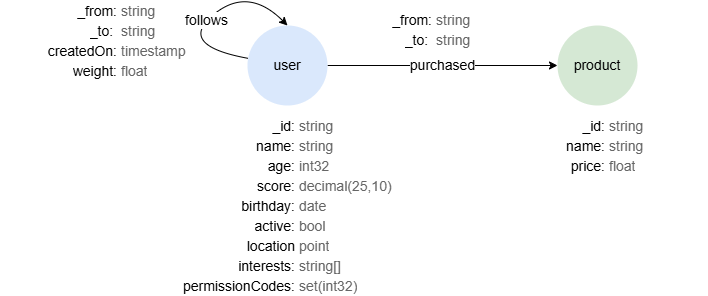
To create this graph structure, see the example provided here.
insertNodes()
Inserts nodes to a schema in the graph.
Parameters
nodes: List<Node>: The list of nodes to be inserted.schemaName: String: Schema name.config: InsertRequestConfig(Optional): Request configuration.
Returns
Response: Response of the request.
Java// Inserts two 'user' nodes into the graph 'social'

InsertRequestConfig insertRequestConfig = new InsertRequestConfig();
insertRequestConfig.setGraph("social");

List<Node> nodes = new ArrayList<>();

Node node1 = new Node();
node1.setId("U1");
node1.setValues(Value.newBuilder()
        .add("name", "Alice")
        .add("age", 18)
        .add("score", 65.32)
        .add("birthday", "1993-05-04")
        .add("active", false)
        .add("location", new Point(132.1, -1.5))
        .add("interests", Arrays.asList("tennis", "violin"))
        .add("permissionCodes", new HashSet<>(Arrays.asList(2004, 3025, 1025)))
        .build());
nodes.add(node1);

Node node2 = new Node();
node2.setId("U2");
node2.setValues(Value.newBuilder().add("name", "Bob").build());
nodes.add(node2);

Response response = driver.insertNodes("user", nodes, insertRequestConfig);
if (response.getStatus().getCode() == Ultipa.ErrorCode.SUCCESS) {
    System.out.println(response.getStatus().getCode());
} else {
    System.out.println(response.getStatus().getMsg());
}
OutputSUCCESS
insertEdges()
Inserts edges to a schema in the graph.
Parameters
edges: List<Edge>: The list of edges to be inserted; the attributesfromandtoof eachEdgeare mandatory.schemaName: String: Schema name.config: InsertRequestConfig(Optional): Request configuration.
Returns
Response: Response of the request.
Java// Inserts two 'follows' edges to the graph 'social'

InsertRequestConfig insertRequestConfig = new InsertRequestConfig();
insertRequestConfig.setGraph("social");

List<Edge> edges = new ArrayList<>();

Edge edge1 = new Edge();
edge1.setFrom("U1");
edge1.setTo("U2");
edge1.setValues(Value.newBuilder()
		.add("createdOn", "2024-5-6")
        .add("weight", 3.2)
        .build());
edges.add(edge1);

Edge edge2 = new Edge();
edge2.setFrom("U2");
edge2.setTo("U1");
edge2.setValues(Value.newBuilder().add("createdOn", 1715169600).build());
edges.add(edge2);

Response response = driver.insertEdges("follows", edges, insertRequestConfig);
if (response.getStatus().getCode() == Ultipa.ErrorCode.SUCCESS) {
    System.out.println(response.getStatus().getCode());
} else {
    System.out.println(response.getStatus().getMsg());
}
OutputSUCCESS
insertNodesBatchBySchema()
Inserts nodes to a schema in the graph through gRPC. This method is optimized for bulk insertion.
Parameters
schema: Schema: The target schema; the attributenameis mandatory,propertiesincludes partial or all properties defined for the corresponding schema in the graph.nodes: List<Node>: The list of nodes to be inserted.config: InsertRequestConfig(Optional): Request configuration.
Returns
InsertResponse: Response of the insertion request.
Java// Inserts two 'user' nodes into the graph 'social'

InsertRequestConfig insertRequestConfig = new InsertRequestConfig();
insertRequestConfig.setGraph("social");

Schema schema = new Schema();
schema.setName("user");
schema.setProperties(new ArrayList<Property>() {{
    add(new Property() {{
    	setName("name");
    	setType(Ultipa.PropertyType.STRING);
  	}});
  	add(new Property() {{
    	setName("age");
    	setType(Ultipa.PropertyType.INT32);
  	}});
  	add(new Property() {{
    	setName("score");
    	setType(Ultipa.PropertyType.DECIMAL);
    	setDecimalExtra(25, 10);
  	}});
  	add(new Property() {{
    	setName("birthday");
    	setType(Ultipa.PropertyType.DATE);
  	}});
  	add(new Property() {{
    	setName("active");
    	setType(Ultipa.PropertyType.BOOL);
  	}});
  	add(new Property() {{
    	setName("location");
    	setType(Ultipa.PropertyType.POINT);
  	}});
  	add(new Property() {{
    	setName("interests");
    	setType(Ultipa.PropertyType.LIST);
    	setSubType(Lists.newArrayList(Ultipa.PropertyType.STRING));
  	}});
  	add(new Property() {{
    	setName("permissionCodes");
    	setType(Ultipa.PropertyType.SET);
    	setSubType(Lists.newArrayList(Ultipa.PropertyType.INT32));
  	}});
}});

List<Node> nodes = new ArrayList<>();

Node node1 = new Node();
node1.setId("U1");
node1.setValues(Value.newBuilder()
		.add("name", "Alice")
        .add("age", 18)
        .add("score", 65.32)
        .add("birthday", "1993-05-04")
        .add("active", false)
        .add("location", new Point(132.1, -1.5))
        .add("interests", Arrays.asList("tennis", "violin"))
        .add("permissionCodes", new HashSet<>(Arrays.asList(2004, 3025, 1025)))
        .build());
nodes.add(node1);

Node node2 = new Node();
node2.setId("U2");
node2.setValues(Value.newBuilder()
		.add("name", "Bob")
        .build());
nodes.add(node2);

InsertResponse insertResponse = driver.insertNodesBatchBySchema(schema, nodes, insertRequestConfig);
if (!insertResponse.getErrorItems().isEmpty()) {
  	System.out.println("Error items: " + insertResponse.getErrorItems());
} else {
  	System.out.println("All nodes inserted successfully");
}
OutputAll nodes inserted successfully
insertEdgesBatchBySchema()
Inserts edges to a schema in the graph through gRPC. This method is optimized for bulk insertion.
Parameters
schema: Schema: The target schema; the attributenameis mandatory,propertiesincludes partial or all properties defined for the corresponding schema in the graph.edges: List[Edge]: The list of edges to be inserted; the attributesfromandtoof eachEdgeare mandatory.config: InsertRequestConfig(Optional): Request configuration.
Returns
InsertResponse: Response of the insertion request.
Java// Inserts two 'follows' edges into the graph 'social'

InsertRequestConfig insertRequestConfig = new InsertRequestConfig();
insertRequestConfig.setGraph("social");

Schema schema = new Schema();
schema.setName("follows");
schema.setProperties(new ArrayList<Property>() {{
    add(new Property() {{
    	setName("createdOn");
    	setType(Ultipa.PropertyType.TIMESTAMP);
  	}});
  	add(new Property() {{
    	setName("weight");
    	setType(Ultipa.PropertyType.FLOAT);
  	}});
}});

List<Edge> edges = new ArrayList<>();

Edge edge1 = new Edge();
edge1.setFrom("U1");
edge1.setTo("U2");
edge1.setValues(Value.newBuilder()
		.add("createdOn", "2024-05-06")
        .add("weight", 3.2f)
        .build());
edges.add(edge1);

Edge edge2 = new Edge();
edge2.setFrom("U2");
edge2.setTo("U1");
edge2.setValues(Value.newBuilder()
		.add("createdOn", new Date(1715169600000L))
        .build());
edges.add(edge2);

InsertResponse insertResponse = driver.insertEdgesBatchBySchema(schema, edges, insertRequestConfig);
if (!insertResponse.getErrorItems().isEmpty()) {
    System.out.println("Error items: " + insertResponse.getErrorItems());
} else {
    System.out.println("All edges inserted successfully");
}
OutputAll edges inserted successfully
insertNodesBatchAuto()
Inserts nodes to one or multipe schemas in the graph through gRPC. This method is optimized for bulk insertion.
Parameters
nodes: List<Node>: The list of nodes to be inserted; the attributeschemaof eachNodeare mandatory,valuesincludes partial or all properties defined for the corresponding schema in the graph.config: InsertRequestConfig(Optional): Request configuration.
Returns
Map<String, InsertResponse>: The schema name, and response of the insertion request.
Java// Inserts two 'user' nodes and a 'product' node into the graph 'social'

InsertRequestConfig insertRequestConfig = new InsertRequestConfig();
insertRequestConfig.setGraph("social");

List<Node> nodes = new ArrayList<>();

Node node1 = new Node();
node1.setId("U1");
node1.setSchema("user");
node1.setValues(Value.newBuilder()
		.add("name", "Alice")
        .add("age", 18)
        .add("score", 65.32)
        .add("birthday", "1993-05-04")
        .add("active", false)
        .add("location", new Point(132.1, -1.5))
        .add("interests", Arrays.asList("tennis", "violin"))
        .add("permissionCodes", new HashSet<>(Arrays.asList(2004, 3025, 1025)))
        .build());
nodes.add(node1);

Node node2 = new Node();
node2.setId("U2");
node2.setSchema("user");
node2.setValues(Value.newBuilder()
        .add("name", "Bob")
        .build());
nodes.add(node2);

Node node3 = new Node();
node3.setSchema("product");
node3.setValues(Value.newBuilder()
		.add("name", "Wireless Earbud")
        .add("price", 93.2f)
        .build());
nodes.add(node3);

Map<String, InsertResponse> result = driver.insertNodesBatchAuto(nodes, insertRequestConfig);
for (Map.Entry<String, InsertResponse> entry : result.entrySet()) {
  	String schemaName = entry.getKey();
  	InsertResponse insertResponse = entry.getValue();

  	if (!insertResponse.getErrorItems().isEmpty()) {
    	System.out.println("Error items of" + schemaName + "nodes: " + insertResponse.getErrorItems());
  	} else {
    	System.out.println("All " + schemaName + " nodes inserted successfully");
  	}
}
OutputAll product nodes inserted successfully
All user nodes inserted successfully
insertEdgesBatchAuto()
Inserts edges to one or multipe schemas in the graph through gRPC. This method is optimized for bulk insertion.
Parameters
edges: List<Edge>: The list of edges to be inserted; the attributesschema,from, andtoof eachEdgeare mandatory,valuesincludes partial or all properties defined for the corresponding schema in the graph.config: InsertRequestConfig(Optional): Request configuration.
Returns
Map<String, InsertResponse>: The schema name, and response of the insertion request.
Java// Inserts two 'follows' edges and a 'purchased' edge into the graph 'social'

InsertRequestConfig insertRequestConfig = new InsertRequestConfig();
insertRequestConfig.setGraph("social");

List<Edge> edges = new ArrayList<>();

Edge edge1 = new Edge();
edge1.setFrom("U1");
edge1.setTo("U2");
edge1.setSchema("follows");
edge1.setValues(Value.newBuilder()
		.add("createdOn", "2024-05-06")
        .add("weight", 3.2f)
        .build());
edges.add(edge1);

Edge edge2 = new Edge();
edge2.setFrom("U2");
edge2.setTo("U1");
edge2.setSchema("follows");
edge2.setValues(Value.newBuilder()
        .add("createdOn", new Date(1715169600000L))
        .build());
edges.add(edge2);

Edge edge3 = new Edge();
edge3.setFrom("U2");
edge3.setTo("684f80470000030022000000");
edge3.setSchema("purchased");
edges.add(edge3);

Map<String, InsertResponse> result = driver.insertEdgesBatchAuto(edges, insertRequestConfig);
for (Map.Entry<String, InsertResponse> entry : result.entrySet()) {
  	String schemaName = entry.getKey();
  	InsertResponse insertResponse = entry.getValue();

  	if (!insertResponse.getErrorItems().isEmpty()) {
   		System.out.println("Error items of" + schemaName + "edges: " + insertResponse.getErrorItems());
  	} else {
    	System.out.println("All " + schemaName + " edges inserted successfully");
  	}
}
OutputAll purchased edges inserted successfully
All follows edges inserted successfully
Full Example
Main.javapackage com.ultipa.www.sdk.api;

import com.google.common.collect.Lists;
import com.ultipa.sdk.UltipaDriver;
import com.ultipa.sdk.connect.conf.InsertRequestConfig;
import com.ultipa.sdk.connect.conf.UltipaConfig;
import com.ultipa.sdk.data.Point;
import com.ultipa.sdk.operate.entity.*;
import com.ultipa.sdk.operate.response.InsertResponse;

import java.util.*;

public class Main {
    public static void main(String[] args) {
        UltipaConfig ultipaConfig = UltipaConfig.config()
                // URI example: .hosts(Lists.newArrayList("d3026ac361964633986849ec43b84877s.eu-south-1.cloud.ultipa.com:8443"))
                .hosts(Lists.newArrayList("192.168.1.85:60061","192.168.1.88:60061","192.168.1.87:60061"))
                .username("<username>")
                .password("<password>");

        UltipaDriver driver = null;

        try {
            driver = new UltipaDriver(ultipaConfig);

            // Inserts two 'user' nodes, a 'product' node, two 'follows' edges, and a 'purchased' edge into the graph 'social'

            InsertRequestConfig insertRequestConfig = new InsertRequestConfig();
            insertRequestConfig.setGraph("social");

            List<Node> nodes = new ArrayList<>();

            Node node1 = new Node();
            node1.setId("U1");
            node1.setSchema("user");
            node1.setValues(Value.newBuilder()
                    .add("name", "Alice")
                    .add("age", 18)
                    .add("score", 65.32)
                    .add("birthday", "1993-05-04")
                    .add("active", false)
                    .add("location", new Point(132.1, -1.5))
                    .add("interests", Arrays.asList("tennis", "violin"))
                    .add("permissionCodes", new HashSet<>(Arrays.asList(2004, 3025, 1025)))
                    .build());
            nodes.add(node1);

            Node node2 = new Node();
            node2.setId("U2");
            node2.setSchema("user");
            node2.setValues(Value.newBuilder()
                    .add("name", "Bob")
                    .build());
            nodes.add(node2);

            Node node3 = new Node();
            node3.setId("P1");
            node3.setSchema("product");
            node3.setValues(Value.newBuilder()
                    .add("name", "Wireless Earbud")
                    .add("price", 93.2f)
                    .build());
            nodes.add(node3);

            List<Edge> edges = new ArrayList<>();

            Edge edge1 = new Edge();
            edge1.setFrom("U1");
            edge1.setTo("U2");
            edge1.setSchema("follows");
            edge1.setValues(Value.newBuilder()
                    .add("createdOn", "2024-05-06")
                    .add("weight", 3.2f)
                    .build());
            edges.add(edge1);

            Edge edge2 = new Edge();
            edge2.setFrom("U2");
            edge2.setTo("U1");
            edge2.setSchema("follows");
            edge2.setValues(Value.newBuilder()
                    .add("createdOn", new Date(1715169600000L))
                    .build());
            edges.add(edge2);

            Edge edge3 = new Edge();
            edge3.setFrom("U2");
            edge3.setTo("P1");
            edge3.setSchema("purchased");
            edges.add(edge3);

            Map<String, InsertResponse> result_n = driver.insertNodesBatchAuto(nodes, insertRequestConfig);
            for (Map.Entry<String, InsertResponse> entry : result_n.entrySet()) {
                String schemaName = entry.getKey();
                InsertResponse insertResponse = entry.getValue();

                if (!insertResponse.getErrorItems().isEmpty()) {
                    System.out.println("Error items of" + schemaName + "nodes: " + insertResponse.getErrorItems());
                } else {
                    System.out.println("All " + schemaName + " nodes inserted successfully");
                }
            }

            Map<String, InsertResponse> result_e = driver.insertEdgesBatchAuto(edges, insertRequestConfig);
            for (Map.Entry<String, InsertResponse> entry : result_e.entrySet()) {
                String schemaName = entry.getKey();
                InsertResponse insertResponse = entry.getValue();

                if (!insertResponse.getErrorItems().isEmpty()) {
                    System.out.println("Error items of" + schemaName + "edges: " + insertResponse.getErrorItems());
                } else {
                    System.out.println("All " + schemaName + " edges inserted successfully");
                }
            }
        } catch (InterruptedException e) {
            throw new RuntimeException(e);
        } finally {
            if (driver != null) {
                driver.close();
            }
        }
    }
}