
Shard Servers
Overview
Shard servers are a crucial component of the Ultipa Powerhouse (v5) architecture, typically comprising multiple servers dedicated to distributed graph storage and computation. This design enables horizontal scaling while delivering highly competitive performance.
Each shard supports multi-replica data storage. In the three-shard setup example below, shards 1 and 2 each have three replicas, while shard 3 has two replicas. Graphs are distributed across these shards: Graph_1 in all three shards, Graph_2 and Graph_3 partially stored across the three shards, and Graph_4 located in a single shard.
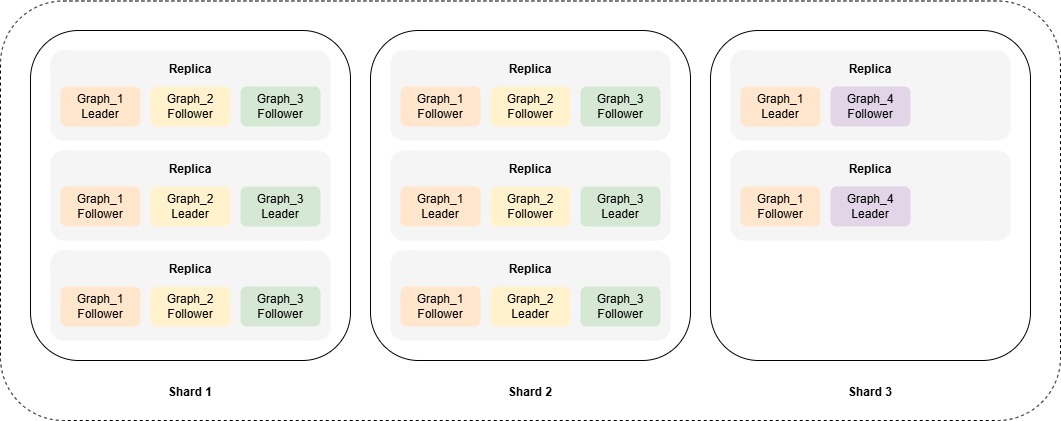
Showing Shard Servers
Retrieves information about all shard servers:
UQLshow().shard()
The details returned for each shard server include:
Field | Description |
|---|---|
shardId | The unique identifier, typically numbered sequentially (1, 2, 3, ...), of each shard server. |
shardStatus | Current state of the shard server, which can be ACTIVE or DEAD. |
replicas | The replicas of the shard server. Each replica includes:
|
Adding a Shard Server
After successfully deploying a new shard server, it must be registered with the meta servers before it can be utilized. This process ensures that the new shard server is recognized within the system.
Adds a Shard server 4 with three replicas:
UQLalter().shard().add({
  shardId: 4,
  replicas: [
    {addr: "127.0.0.1:40061", streamAddr: "127.0.0.1:40023"},
    {addr: "127.0.0.2:40061", streamAddr: "127.0.0.2:40023"},
    {addr: "127.0.0.3:40061", streamAddr: "127.0.0.3:40023"}
  ]
})
You can also add shard servers on the server-side by running the ./ultipa.sh script provided during deployment:
Bash./ultipa.sh cluster addshard --config example.sh
Altering a Shard Server
You can alter the replicas of a shard server.
Alters the replicas of the Shard server 4:
UQLalter().shard().replace({
  shardId: 4,
  replicas: [
    {addr: "127.0.0.1:40061", streamAddr: "127.0.0.1:40023"},
    {addr: "127.0.0.2:40061", streamAddr: "127.0.0.2:40023"}
  ]
})
Deleting a Shard Server
You can unregister an inactive or obsolete shard server from the meta servers.
Deletes the shard server 1:
UQLalter().shard().delete({shardId: 1})