
Modeling: Relational to Graph
You may already have an existing project running on a relational database that you'd like to convert to a graph, or you might want to start a new graph project but are more familiar with relational models. Either way, this guide will walk you through the process of easily transforming a relational data model into a graph model.
Introducing the Tables
Assume we have three tables in a retail business: Customer, Merchant, and Transaction. The Transaction table records customers' transaction behaviors with merchants.
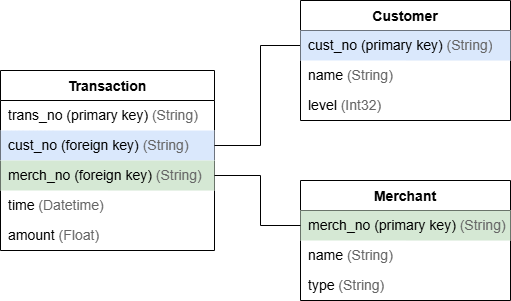
cust_no (Primary Key) | name | level |
|---|---|---|
| C100250090 | John Doe | 2 |
| C100250091 | Alice Carter | 3 |
| C100250092 | David Miller | 1 |
merch_no (Primary Key) | name | type |
|---|---|---|
| RS00JF1DF | Fay's Shop | IV |
| RT67KNH2R | SunnyMart | V |
| trans_no (Primary Key) | cust_no (Foreign Key) | merch_no (Foreign Key) | time | amount |
|---|---|---|---|---|
| TR58542 | C100250090 | RS00JF1DF | 2025-01-21 09:12:56 | 123.45 |
| TR58543 | C100250091 | RT67KNH2R | 2025-01-21 10:03:23 | 87.0 |
| TR58544 | C100250090 | RT67KNH2R | 2025-01-22 13:08:10 | 255.8 |
| TR58545 | C100250092 | RS00JF1DF | 2025-01-22 13:52:12 | 85.4 |
| TR58546 | C100250090 | RS00JF1DF | 2025-01-22 14:00:52 | 88.3 |
Modeling into a Graph
Graph databases are unlike relational databases that require you to establish connections between entities using foreign keys. Instead, you can model the connections directly as edges in the graph.
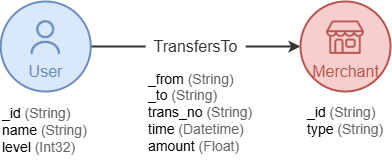
Building on the graph structure introduced, here's how the transformation goes:
- Entity tables to node types: Map the
CustomerandMerchanttables, which represent entities, to node typesCustomerandMerchant. - Columns to node properties: Transform the columns in each entity table into properties of the corresponding node type. Use the primary key as the unique identifier
_idfor each node.x - Relationship tables to edge types: Map the
Transactiontable, which defines connections between entities, to an edge type namedTransfersTo. Using a verb as the edge type name is recommended, as it better expresses the action and direction of the relationship. - Columns to edge properties: Transform the columns in each relationship table into properties of the corresponding edge type. Use the foreign keys
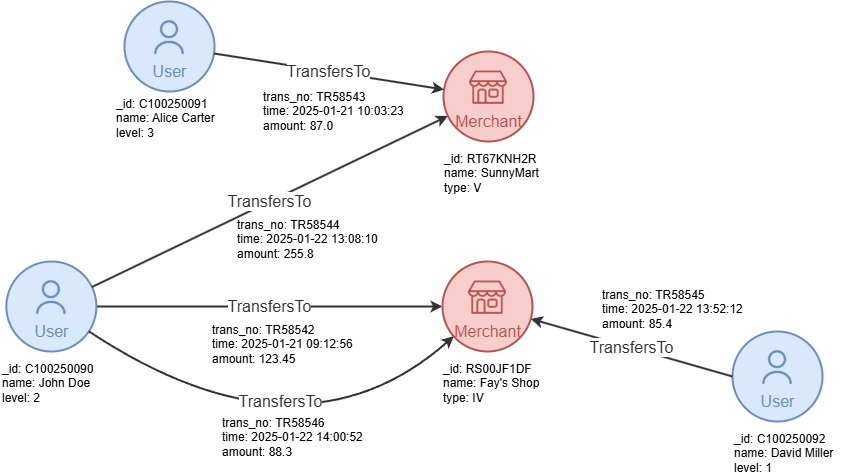
cust_noandmerch_noas the system properties_fromand_to, representing the_idof the source and destination nodes, respectively. - Rows to nodes and edges: Treat each row in the tables as a node or an edge in the graph.
This effectively maps the relational data model to graph structures as shown below:
And here is the graph produced:
You can refer to Importing Data to Ultipa to learn how to import data into the graph database.
Customizing the Graph Structure
The graph structure is highly flexible and can be tailored to specific analytical or operational requirements. Adjusting the structure helps better align the graph with the focus and goals of your use case.
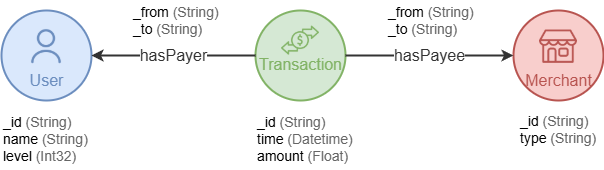
For example, some scenarios focus on transactions as primary entities that require modeling them as nodes instead of edges. The graph structure can be adjusted as below where the Trasaction table is mapped into the Transaction node type, which connects to the User and Merchant nodes through hasPayer and hasPayee edge types:
In cases where there is a need to analyze the types of merchants, you can enhance the graph structure by extracting the type column in the Merchant table and converting it into a separate node type. Instead of storing this information as a property of Merchant nodes, the graph structure would include Type nodes connected to Merchant nodes.
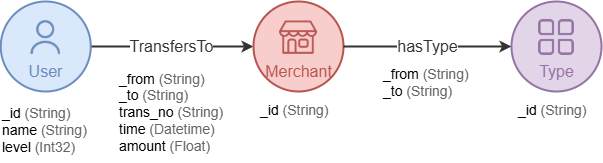
Ensure the type column is deduplicated before converting rows into Type nodes.