
Data Insertion and Deletion
This section introduces methods on a Connection object for inserting nodes and edges to the graph or deleting nodes and edges from the graphset.
Each example focuses solely on the method's usage. For a complete code example, please refer to the full example.
Example Graph Data Model
The examples below demonstrate how to insert or delete nodes or edges from a graphset with the following schema and property definitions:
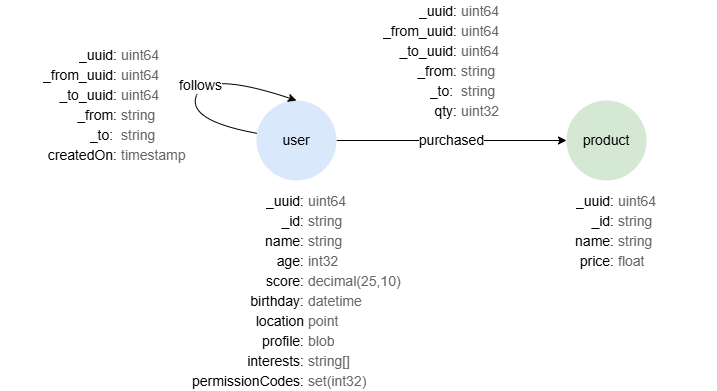
Property Type Mapping
When inserting nodes or edges, you may need to specify property values of different types. The mapping between Ultipa property types and Python/Driver data types is as follows:
| Ultipa Property Type | Python/Driver Type |
|---|---|
| int32 | int |
| uint32 | int |
| int64 | int |
| uint64 | int |
| float | float |
| double | float |
| decimal | Decimal, supports various numeric types (int, float, etc.) and str |
| string | str |
| text | str |
| datetime | str[1] |
| timestamp | str[1], int |
| point | str |
| blob | bytes |
| list | list |
| set | set |
[1] Supported date string formats in batch insertion include [YY]YY-MM-DD HH:MM:SS, [YY]YY-MM-DD HH:MM:SSZ, [YY]YY-MM-DDTHH:MM:SSZ, [YY]YY-MM-DDTHH:MM:SSXX, [YY]YY-MM-DDTHH:MM:SSXXX, [YY]YY-MM-DD HH:MM:SS.SSS and their variations.
Insertion
insertNodes()
Inserts new nodes of a schema to the current graph.
Parameters:
List[Node]: The list ofNodeobjects to be inserted.str: Name of the schema.InsertRequestConfig(Optional): Configuration settings for the request.
Returns:
ResponseInsertNode: Result of the request. TheResponseInsertNodeobject contains an aliasnodesthat holds all the inserted nodes whenInsertRequestConfig.silentis set to false.
Python# Inserts two nodes into schema 'user' in graphset 'lcc', prints error code and information of the inserted nodes

insertRequestConfig = InsertRequestConfig(
    insertType=InsertType.NORMAL,
    graphName="lcc",
    silent=False
)

nodes = [
    Node(uuid=1, id="U001", values={
        "name": "Alice",
        "age": 18,
        "score": 65.32,
        "birthday": "1993-5-4",
        "location": "point({latitude: 132.1, longitude: -1.5})",
        "profile": "castToRaw(abc)",
        "interests": ["tennis", "violin"],
        "permissionCodes": [2004, 3025, 1025]
    }),
    Node(uuid=2, id="U002", values={
        "name": "Bob"
    })
]

response = Conn.insertNodes(nodes, "user", insertRequestConfig)
print(response.status.code)
# There is no alias in ResponseInsertNode if InsertRequestConfig.silent is true
insertedNodes = response.alias("nodes").asNodes()
for insertedNode in insertedNodes:
    print(insertedNode.toJSON())
Output0
{"id": "U001", "schema": "user", "uuid": 1, "values": {"age": 18, "birthday": "1993-05-04 00:00:00", "interests": ["tennis", "violin"], "location": "POINT(132.100000 -1.500000)", "name": "Alice", "permissionCodes": [3025, 2004, 1025], "profile": [99, 97, 115, 116, 84, 111, 82, 97, 119, 40, 97, 98, 99, 41], "score": "65.3200000000"}}
{"id": "U002", "schema": "user", "uuid": 2, "values": {"age": null, "birthday": null, "interests": null, "location": null, "name": "Bob", "permissionCodes": null, "profile": null, "score": null}}
insertEdges()
Inserts new edges of a schema to the current graph.
Parameters:
List[Edge]: The list ofEdgeobjects to be inserted.str: Name of the schema.InsertRequestConfig(Optional): Configuration settings for the request.
Returns:
ResponseInsertEdge: Result of the request. TheResponseInsertEdgeobject contains an aliasedgesthat holds all the inserted edges whenInsertRequestConfig.silentis set to false.
Python# Inserts two edges into schema 'follows' in graphset 'lcc', prints error code and information of the inserted edges

insertRequestConfig = InsertRequestConfig(
    insertType=InsertType.NORMAL,
    graphName="lcc",
    silent=False
)

edges = [
    Edge(uuid=1, from_id="U001", to_id="U002", values={"createdOn": "2024-5-6"}),
    Edge(uuid=2, from_id="U002", to_id="U001", values={"createdOn": 1715169600})
]

response = Conn.insertEdges(edges, "follows", insertRequestConfig)
print(response.status.code)
# There is no alias in ResponseInsertEdge if InsertRequestConfig.silent is true
insertedEdges = response.alias("edges").asEdges()
for insertedEdge in insertedEdges:
    print(insertedEdge.toJSON())
Output0
{"from_id": "U001", "from_uuid": 1, "schema": "follows", "to_id": "U002", "to_uuid": 2, "uuid": 1, "values": {"createdOn": 1714924800}}
{"from_id": "U002", "from_uuid": 2, "schema": "follows", "to_id": "U001", "to_uuid": 1, "uuid": 2, "values": {"createdOn": 1715169600}}
insertNodesBatchBySchema()
Inserts new nodes of a schema into the current graph through gRPC. The properties within the node values must be consistent with those declared in the schema structure.
Parameters:
Schema: The target schema.List[Node]: The list ofNodeobjects to be inserted.InsertRequestConfig(Optional): Configuration settings for the request.
Returns:
InsertResponse: Result of the request.InsertResponse.data.uuidscontains the UUIDs of the inserted nodes whenInsertRequestConfig.silentis set to false.
Python# Inserts two nodes into schema 'user' in graphset 'lcc', prints error code and the UUIDs of the inserted nodes

insertRequestConfig = InsertRequestConfig(
    insertType=InsertType.NORMAL,
    graphName="lcc",
    silent=False
)

schema = Schema(
    name="user",
    dbType=DBType.DBNODE,
    properties=[
        Property(name="name", type=PropertyType.PROPERTY_STRING),
        Property(name="age", type=PropertyType.PROPERTY_INT32),
        Property(name="score", type=PropertyType.PROPERTY_DECIMAL),
        Property(name="birthday", type=PropertyType.PROPERTY_DATETIME),
        Property(name="location", type=PropertyType.PROPERTY_POINT),
        Property(name="profile", type=PropertyType.PROPERTY_BLOB),
        Property(name="interests", type=PropertyType.PROPERTY_LIST, subTypes=[PropertyType.PROPERTY_STRING]),
        Property(name="permissionCodes", type=PropertyType.PROPERTY_SET, subTypes=[PropertyType.PROPERTY_INT32])
    ]
)

nodes = [
    Node(uuid=1, id="U001", values={
        "name": "Alice",
        "age": 18,
        "score": 65.32,
        "birthday": "1993-5-4",
        "location": "point({latitude: 132.1, longitude: -1.5})",
        "profile": b"abc",
        "interests": ["tennis", "violin"],
        "permissionCodes": {2004, 3025, 1025}
    }),
    Node(uuid=2, id="U002", values={
        "name": "Bob",
        "age": None,
        "score": None,
        "birthday": None,
        "location": None,
        "profile": None,
        "interests": None,
        "permissionCodes": None
    })
]

response = Conn.insertNodesBatchBySchema(schema, nodes, insertRequestConfig)
print(response.status.code)
# InsertResponse.data.uuids is empty if InsertRequestConfig.silent is true
print(response.data.uuids)
Output0
[1, 2]
insertEdgesBatchBySchema()
Inserts new edges of a schema into the current graph through gRPC. The properties within the edge values must be consistent with those declared in the schema structure.
Parameters:
Schema: The target schema.List[Edge]: The list ofEdgeobjects to be inserted.InsertRequestConfig(Optional): Configuration settings for the request.
Returns:
InsertResponse: Result of the request.InsertResponse.data.uuidscontains the UUIDs of the inserted edges whenInsertRequestConfig.silentis set to false.
Python# Inserts two edges into schema 'follows' in graphset 'lcc', prints error code and the UUIDs of the inserted edges

insertRequestConfig = InsertRequestConfig(
    insertType=InsertType.NORMAL,
    graphName="lcc",
    silent=False
)

schema = Schema(
    name="follows",
    dbType=DBType.DBEDGE,
    properties=[
        Property(name="createdOn", type=PropertyType.PROPERTY_TIMESTAMP)
    ]
)

edges = [
    Edge(uuid=1, from_id="U001", to_id="U002", values={"createdOn": "2024-05-06"}),
    Edge(uuid=2, from_id="U002", to_id="U001", values={"createdOn": None}),
]

response = Conn.insertEdgesBatchBySchema(schema, edges, insertRequestConfig)
print(response.status.code)

# InsertResponse.data.uuids is empty if InsertRequestConfig.silent is true
print(response.data.uuids)
Output0
[1,2]
insertNodesBatchAuto()
Inserts new nodes of one or multiple schemas to the current graph through gRPC. The properties within node values must be consistent with those defined in the corresponding schema structure.
Parameters:
List[Node]: The list ofNodeobjects to be inserted.InsertRequestConfig(Optional): Configuration settings for the request.
Returns:
ResponseBatchAutoInsert: Result of the request.ResponseBatchAutoInsert.data.uuidscontains the insertion report whenInsertRequestConfig.silentis set to false.
Python# Inserts two nodes into schema 'user' and one node into schema `product` in graphset 'lcc', prints error code and the insert reply

insertRequestConfig = InsertRequestConfig(
    insertType=InsertType.NORMAL,
    graphName="lcc",
    silent=False
)

nodes = [
    Node(schema="user", uuid=1, id="U001", values={
        "name": "Alice",
        "age": 18,
        "score": 65.32,
        "birthday": "1993-5-4",
        "location": "point({latitude: 132.1, longitude: -1.5})",
        "profile": b"abc",
        "interests": ["tennis", "violin"],
        "permissionCodes": {2004, 3025, 1025}
    }),
    Node(schema="user", uuid=2, id="U002", values={
        "name": "Bob",
        "age": None,
        "score": None,
        "birthday": None,
        "location": None,
        "profile": None,
        "interests": None,
        "permissionCodes": None
    }),
    Node(schema="product", uuid=3, id="P001", values={
        "name": "Wireless Earbud",
        "price": 93.2
    })
]

response = Conn.insertNodesBatchAuto(nodes, insertRequestConfig)
print(response.status.code)
# Response.data.uuids is empty if InsertRequestConfig.silent is true
print(response.data.uuids)
Output0
[1, 2, 3]
insertEdgesBatchAuto()
Inserts new edges of one or multiple schemas to the current graph through gRPC. The properties within edge values must be consistent with those defined in the corresponding schema structure.
Parameters:
List[Edge]: The list ofEdgeobjects to be inserted.InsertRequestConfig(Optional): Configuration settings for the request.
Returns:
ResponseBatchAutoInsert: Result of the request.ResponseBatchAutoInsert.data.uuidscontains the insertion report whenInsertRequestConfig.silentis set to false.
Python# Inserts two edges into schema 'follows' and one edge into schema 'purchased' in graphset 'lcc', prints error code and the insert reply

insertRequestConfig = InsertRequestConfig(
    insertType=InsertType.NORMAL,
    graphName="lcc",
    silent=False
)

edges = [
    Edge(schema="follows", uuid=1, from_id="U001", to_id="U002", values={"createdOn": "2024-05-06"}),
    Edge(schema="follows", uuid=2, from_id="U002", to_id="U001", values={"createdOn": 1715169600}),
    Edge(schema="purchased", uuid=3, from_id="U002", to_id="P001", values={"qty": 1})
]

response = Conn.insertEdgesBatchAuto(edges, insertRequestConfig)
print(response.status.code)
# Response.data.uuids is empty if InsertRequestConfig.silent is true
print(response.data.uuids)
Output0
[1, 2, 3]
Deletion
deleteNodes()
Deletes nodes that meet the given conditions from the current graph. It's important to note that deleting a node leads to the removal of all edges that are connected to it.
Parameters:
str: The filtering condition to specify the nodes to delete.InsertRequestConfig(Optional): Configuration settings for the request.
Returns:
ResponseDeleteNode: Result of the request. TheResponseDeleteNodeobject contains an aliasnodesthat holds all the deleted nodes whenInsertRequestConfig.silentis set to false.
Python# Deletes one @user nodes whose name is 'Alice' from graphset 'lcc', prints error code and information of the deleted nodes
# All edges attached to the deleted node are deleted as well

insertRequestConfig = InsertRequestConfig(
    insertType=InsertType.NORMAL,
    graphName="lcc",
    silent=False
)

response = Conn.deleteNodes("{@user.name == 'Alice'}", insertRequestConfig)
print(response.status.code)
# There is no alias in ResponseDeleteNode if InsertRequestConfig.silent is true
deletedNodes = response.alias("nodes").asNodes()
for deletedNode in deletedNodes:
    print(deletedNode.toJSON())
Output0
{"id": "U001", "schema": "user", "uuid": 1, "values": {"name": "Alice"}}
deleteEdges()
Deletes edges that meet the given conditions from the current graph.
Parameters:
str: The filtering condition to specify the edges to delete.InsertRequestConfig(Optional): Configuration settings for the request.
Returns:
ResponseDeleteEdge: Result of the request. TheResponseDeleteEdgeobject contains an aliasedgesthat holds all the deleted edges whenInsertRequestConfig.silentis set to false.
Python# Deletes all @purchased edges from graphset 'lcc', prints error code and information of the deleted edges

insertRequestConfig = InsertRequestConfig(
    insertType=InsertType.NORMAL,
    graphName="lcc",
    silent=False
)

response = Conn.deleteEdges("{@purchased}", insertRequestConfig)
print(response.status.code)
# There is no alias in ResponseDeleteEdge if InsertRequestConfig.silent is true
deletedEdges = response.alias("edges").asEdges()
for deletedEdge in deletedEdges:
    print(deletedEdge.toJSON())
Output0
{"from_id": "U002", "from_uuid": 2, "schema": "purchased", "to_id": "P001", "to_uuid": 3, "uuid": 3, "values": {}}
Full Example
Example.pyfrom ultipa.configuration.InsertRequestConfig import InsertRequestConfig
from ultipa import Connection, UltipaConfig, Node, Edge
from ultipa.structs import InsertType

ultipaConfig = UltipaConfig()
# URI example: ultipaConfig.hosts = ["mqj4zouys.us-east-1.cloud.ultipa.com:60010"]
ultipaConfig.hosts = ["192.168.1.85:60061", "192.168.1.87:60061", "192.168.1.88:60061"]
ultipaConfig.username = "<username>"
ultipaConfig.password = "<password>"

Conn = Connection.NewConnection(defaultConfig=ultipaConfig)

# Request configurations
insertRequestConfig = InsertRequestConfig(
    insertType=InsertType.NORMAL,
    graphName="lcc",
    silent=False
)

# Inserts two nodes into schema 'user' and one node into schema `product` in graphset 'lcc', prints error code and the insert reply

nodes = [
    Node(schema="user", uuid=1, id="U001", values={
        "name": "Alice",
        "age": 18,
        "score": 65.32,
        "birthday": "1993-5-4",
        "location": "point({latitude: 132.1, longitude: -1.5})",
        "profile": b"abc",
        "interests": ["tennis", "violin"],
        "permissionCodes": {2004, 3025, 1025}
    }),
    Node(schema="user", uuid=2, id="U002", values={
        "name": "Bob",
        "age": None,
        "score": None,
        "birthday": None,
        "location": None,
        "profile": None,
        "interests": None,
        "permissionCodes": None
    }),
    Node(schema="product", uuid=3, id="P001", values={
        "name": "Wireless Earbud",
        "price": 93.2
    })
]

response1 = Conn.insertNodesBatchAuto(nodes, insertRequestConfig)
print("Node insertion status:", response1.status.code)
# Response.data.uuids is empty if InsertRequestConfig.silent is true
print("Node inserted:", response1.data.uuids)

# Inserts two edges into schema 'follows' and one edge into schema 'purchased' in graphset 'lcc', prints error code and the insert reply

edges = [
    Edge(schema="follows", uuid=1, from_id="U001", to_id="U002", values={"createdOn": "2024-05-06"}),
    Edge(schema="follows", uuid=2, from_id="U002", to_id="U001", values={"createdOn": 1715169600}),
    Edge(schema="purchased", uuid=3, from_id="U002", to_id="P001", values={"qty": 1})
]

response2 = Conn.insertEdgesBatchAuto(edges, insertRequestConfig)
print("Edge insertion status:", response2.status.code)
# Response.data.uuids is empty if InsertRequestConfig.silent is true
print("Edge inserted:", response2.data.uuids)