
Inspecting Ontologies
After loading or defining an ontology, you can inspect it two ways:
SHOWstatements give quick tabular readouts of the ontologies, classes, and properties registered in the graph.LOAD ONTOLOGY GRAPHmaterializes the ontology as actual nodes and edges you canMATCH, traverse, and visualize.
For a quick look, use SHOW; to explore or visualize the ontology's structure, project it.
Viewing Ontologies
GQLSHOW ONTOLOGY
Example output:
| name | iri | classes | objectProperties | dataProperties |
|---|---|---|---|---|
| FOAF | http://xmlns.com/foaf/0.1/ | 14 | 25 | 19 |
| local | urn:local:myOntology | 3 | 1 | 2 |
It lists every ontology in the current graph with summary counts. A single graph can hold multiple ontologies, they come from:
- One per
LOAD ONTOLOGYimport, named after its source IRI. - One synthetic
localontology that groups everything you defined inline withCREATE CLASSandCREATE OBJECT|DATA PROPERTY.
Related SHOW statements for finer views:
GQL-- Loaded prefix → IRI mappings
SHOW PREFIX

-- Every class, with localName, superClasses, and label
SHOW CLASSES

-- Every object/data property and its full metadata
SHOW PROPERTIES

-- Restrict to one kind
SHOW OBJECT PROPERTIES
SHOW DATA PROPERTIES
SHOW PROPERTIES returns these columns for each property: property, localName, prefix, type, label, comment, domain, range, subPropertyOf, equivalentTo, inverseOf, propertyChain, cardinality, and characteristics. inverseOf and propertyChain apply to object properties only.
Projecting Ontologies as a Graph
Materialize all ontologies as node and edges:
GQLLOAD ONTOLOGY GRAPH
It projects every class and property currently registered in the graph, whether imported or defined inline, into nodes and edges under the @owl: / @rdfs: meta-vocabulary (the owl and rdfs prefixes are auto-registered):
| Element | Becomes |
|---|---|
| Each class | a node labeled @owl:Class |
| Each object property | a node labeled @owl:ObjectProperty |
| Each data property | a node labeled @owl:DatatypeProperty |
SUBCLASS OF | an @rdfs:subClassOf edge |
SUBPROPERTY OF | an @rdfs:subPropertyOf edge |
DOMAIN / RANGE | @rdfs:domain / @rdfs:range edges |
INVERSE OF | an @owl:inverseOf edge |
EQUIVALENT TO restrictions | @owl:someValuesFrom / @owl:allValuesFrom edges (carrying an onProperty property) |
Each node carries _iri, name (the local name), and prefix.
NOTEIt projects a structural skeleton, not every axiom. The table above is the complete set of what the projection materializes. Other features are not drawn as nodes or edges (such as
DISJOINT WITH, property characteristics,CARDINALITY, data-propertyDOMAIN/RANGE, etc.). Those are still registered and still do their job, they just don't appear in the projection.
Example: a local ontology
No file is needed. Inline CREATE definitions form the local ontology, and LOAD ONTOLOGY GRAPH projects them the same way.
Define a small ontology then project it:
GQLCREATE GRAPH myOntology WITH ONTOLOGY
USE myOntology
LOAD PREFIX ex FROM 'http://example.org/'

-- Inline ontology (grouped under the synthetic "local" ontology)
CREATE CLASS @ex:Agent
CREATE CLASS @ex:Person SUBCLASS OF @ex:Agent
CREATE CLASS @ex:Organization SUBCLASS OF @ex:Agent
CREATE OBJECT PROPERTY @ex:worksFor DOMAIN @ex:Person RANGE @ex:Organization
CREATE OBJECT PROPERTY @ex:employs DOMAIN @ex:Organization RANGE @ex:Person INVERSE OF @ex:worksFor
CREATE DATA PROPERTY @ex:name DOMAIN @ex:Agent RANGE xsd:string

-- Materialize the ontology as nodes and edges
LOAD ONTOLOGY GRAPH
The projected graph looks like this:
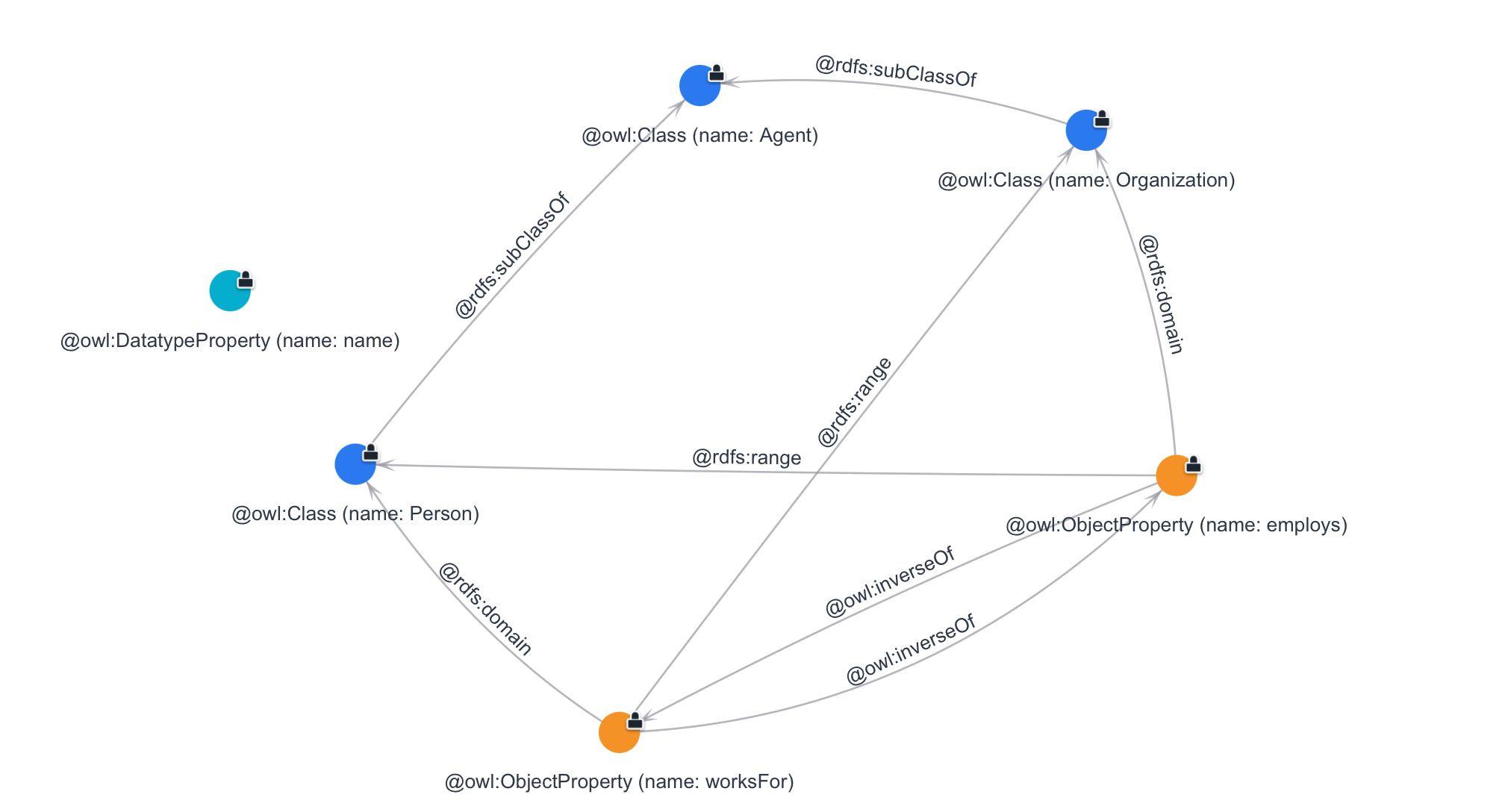
Now the ontology is queryable like any other graph:
GQL-- Classes and their direct superclass
MATCH (sub@owl:Class)-[@rdfs:subClassOf]->(super@owl:Class)
RETURN sub.name, super.name
-- (Person, Agent), (Organization, Agent)

-- Object properties with their domain and range
MATCH (src@owl:Class)<-[@rdfs:domain]-(e@owl:ObjectProperty)-[@rdfs:range]->(dest@owl:Class)
RETURN src.name, e.name, dest.name
-- (Person, worksFor, Organization), (Organization, employs, Person)
The projection is not idempotent. It has no built-in cleanup, so running LOAD ONTOLOGY GRAPH a second time creates duplicate ontology nodes and edges. The projected ontology nodes and edges can coexist with instance data.
To re-project (e.g. after the schema changes), delete the previously projected nodes first, then project again. DETACH DELETE removes each node's edges too, so the @rdfs: / @owl: schema edges go with them; instance nodes (labeled @:Person, @ex:Person, …) are untouched:
GQL-- 1. Remove the previously projected schema
-- This assumes the @owl:Class, @owl:ObjectProperty, and @owl:DatatypeProperty labels are used only by the projection
-- If your own data also carries them, scope the delete more narrowly so it doesn't remove that data
MATCH (n@owl:Class) DETACH DELETE n
MATCH (n@owl:ObjectProperty) DETACH DELETE n
MATCH (n@owl:DatatypeProperty) DETACH DELETE n

-- 2. Project the current schema again
LOAD ONTOLOGY GRAPH